
Swap crypto.
No KYC.
Choose the asset and network you hold, check the live receive amount, and send your deposit using the order instructions. Start with the swap form below.
Why swap crypto on AceChange
A privacy-first, non-custodial crypto swap built for people who value control of their funds and freedom from unnecessary verification. Below is what sets our exchange platform apart from regular CEX accounts.
Truly anonymous swap
No KYC, no email, no phone. We don’t ask for documents and we don’t store your personal data — your crypto swap stays your business.
Non-custodial exchange
Your crypto goes directly from your wallet through the swap engine to your destination wallet. We never hold your funds — true wallet-to-wallet trade.
Instant crypto exchange
Most swaps complete within 5 minutes. Live order tracking shows every confirmation, so you know exactly where your crypto is at any moment.
Fair, transparent rates
The price you see is the price you get. Service fee is built into the displayed rate — no hidden spreads, no last-second markups, no surprises before you confirm.
24/7 human support
Real specialists via live chat, email and Telegram. Average response under 15 minutes — no bots, no scripts, no delays. Crypto questions answered by people.
70+ coins, 4,000+ swap pairs
Hand-picked support for BTC, ETH, XMR, USDT (ERC-20, TRC-20, BEP-20, Polygon, Arbitrum, Solana), USDC, LTC, BCH, SOL, BNB and the most-traded altcoins across 20+ blockchain networks.
How to swap crypto in 3 simple steps
A clean, predictable swap flow — no signup, no KYC, no friction. From clicking Exchange to receiving your crypto typically takes under 5 minutes.
Choose your pair & amount
Select the cryptocurrency you want to send and the one you want to receive. Live exchange rates are shown instantly — pick floating or fixed rate.
Enter your receiving wallet
Paste the wallet address (and MEMO if needed). Pick the correct network for multi-chain assets like USDT or USDC. Always double-check the address.
Send & receive in minutes
Send crypto to the unique deposit address. Once confirmed on-chain, your new coin is delivered straight to your wallet — typically within five minutes.
How to swap crypto on AceChange — full visual guide
A real, screenshot-by-screenshot walk-through of an anonymous no-KYC crypto swap on AceChange. Seven steps, seven actual screens from the live platform — everything you need to complete your first swap with confidence.
Open the coin picker
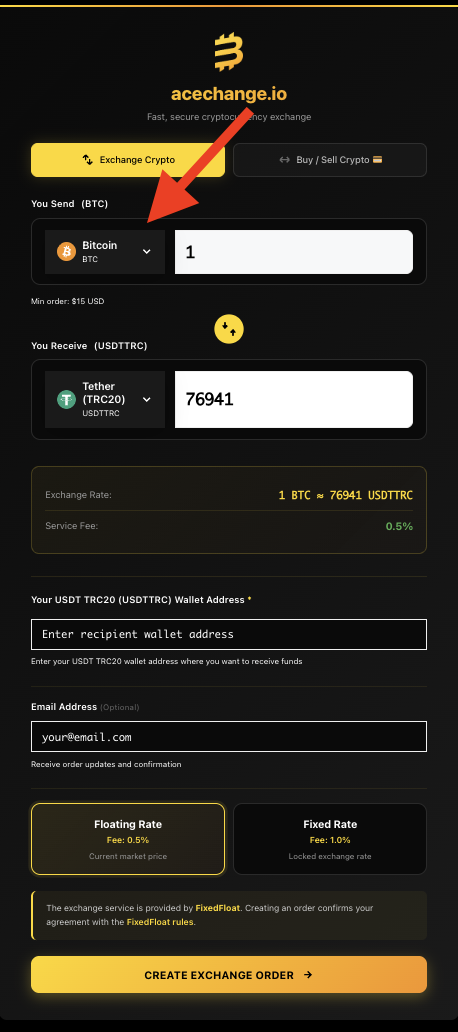
On the AceChange homepage, click the coin picker on the left side of the swap widget. This is where you choose which cryptocurrency you want to send. The red arrow highlights exactly where to click.
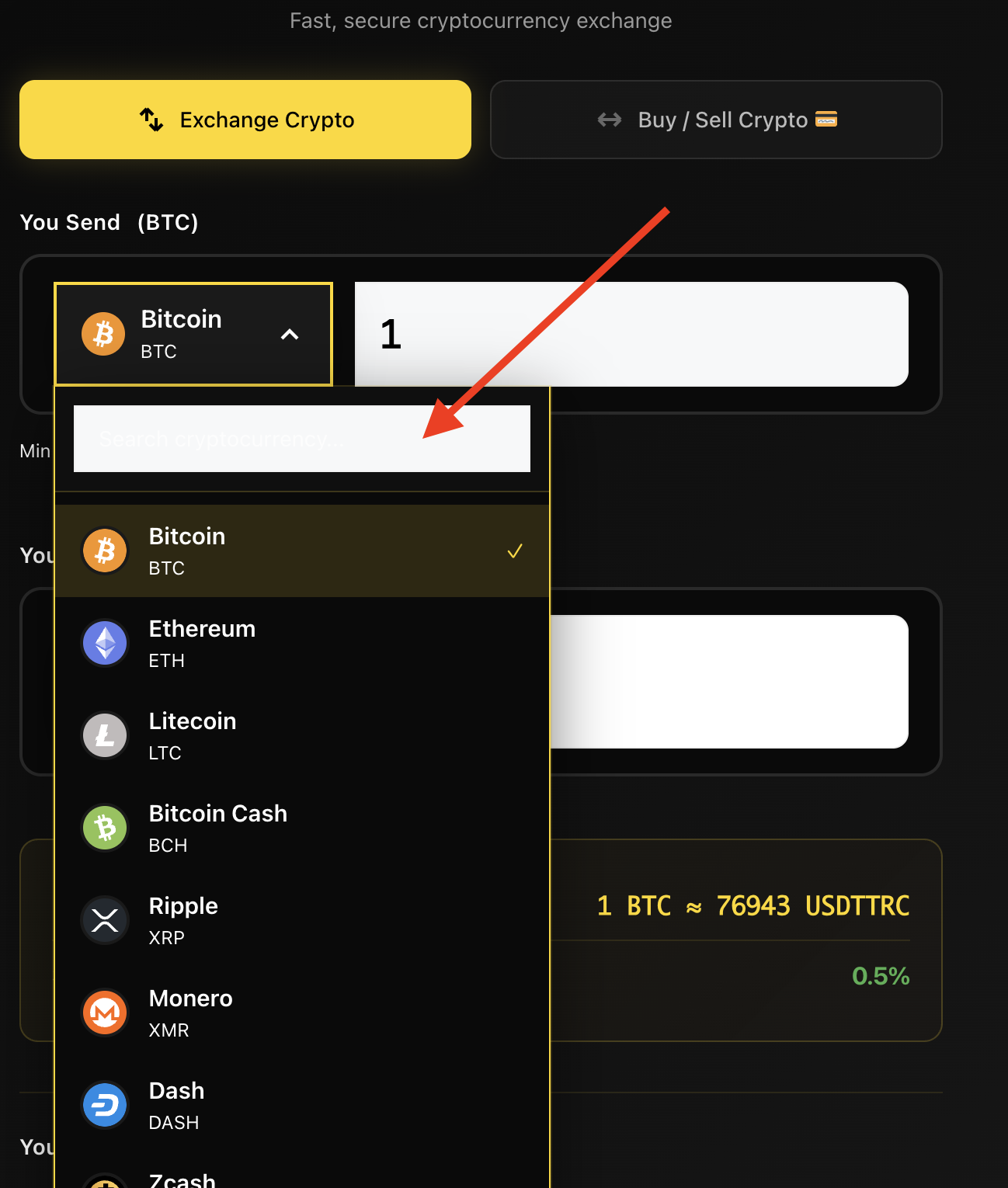
Search and select your coin
Once the picker is open, type the coin’s full name (for example Monero) or its ticker (XMR) into the search field — the list filters instantly. Important: for multi-chain coins like USDT or USDC, always pick the correct network (TRC-20, ERC-20, BEP-20, Polygon, Arbitrum or Solana) — sending on the wrong network can result in lost funds.
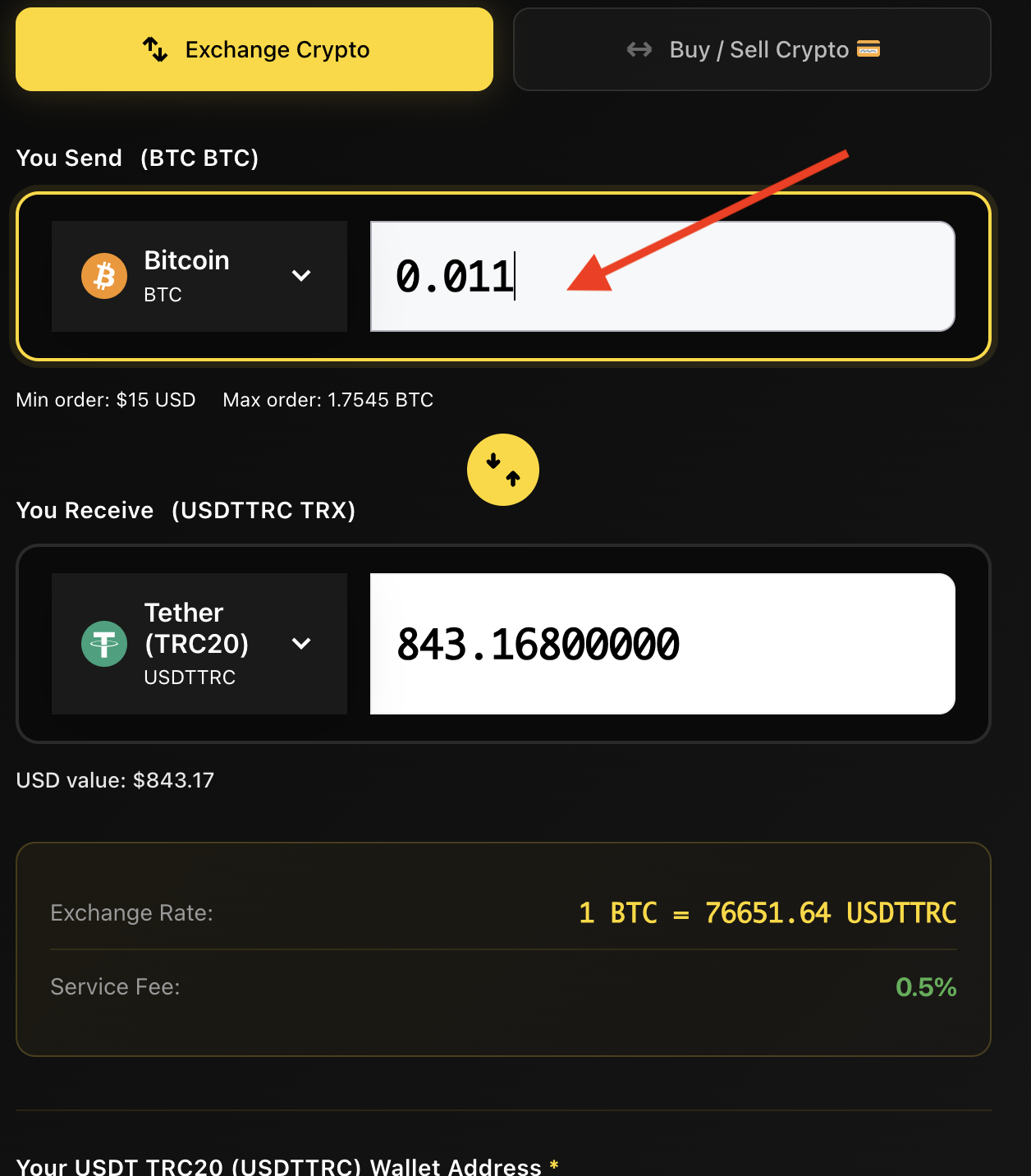
Enter the amount you want to swap
Type the exact amount you’d like to exchange — for example 0.001 BTC. The widget instantly shows you how much you’ll receive in the destination coin at the live exchange rate. You can edit this anytime before creating the order.
Tip: just below the amount field you’ll see Min order and Max order for that specific pair (typically up to ~$150,000 per swap). This is a per-transaction limit only — there’s no cap on how many swaps you can run.
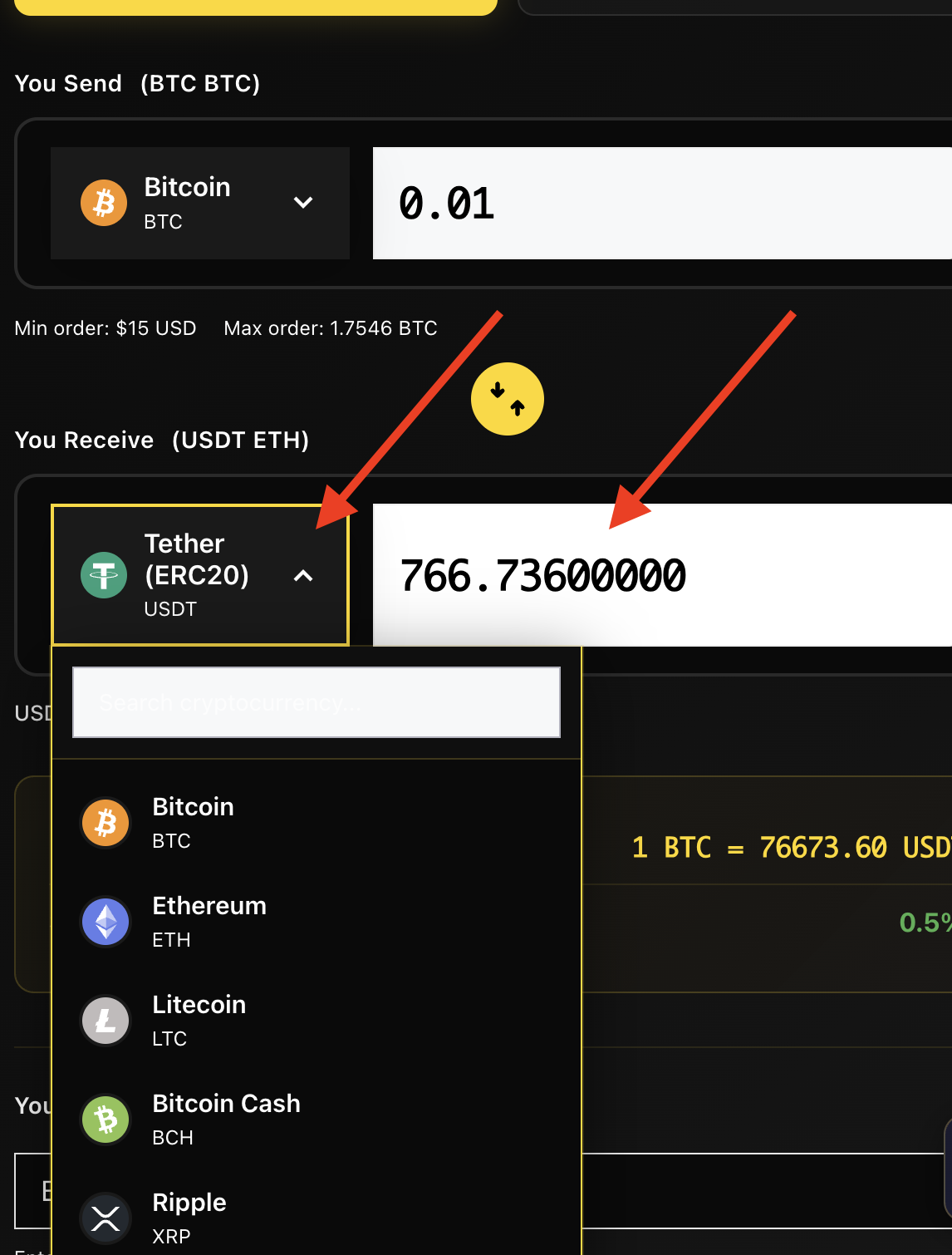
Pick the coin you want to receive
Now do the same for the destination coin — click the right-side picker and select what you want to receive (for example USDT if you’re swapping BTC into a stablecoin). The same network rule applies: for USDT, USDC and other multi-chain coins, always confirm you’ve picked the right network — TRC-20, ERC-20, BEP-20, Polygon, Arbitrum or Solana.
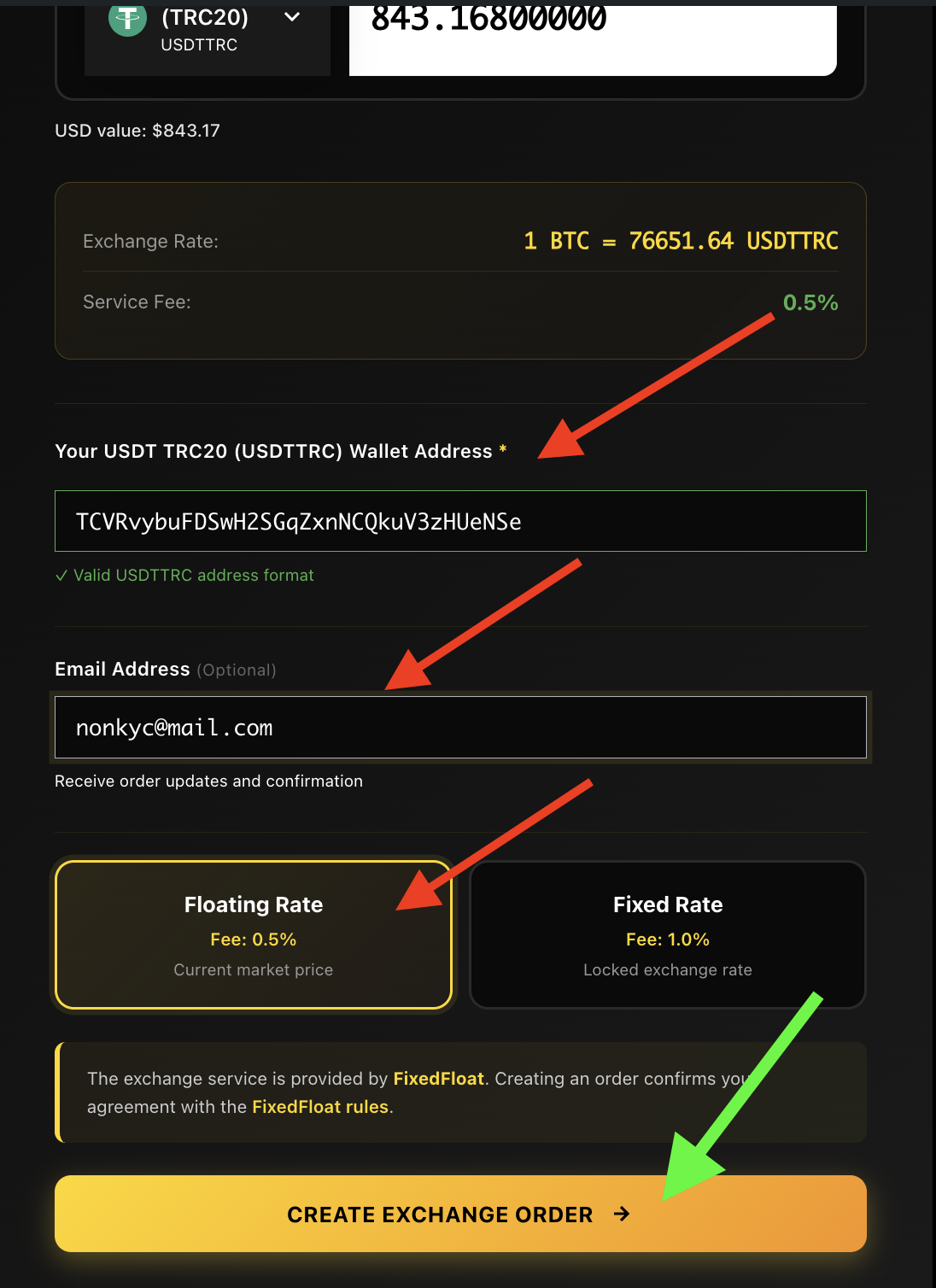
Enter your wallet address and pick the rate type
Paste the wallet address where you’d like the new coin delivered — for example, your USDT address if you’re receiving USDT. Email is optional; if you add it, you’ll get a detailed order receipt and a tracking link. Then choose your rate type:
- Floating rate — fee from 0.5%. The exchange rate follows the live market until your deposit is confirmed, so you may receive slightly more or less.
- Fixed rate — fee 1.0%. The rate is locked the moment you create the order and stays valid for 10 minutes — you receive the exact amount shown.
When everything looks right, click the green Create Exchange Order button.
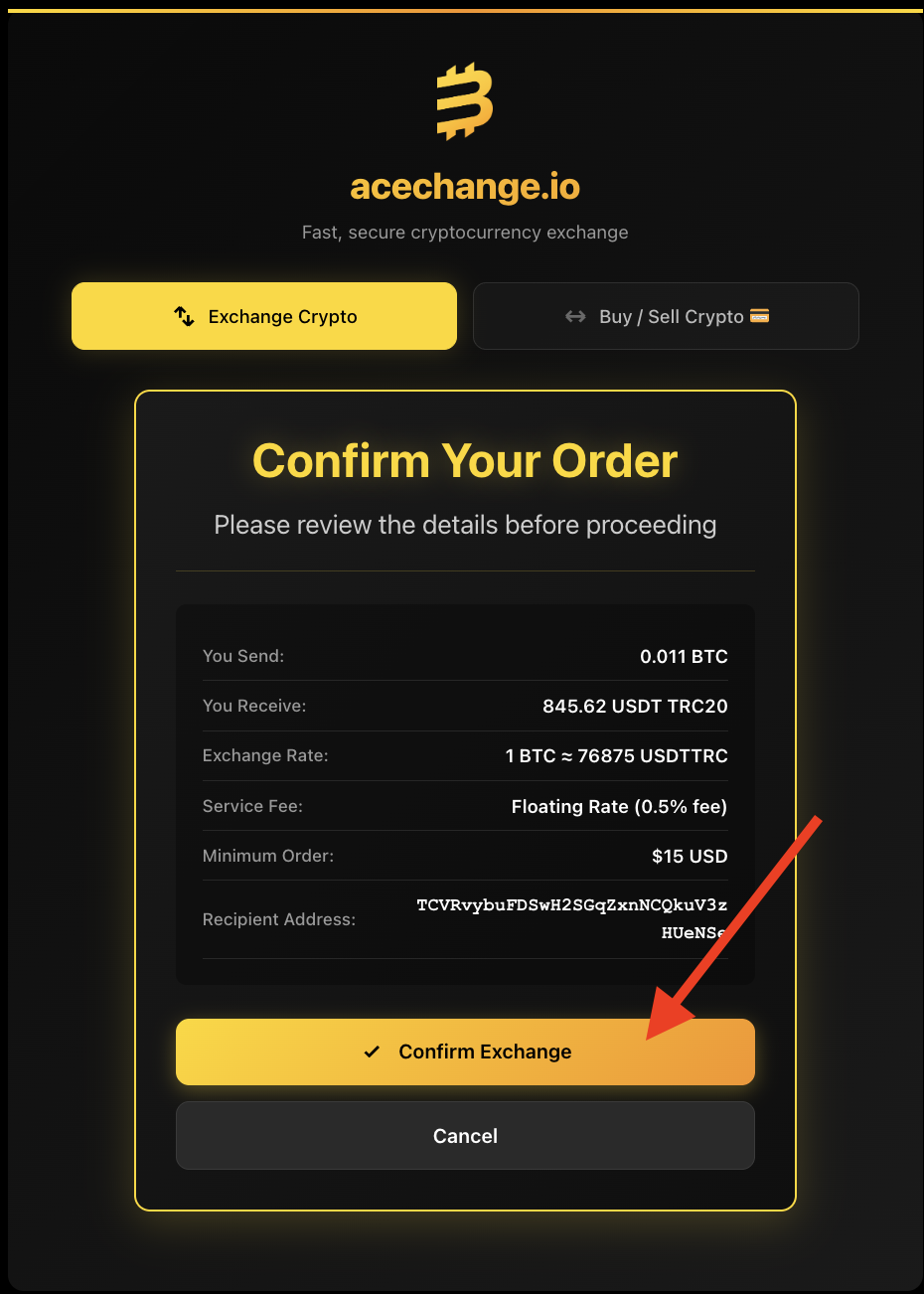
Review the order summary
Before sending any crypto, take a moment to verify everything: amount sent, amount received, exchange rate, service fee and — most importantly — the receiving wallet address. The wallet address cannot be changed after this step, so getting it right matters. Crypto transactions are irreversible.
Send the deposit and track your order
You’ll see your unique Order ID — save it. If you didn’t enter an email, this ID is the only way to retrieve your order if something goes wrong (for example, sending a wrong amount). You can track any order at any time at acechange.io/track-order.
Now send the exact amount shown to the deposit address — either by scanning the QR code with your wallet app or by clicking the copy button next to the address. Sending a different amount may delay the swap. Once the deposit is confirmed on-chain, your new coin lands directly in your wallet — typically in under 5 minutes.
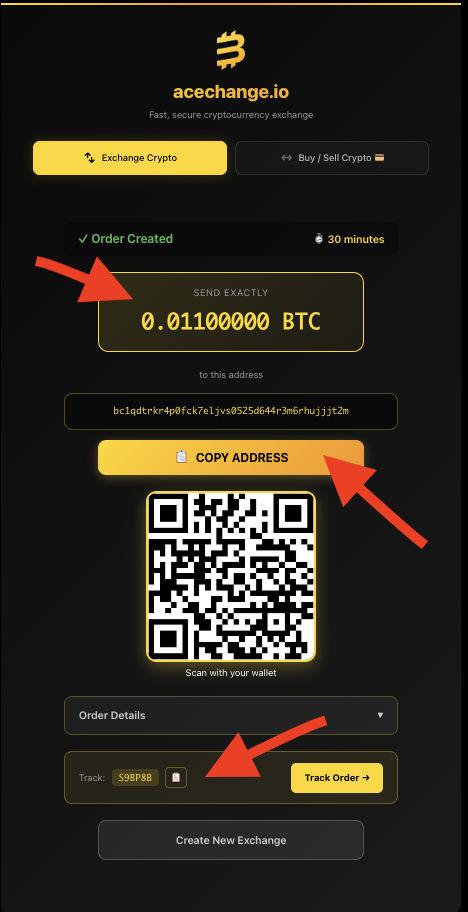
Screenshots above are from the live AceChange platform. Wallet addresses, Order IDs and any sensitive details are partially redacted for privacy.
What is MEMO or TAG on a swap?
Some cryptocurrencies need a second piece of information besides the wallet address — a MEMO or Destination TAG. If your swap shows one of these fields, it’s mandatory. Here’s what it is and why it matters.
Why some coins need a MEMO or TAG
Many cryptocurrency exchanges and wallets share a single blockchain address across all their users. The MEMO or TAG is the routing code that tells the exchange which user a deposit belongs to — like an apartment number on a shared street address.
If a MEMO or TAG is required and you forget it, your funds do not disappear, but they land in the platform’s pooled wallet. Recovery is possible through our emergency support process, but it can take up to 14 days. It’s much faster — and safer — to enter the MEMO at send time.
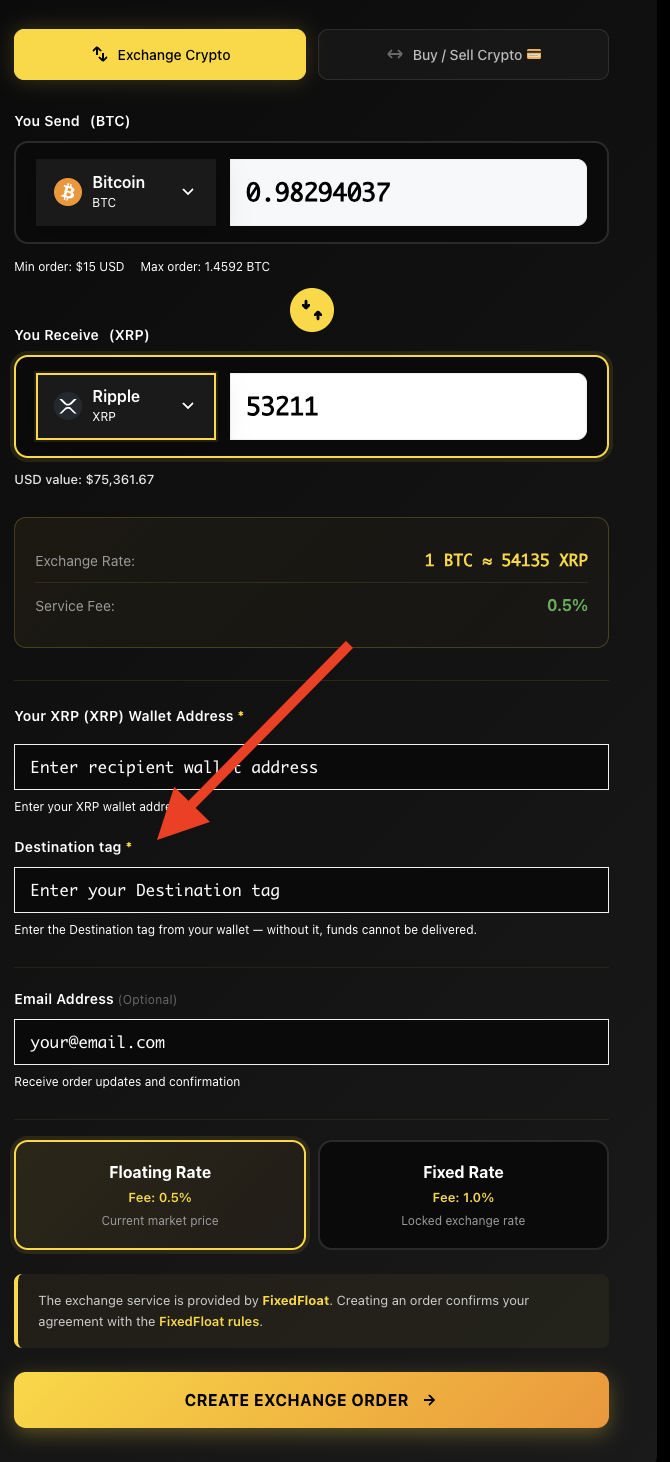
Quick rule: if the AceChange swap form shows a MEMO or TAG field, fill it in. If it doesn’t show one, you don’t need it. When in doubt, our 24/7 human support is one click away.
No-KYC swap vs. regular crypto exchange
A side-by-side comparison so you understand exactly what you’re getting from a non-custodial crypto swap — and what you’re not giving up to use it.
| Feature | AceChange (No-KYC swap) | Regular CEX (KYC) |
|---|---|---|
| Account & sign-up | Not required | Mandatory |
| Identity verification | Not required | Passport / ID |
| Email / phone | Optional only | Required |
| Custody of funds | You hold them | Exchange holds them |
| Withdrawal limits | No upper limit | Tier-based caps |
| Service fee | From 0.5% | 0.1–1.5% + spread |
| Privacy of trading data | Maximum | Reported under DAC8 / FATF |
Fees breakdown — what you pay and to whom
Two separate costs apply to every crypto swap. Here’s exactly what they are — no hidden fees, no spread games, what you see is what you pay.
| Cost type | Paid to | Amount | When |
|---|---|---|---|
| Service fee — Floating rate | AceChange | From 0.5% | Built into the displayed exchange rate |
| Service fee — Fixed rate | AceChange | 1.0% | Built into the displayed exchange rate |
| Network fee (sending) | Blockchain miners / validators | Varies by network — paid by your wallet | When you send the deposit transaction |
| Network fee (receiving) | Blockchain miners / validators | Built into the swap output amount | Automatically deducted before delivery to your wallet |
AceChange does not charge any deposit, withdrawal or hidden spread fees beyond the service fee shown above. The service fee is already included in the rate displayed in the swap widget — what you see is what you get.
Network confirmation times — what to expect
Every blockchain works at its own speed. Here’s how long each network typically takes to confirm a deposit. Once we record your confirmed deposit, we send the receiving coin automatically.
| Coin / Network | Confirmations needed | Typical time |
|---|---|---|
| Bitcoin (BTC) | 1–3 | 10–30 minutes |
| Ethereum (ETH, ERC-20 tokens) | 12 | 3–5 minutes |
| Monero (XMR) | 10 | ~20 minutes |
| Litecoin (LTC) | 1–12 | 5–10 minutes |
| USDT / USDC (TRC-20, Tron) | 19–20 | under 1 minute |
| USDT / USDC (ERC-20, Ethereum) | 12 | 3–5 minutes |
| Solana (SOL, SPL tokens) | ~32 | under 30 seconds |
| XRP | 1 | ~5 seconds |
| Tron (TRX) | 19 | ~1 minute |
| Bitcoin Cash (BCH) | 15 | 1–1.5 hours |
| Dogecoin (DOGE) | 1–10 | ~10 minutes |
Some coins need only one confirmation, others a few — but as soon as we record your deposit, we dispatch your new coin automatically. Most swaps complete within minutes after confirmation. Networks like Bitcoin and Monero can take longer due to their block time — that’s a blockchain-level constraint, not a delay on our side.
Frequently asked questions about crypto swap
Everything you need to know about anonymous, non-custodial crypto swap on AceChange.
Can I swap crypto without KYC in 2026?
Yes. AceChange is a non-custodial swap service that lets you exchange crypto without creating an account, providing an email or uploading any ID. You only enter your sending and receiving wallet addresses. Identity verification is never asked for crypto-to-crypto swaps.
How long does an anonymous crypto swap take?
Most swaps complete in 5 to 30 minutes. Speed depends on the network confirmation time of the coin you send. Bitcoin usually confirms within 10–30 minutes; Ethereum, Monero and most newer chains are typically faster; chains like Solana or Tron settle in seconds. AceChange shows live progress while the order is processing.
What are the fees for swapping crypto on AceChange?
Service fee starts at 0.5% on floating-rate swaps and 1.0% on fixed-rate swaps. The fee is already included in the displayed exchange rate — there are no hidden charges. Network fees are paid to the blockchain itself and are independent of AceChange.
Is it legal to use a no-KYC crypto swap?
Using a non-custodial swap is legal in most jurisdictions because you remain in full custody of your funds at all times. Tax obligations still apply — you are responsible for reporting capital gains and complying with the rules of your country, especially with EU DAC8 in force from 1 January 2026.
Which cryptocurrencies can I swap on AceChange?
You can swap 70+ hand-picked cryptocurrencies across 4,000+ trading pairs, including BTC, ETH, XMR (Monero), USDT (ERC-20, TRC-20, BEP-20, Polygon, Arbitrum, Solana), USDC, LTC, BCH, XRP, DASH, ZEC, DOGE, SOL, BNB, TRX, TON, ADA, DOT, MATIC and AVAX.
Can I swap Bitcoin to Monero (BTC to XMR) anonymously?
Yes — BTC to XMR is one of the most popular swaps on AceChange. You enter your Monero wallet address, send Bitcoin to the deposit address shown, and your XMR arrives directly in your wallet within minutes. No account, no KYC, no upper limits.
Do I need to sign up or create an account to swap crypto?
No. AceChange does not require an account, password, email or phone number. You start a swap directly from the page — choose the pair, enter your wallet address, send crypto. Your privacy is preserved end-to-end.
What is the difference between fixed-rate and floating-rate swap?
Floating rate (fee from 0.5%) follows the live market price between deposit and execution; you may receive slightly more or less depending on volatility.
Fixed rate (fee 1.0%) locks the exchange rate the moment you create the order — the exact amount you see is the exact amount you receive.
What is slippage and how does AceChange minimize it?
Slippage is the difference between the rate you saw when you started a swap and the rate at which the swap actually executes. Crypto markets move fast — even a 5–10 minute confirmation window can shift the rate by 0.1–2%, occasionally more during high volatility.
Floating rate (from 0.5%) — the rate follows the live market between your deposit and execution. You may receive slightly more or slightly less than the initial estimate. Best for: stable pairs (USDC ↔ USDT), small amounts, when speed matters more than certainty.
Fixed rate (1.0%) — the rate is locked the moment you create the order, valid for 10 minutes. The exact amount you see is the exact amount you receive. Best for: volatile pairs (BTC ↔ XMR), large amounts, when certainty matters more than the extra 0.5%.
Is the no-KYC crypto swap on AceChange safe?
AceChange operates non-custodially, which means we never hold your funds. Each swap uses a unique, one-time deposit address. Always double-check wallet addresses and select the correct network before sending crypto.
How can I verify my swap on the blockchain?
You can check any swap directly on the blockchain — no need to wait for confirmation from us. Open the blockchain explorer for the coin you sent: Mempool.space (Bitcoin), Etherscan (Ethereum, ERC-20 tokens), Tronscan (TRC-20 USDT/USDC), Solscan (Solana). Paste the wallet address you sent from, then look at the Outgoing or OUT transactions section — your transfer will be there with its transaction hash (TXID), which you can use to live-track confirmations.
Once your transaction has at least one confirmed block, our system has recorded it. As soon as we record your deposit, we dispatch your new coin automatically. Networks like Bitcoin and Monero can take longer to confirm — that’s a blockchain-level timing, not delay on our side.
Can I swap large amounts of crypto without KYC?
Yes. There are no upper limits on swap amounts. Some flagged transactions may require additional verification, but the vast majority of swaps complete without any verification at all.
Informational content. Not financial advice. Tax and reporting obligations remain with the user.
Ready to swap crypto privately?
No account. No KYC. Just paste a wallet address and swap.
Start swap nowFind your crypto swap pair
Choose a direction below, then check the current quote and supported network in the swap form.
- ETH → BNB
- USDT → TON
- TON → USDT
- BNB → USDC
- USDT → ETH
- ETH → USDT
- USDT → TRX
- TRX → USDT
- ETH → SOL
- XMR → BTC
- BTC → XMR
- SOL → ETH
- BTC → SOL
- SOL → BTC
- USDC → BTC
- USDC → ETH
- ETH → USDC
- SOL → USDC
- USDC → SOL
- BNB → ETH
- USDT (ERC20) → USDT (BEP20)
- USDT (BEP20) → USDT (ERC20)
- USDT → ADA
- ADA → USDT
- USDT → DOGE
- DOGE → USDT
- USDT → XRP
- XRP → USDT
- USDT → XMR
- XMR → USDT
- BNB → USDT
- USDT → BNB
- SOL → USDT
- USDT → SOL
- USDT (ERC20) → USDT (TRC20)
- USDT (TRC20) → USDT (ERC20)
- USDT → USDC
- USDC → USDT
- BTC → ETH
- ETH → BTC
- XMR → ETH
- ETH → XMR
- USDC to BNB
- BTC to USDC
- LTC → XMR
- SOL → XMR
- USDC Solana → USDC Ethereum
Plan your wallet-to-wallet swap
Keep your wallet app separate from the exchange website with our guide to swapping without connecting a wallet. For a specific Monero route, follow the Litecoin-to-Monero wallet guide, including receiving-wallet preparation and delivery checks.
Swapping into a different wallet? Use our route checklists before you send: XMR to USDT: choose the receiving network; USDT to XRP: check the destination tag; TON to USDT TRC20: send from Tonkeeper / Keeper.
Before you fund your crypto swap
Check the sending network in your wallet and the receiving network in the order. Compare the deposit amount with what your wallet or exchange will actually send after any withdrawal deduction. Save the order ID and tracking link before leaving the page.
If you hold USDT on TRON and want TRX, use the USDT to TRX guide, including the checklist for a wallet with no TRX available to pay for sending. If you are evaluating a different swap interface, our FixedFloat alternative guide explains the provider relationship and the checks to make before paying.
An order being created is not the same as a completed swap. Follow the deposit and payout on Track Order, then confirm the receiving transaction in your wallet. Use the official contact page for an unresolved order.
By Marcus Richardson — Founder & Privacy Research Lead. AceChange, | | Company S.R.L., Avenida 2, entre calles 38 y 40, Oficentro ASG, Office 19, San José 10103.
