
Swap Crypto on Telegram — No KYC, 70+ Coins, Instant
Your crypto exchange fits in a chat. Open Telegram, tap the bot, swap. It's the same engine that powers acechange.io — just faster to reach, anywhere you already are.
or search @nokyc_crypto_swap_bot in Telegram
See it in action
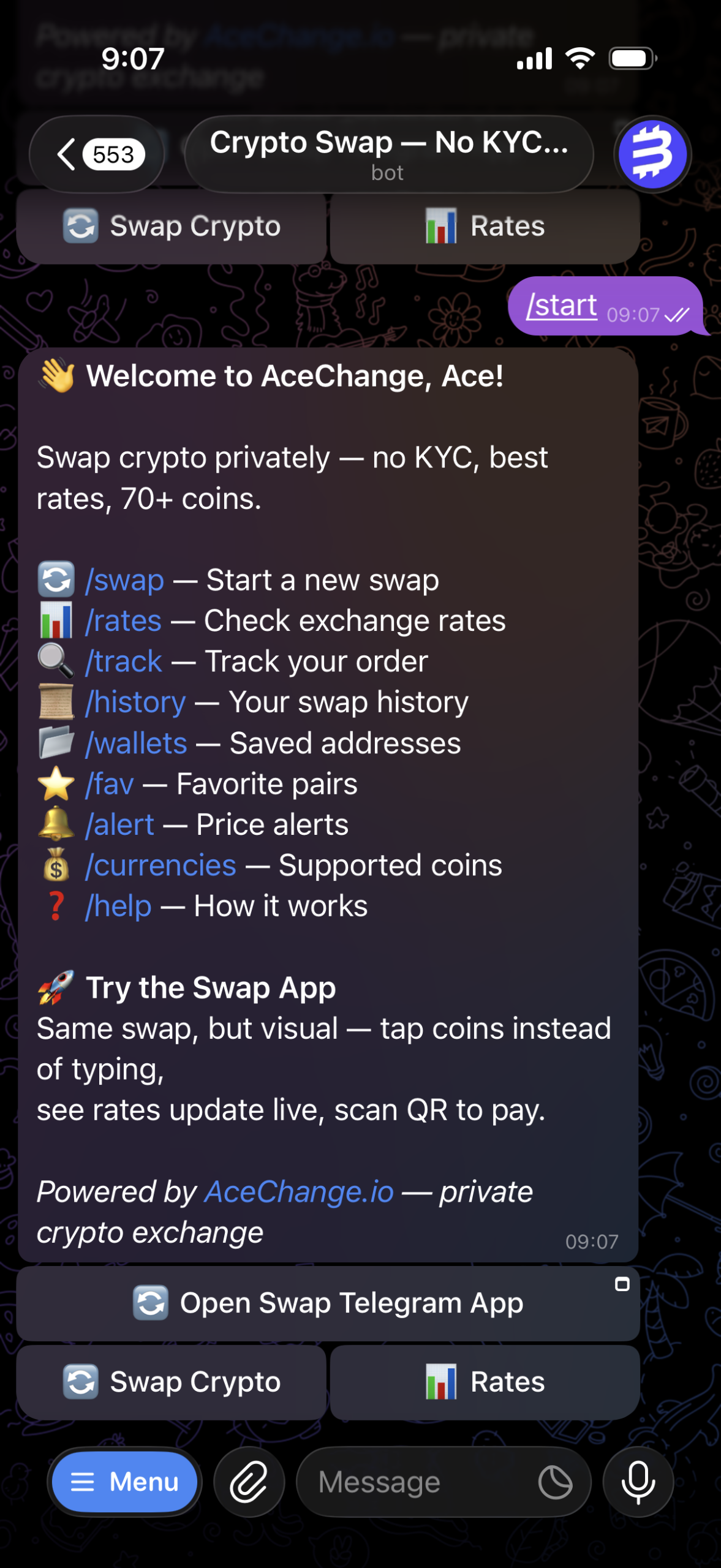
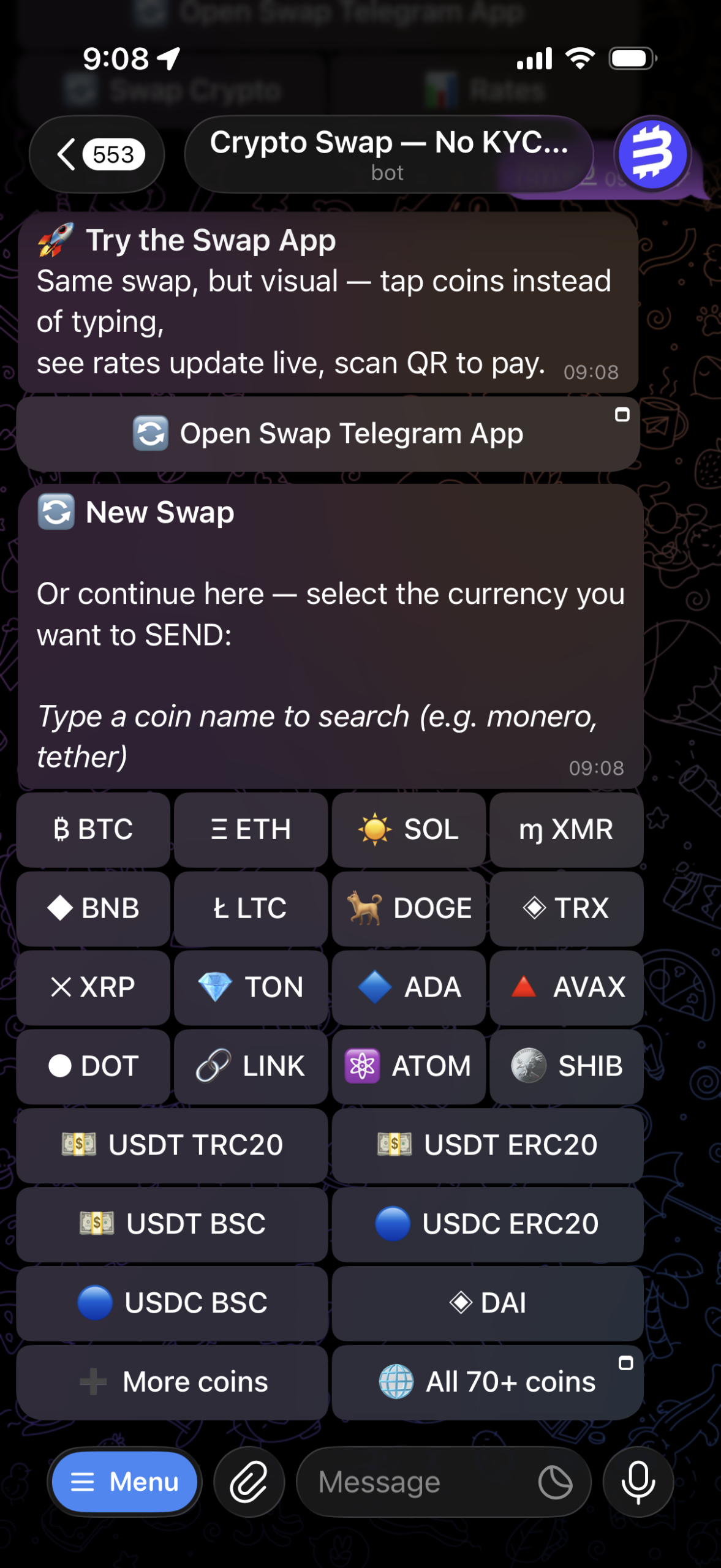
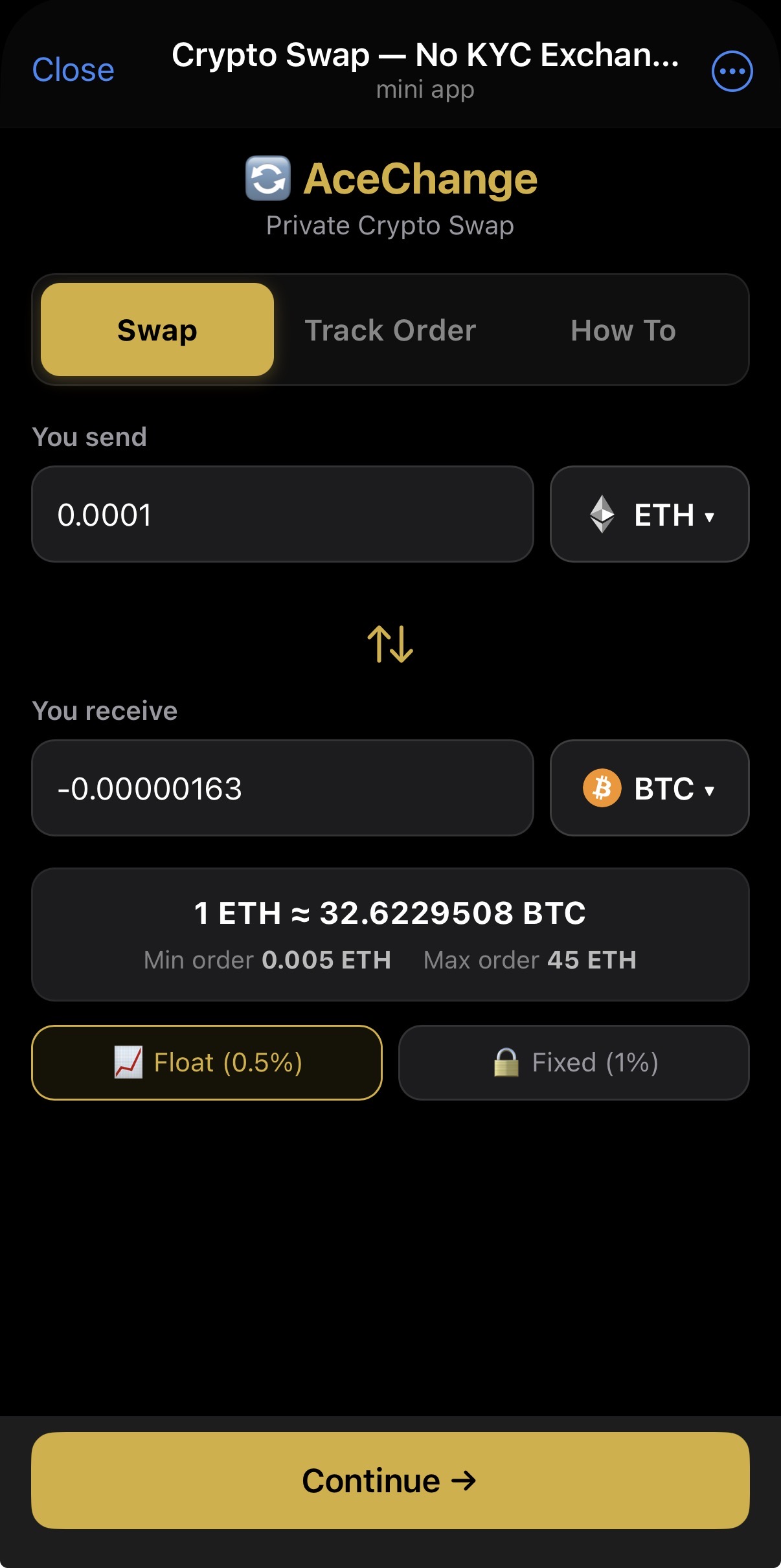
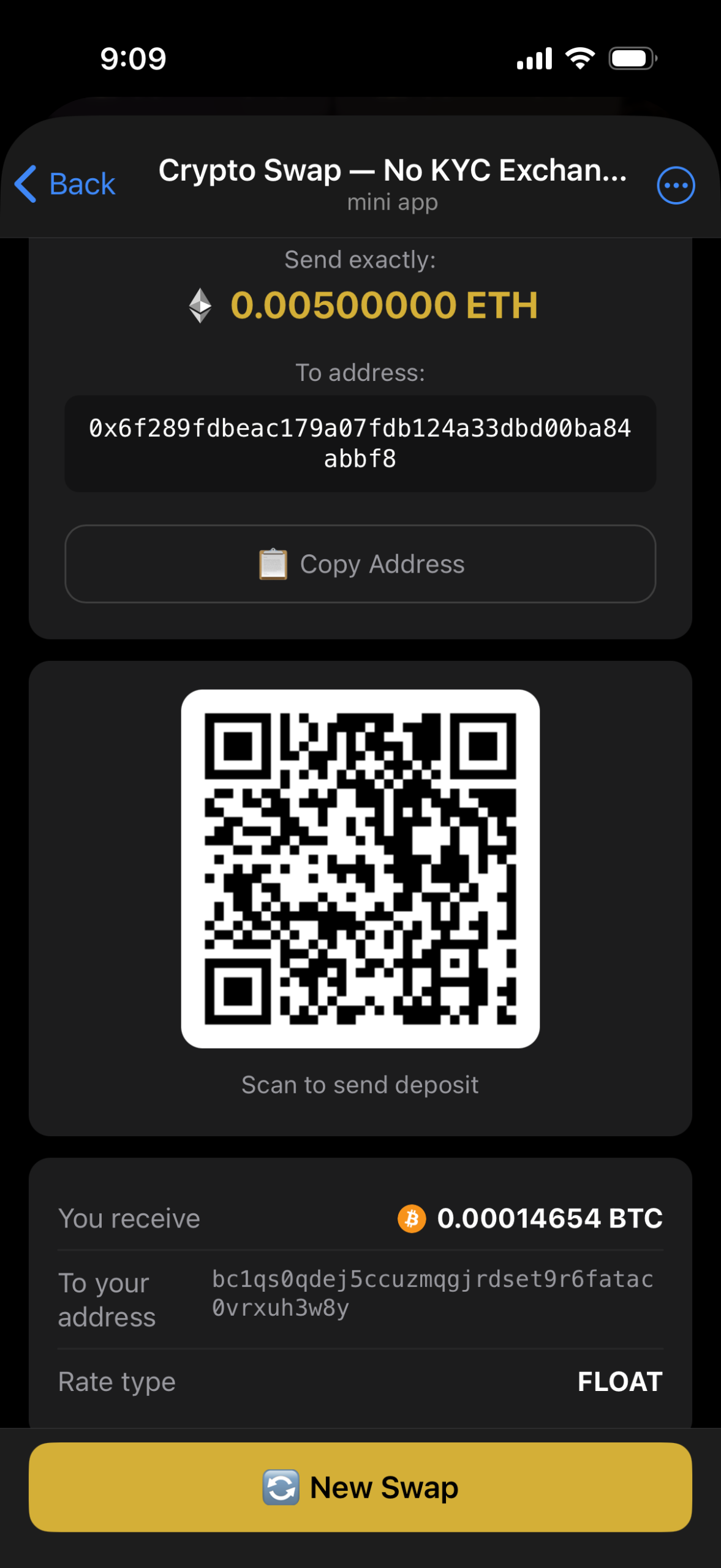
Your crypto exchange fits in a chat
No app to install, no account to create, no documents to upload. You open Telegram, tap a button, and a minute later your coins are on their way. The bot talks to you the way a friend would — one message at a time, with clear buttons, real icons and plain language. Everything happens inside Telegram, so your phone number stays with Telegram and your wallet address stays with you.
Under the hood it's the same swap engine that runs acechange.io — same 70+ coins, same rates, same reliability. The difference is reach: you don't need a browser tab, you don't need a bookmark. If Telegram is open, so is your exchange.
Everything the bot can do
No selfies, no ID uploads, no verification wait. Open the bot and swap immediately.
BTC, ETH, USDT, USDC, XMR, SOL, TRX, BNB, LTC, DOGE, ADA, AVAX, TON and many more — including all major network variants.
Fixed locks your rate for 30 minutes (1% fee). Float tracks the market for the best possible deal (0.5% fee). Your choice on every swap.
Save up to 20 wallet addresses with labels. The bot suggests them automatically when you're making a swap — no more copy-pasting.
Pin up to 10 trading pairs. One tap on a favorite and you're straight to the amount screen — no picking coins again.
Set a USD target for any coin. The bot checks the market every 5 minutes and pings you the moment your price hits.
Your last 10 swaps with amounts, status and dates. Tap any row to track it live.
Every new order generates a QR code for the deposit address — scan it from another device to send funds in seconds.
Full support for coins that need a destination tag or memo: XRP, XLM, ATOM, EOS, BNB, HBAR, TON.
Optional — add your email to an order and get status updates in your inbox too, not just Telegram.
If a deposit arrives late, short or over the limit, the bot lets you choose between completing the swap or getting a refund to your address.
Deposit detected, confirming, exchanging, sending, done — you get a Telegram message at every step. No refreshing pages.
🚀 The Mini App — a full exchange, right inside Telegram
The Mini App is our favorite thing we've built. It's a complete swap interface that opens directly inside Telegram — no browser, no redirects, no second tab. You get real coin icons, a searchable currency picker, live rates that update as you type, a QR deposit screen and a 30-minute countdown, all with the smooth feel of a native app.
Swap, Track Order, How To. Switch between them with one tap, no navigation needed.
Type "monero" or "usdt" or "tron" — results filter as you type. Every coin shows its real logo and network.
As you type your amount, the rate and min/max refresh in real time. You see exactly what you'll get before confirming.
Every created order opens on a deposit screen with a scannable QR plus a copy-to-clipboard address. The bot sends the same QR to the chat too.
Watch the rate-lock timer tick down. When it expires, the app nudges you to the Track tab to check the order status.
If an order enters EMERGENCY state, the Track tab shows Exchange / Refund buttons directly — no separate command needed.
Subtle vibration on successful order, errors and coin selection — matches Telegram's native feel.
Uses Telegram's MainButton (above the keyboard, always reachable) and BackButton for step navigation.
Works on iOS, Android, Desktop and Telegram Web — same app, same experience, everywhere you use Telegram.
Where to find it: tap /app inside the bot, use the "Launch Mini App" button on the /start screen, or tap the 🌐 button on any currency picker.
Supported cryptocurrencies
Bitcoin (BTC), Ethereum (ETH), Tether (USDT), USD Coin (USDC), Monero (XMR), Litecoin (LTC), Solana (SOL), TRON (TRX), BNB, Polygon (POL), Dogecoin (DOGE), Cardano (ADA), Polkadot (DOT), Avalanche (AVAX), DAI, Toncoin (TON), Chainlink (LINK), Cosmos (ATOM), Stellar (XLM), XRP, Shiba Inu (SHIB), Uniswap (UNI), NEAR, Aptos (APT), Arbitrum (ARB) — and many more, 70+ in total.
Network variants
Stablecoins and multi-chain tokens work across the networks you actually use:
All bot commands
| /swap | Start a new crypto swap — pick coins, enter amount, paste your wallet. |
| /app | Open the Mini App — full visual swap interface inside Telegram. |
| /rates | Check the live rate for any pair, with min and max amounts. |
| /track | Track your swap status in real time — pending, confirming, exchanging, done. |
| /history | Your last 10 swaps with amounts, status and tap-to-track buttons. |
| /wallets | Save, view and remove your receiving addresses (up to 20, labeled). |
| /fav | Manage favorite pairs for one-tap swaps (up to 10). |
| /alert | Set a USD price alert — the bot pings you when the market hits your target. |
| /emergency | Handle stuck orders — choose Exchange (swap what arrived) or Refund. |
| /currencies | Browse every supported coin, complete with networks. |
| /help | Step-by-step guide with links to useful AceChange articles. |
🔒 Security & privacy — by design, not by promise
We built the bot the way we build the rest of AceChange: no tracking, no account database, no secrets in your browser. Here's what actually protects you:
Every Mini App request is signed with Telegram's initData and verified server-side. We never trust a browser blindly.
All exchange API calls happen on our server. Your Telegram app never sees our keys or tokens — it can't be harvested.
You can only track or refund orders that were created from your Telegram account. Strict integer comparison, no bypass.
Fixed-rate orders expire after 30 minutes. If your deposit doesn't arrive, the order closes cleanly and funds (if sent late) are handled by the emergency flow.
Two-tier rate limiting protects against abuse and keeps every user's swaps smooth even at peak times.
We don't ask for email, phone or name. Your wallets, favorites and alerts are tied to your Telegram chat — not to a profile.
Frequently asked questions
-
Is there any registration or KYC required?
No. You don't need to create an account, upload documents or verify your identity. Just open the bot, pick your coins and swap. That's it.
-
How much does it cost?
The bot itself is free. You pay only the swap fee: 0.5% for floating rate or 1% for fixed rate, plus the standard blockchain network fee for the coin you're sending.
-
What's the difference between Fixed and Float rates?
Fixed locks your exchange rate for 30 minutes — you know exactly what you'll receive (1% fee). Float gives you whatever the market rate is when your deposit confirms — usually better, sometimes slightly different (0.5% fee).
-
How long does a swap take?
Usually 5 to 30 minutes. It depends on the blockchain. Solana, TRON and Lightning swaps finish in a few minutes. Bitcoin on-chain takes around 20 minutes because it needs two confirmations.
-
Can I save my wallet addresses?
Yes. Use
/walletsto save up to 20 addresses with labels. The bot automatically suggests your saved wallets whenever you start a swap — no more copy-pasting every time. -
What's a Memo / Destination Tag and when do I need one?
Some coins (XRP, XLM, ATOM, EOS, BNB, HBAR, TON) route deposits to a shared address using a memo or tag. Exchanges like Binance require it so your funds reach your account. The bot asks for it automatically whenever it's relevant — leave it blank if your wallet doesn't use one.
-
What's the difference between the bot and the Mini App?
Both use the same swap engine and the same rates. The bot talks to you with messages and buttons — quick and familiar. The Mini App opens a full visual interface inside Telegram with a searchable coin picker, live rate preview, QR deposit screen and a 30-minute countdown. Use whichever feels better — you can switch any time with
/app. -
What if something goes wrong with my order?
Use
/emergencywith your order ID (or tap the emergency buttons in the Mini App's Track tab). The bot lets you choose between completing the swap at the current rate or getting a refund to a wallet address you supply. -
Is it secure?
Yes. Mini App requests are signed with HMAC-SHA256 using Telegram's initData, API keys live only on our server (never in your browser), and every order is tied to the Telegram account that created it — no one else can track or act on it. We don't store email, phone numbers or KYC data because we don't need any.
-
Can I also swap on the website?
Yes. The same engine powers both — same coins, same rates. Visit acechange.io for the full web interface, or acechange.io/buy-sell if you want to buy or sell with cash. Orders created on the web can't be tracked from the bot (different session), but you can track them on the website.
Learn more
- 🔄 Swap crypto on AceChange.io — the same engine, in a browser
- 💵 Buy or sell crypto with cash — fiat on/off-ramp
- 📖 How to Anonymize Crypto Transactions — privacy guide
- 📖 No-KYC Crypto Exchange — Complete Guide
- 🛡 Free AML screening tool — check a wallet or name before you send
It takes 10 seconds. No signup, no download.
