
USDT PRIVACY · PRACTICAL GUIDE
An ordinary USDT transfer on Ethereum or TRON is not anonymous. Anyone can inspect public addresses and token movements, even without knowing the owners’ names. Swapping without an exchange account avoids a separate registration process; it does not erase blockchain history. Before exchanging USDT, check both your privacy expectations and the receiving network, minimum and final amount.
You might want to pay a merchant, receive USDT in your own wallet or move it between supported networks. Each task raises different questions. Your name, balance, payment details and address history are separate pieces of information. Start by deciding which information you want to protect and who might see it.
Separate your name from your transaction history
A blockchain address does not automatically display its owner’s legal name. Its activity can still be public. Ethereum describes its ordinary onchain activity as transparent and pseudonymous: addresses identify activity, while outside information and patterns can help identify people. See Ethereum’s explanation of privacy.
For example, you send a customer your USDT address with an invoice. The customer already knows your business and now knows which address received that payment. They do not need access to your wallet to make that connection. The information you exchanged while arranging the payment provides it.
A wallet screenshot can reveal an address, amount, time or transaction hash. Removing a name from the image may leave enough information to identify a particular payment. Share details needed for support privately through the service’s official channel, rather than posting the entire order publicly.
Ask a specific question: do you want to avoid another account, keep unrelated payments separate, or stop publishing your savings balance? These are different objectives. An “anonymous USDT swap” search can help you find services, but the label alone does not explain which objective a service addresses.
Who sees what during a swap?
A swap involves blockchain records, order information and any communication you exchange. The following table separates public information from information held by particular parties. It is not a universal data-retention policy: check the policies of the service processing your order.
| Observer | What they may see or know | What this does not establish |
|---|---|---|
| Public blockchain observer | Visible addresses, token transfers, amounts and available timing information. | The owner’s name or reason for paying. |
| Person you pay | Their incoming payment and information from your conversation. | Access to your private keys. |
| Swap provider | Input and output details needed to process its order. | That those details are public—or that no record exists. |
| Receiving exchange | A deposit credited to your account and its account records. | That an earlier swap removes its own record of your deposit. |
| Someone viewing an order screenshot | Everything you leave readable in the image. | That hiding one field makes the remaining fields anonymous. |
For AceChange, read what information we see during a swap and our Privacy Policy. Also check the provider identified in the form. The reviewed swap interface identifies FixedFloat; its rules are separate from your wallet’s rules.
Resolve unclear details before depositing. Keep your order information privately and know where to find official support. Once you send funds, you are dealing with an actual payment rather than an indicative quote.
Can Tether restrict USDT in your own wallet?
Self-custody gives you control over signing with your keys. It does not remove the token issuer’s controls. Tether’s Relevant Information Document, section 2.7, says that in certain circumstances it may attempt to freeze tokens in external wallets at the request of authorities, even when it does not hold those wallets’ private keys. Its terms also describe freezing powers.
That does not mean the issuer obtains your recovery phrase or can sign arbitrary transactions for you. Restrictions affecting a token are different from control of the wallet’s keys. Keep three questions separate: who knows your identity, who can inspect the transfer, and who can restrict the token’s movement?
Account-free access describes how you use a service. It does not describe every property of the asset you receive. A self-custody wallet, a no-KYC swap and a privacy-focused blockchain therefore address different parts of the process.
How to read a USDT transaction in an explorer
A block explorer lets you inspect public blockchain records. Use it to distinguish a completed transfer from the balance currently displayed by an app. These steps cover an ordinary Ethereum USDT transfer; use a TRON explorer for TRON transactions. Field names can differ.
- Open the right transaction. Use the explorer link in your wallet’s transfer details. If you only have a hash, first confirm the network. Reading a public record does not require your recovery phrase or a transaction signature.
- Check its status. Distinguish pending from successful execution. Compare the hash with your own record; a similar amount and time are not a unique identifier.
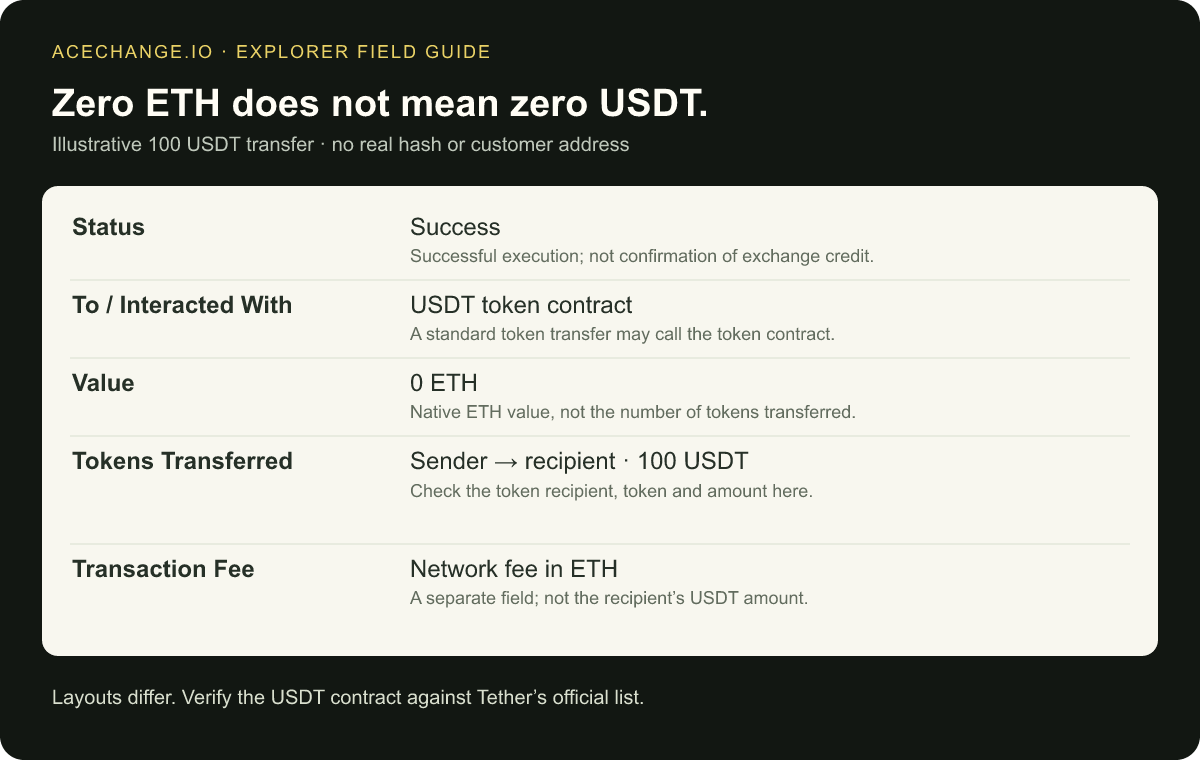
- Find the token movement. In Tokens Transferred or its equivalent, check the USDT recipient and amount. The main To field may identify the contract being called, rather than the token’s final recipient.
- Separate ETH from USDT. The transaction’s Value field concerns ETH transferred directly. Zero ETH does not necessarily mean zero USDT moved. Read the token movement and network fee separately. Ethereum’s explorer documentation explains these fields.
- Verify the token. Compare its contract with the relevant network entry in Tether’s official list. A matching ticker or icon alone does not prove authenticity.
For a merchant payment, compare the token recipient and amount with the invoice. For an exchange deposit, compare them with the exchange’s deposit instructions. Successful execution does not establish that the receiving exchange has met its confirmation requirements or credited your account.
The explorer also makes the privacy issue tangible. Other people can inspect the same public fields. Those fields do not automatically reveal your name, but sharing the hash together with your identity gives the recipient additional context. Share the information needed for the task, such as a private support investigation, rather than publishing unrelated details.
Keep the input and output checks separate. The transaction you sent to a provider proves something about the deposit, not the later payout. When the order shows that the output was sent, inspect the output transaction on its own network. Compare its token recipient with your receiving address. For a cross-network swap, one explorer cannot answer both questions. This distinction helps you explain a delay accurately: deposit not confirmed, provider still processing, or output sent but not yet displayed.
USDT is not a network name
Tether issues tokens on several blockchains. Here, the relevant examples are ERC-20 USDT on Ethereum and TRC-20 USDT on TRON. The official protocol and contract list identifies them. An issuer’s support does not establish support at every receiving exchange or wallet.
Open the destination’s USDT receive or deposit screen. On an exchange, select the network explicitly. In a wallet, check the token account you are viewing. You should finish this check knowing the asset, network and address together—not simply that the application displays “USDT.”
| Your asset or destination | Check | Common mistake |
|---|---|---|
| USDT on Ethereum | Ethereum, the correct token and gas coverage when sending. | Confusing networks because the ticker is identical. |
| USDT on TRON | TRON/TRC-20 and a supported receiving address. | Selecting a cheap network the destination cannot accept. |
| Exchange deposit | Supported network, deposit minimum and deposit availability. | Confusing the swap minimum with the exchange’s crediting minimum. |
| Merchant payment | Network, required amount and valid payment instructions. | Using an expired invoice or sending another asset. |
Moving between networks requires a supported conversion or transfer method; it is not an ordinary same-network send. Never experiment by sending a token to an unrelated address from the other network. A form accepting an address is not proof that the entire transfer is correct.
Clear wallet labels help prevent confusion: “USDT payments—TRON” is more useful than “wallet 2.” A label is an organizational aid, however, not a network check. Confirm the actual asset and chain each time.
Prepare a USDT swap, step by step
This procedure is for someone who already owns cryptocurrency. It does not describe buying with a card or bank transfer. You can inspect a quote by selecting the pair and amount without sending funds. A quote preview is not a completed exchange.
1. Start at the receiving wallet
Decide where the output should arrive. Open that asset’s receive or deposit screen, verify the network, copy the address and read the requirements. On an exchange, check that deposits are available. If the destination specifies a memo or tag, follow its instructions; never invent a value.
Copy from the current destination interface rather than an old message or unrelated transaction history. Compare the full address after pasting. For a payment to someone else, confirm changed instructions through an already trusted contact channel. The swap cannot correct an address you supplied incorrectly.
2. Confirm what you actually hold
Check the asset and network in your sending wallet. If it contains several accounts, open the one you intend to use and check the spendable balance. Your token balance and the balance required for transaction fees may be different assets.
Standard Ethereum gas is paid in ETH. Review your wallet’s estimate before signing; network conditions change. Having enough USDT does not automatically mean you can send it. The Ethereum gas guide explains this separate execution cost.
3. Choose the pair in AceChange
Open the AceChange swap form. Under You Send, select the asset and network you hold. Under You Receive, select the required output. When both sides say USDT, inspect the network labels carefully.
Enter the amount and wait for the current quote. If the pair is unavailable or the quote fails to load, do not send using an old screenshot or order. Check current availability. For the reverse network direction, our USDT TRC-20 to ERC-20 guide provides additional context.
4. Compare the output, minimum and rate type
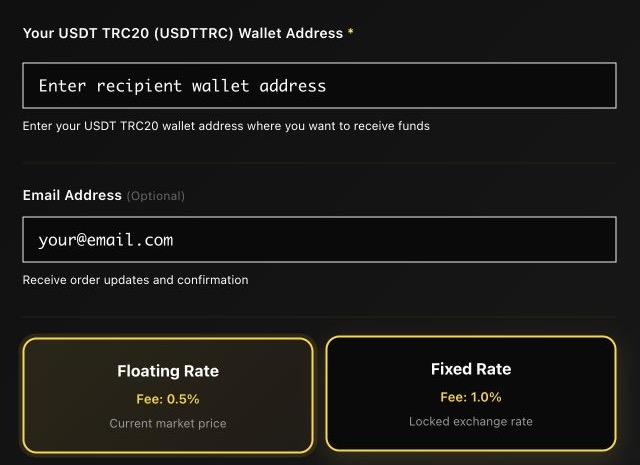
Read You Receive, the displayed service fee, minimum and rate type together. Establish what you must send, what your wallet charges separately and what the quote indicates you will receive. Resolve any uncertainty before confirming.
With FixedFloat’s floating rate, the final rate is determined after the required confirmations under the provider’s rules. A fixed rate depends on meeting the order’s timing and payment conditions. Read the deadline, required amount and exception instructions. The FixedFloat FAQ explains both modes; its terms cover the service rules.
5. Paste the destination and review
Paste the receiving address from step one and check the complete string. Confirm it belongs to the selected network. Read the required declarations and only confirm statements that are true for you. In the summary, compare both assets, the amount and the receiving address again.
Your recovery phrase, private key and wallet password do not belong in these fields. A receiving address tells the provider where to deliver the output; supplying it does not authorize the provider to sign transactions in your wallet. Stop if an unexpected page requests wallet secrets.
6. Follow that order’s deposit instructions
After creating the order, use its own deposit instructions. Your receiving address and the provider’s deposit address have different roles. Check the input network, amount and deadline before signing. Never send to a deposit address copied from an article screenshot.
If withdrawing from an exchange, check whether its withdrawal charge reduces the amount that arrives. Do not send a small test payment into an order expecting a larger amount. A trial swap should be a separate order meeting its own current minimum and instructions.
7. Save the record and check delivery
Keep your tracking details privately, along with the sending transaction hash. Check the order status and the receiving wallet separately. An order status and an app’s displayed balance are different checks.
For an exchange destination, review its confirmation and crediting requirements. In a self-custody wallet, check the correct account, network and token. Do not send again just because the balance has not appeared. First establish whether the provider has already sent the output.
Compare the complete cost, not just a percentage
A difference between USDT input and output can look surprising because the ticker is unchanged. The route still has processing conditions and costs. Compare the original quote, the actual amount sent and the rate rules before explaining a discrepancy.
The following is a fictional calculation, not an AceChange quote or network price list. Suppose the quote shows 100 USDT in and 97 USDT out. The difference is 3 USDT, or 3% of the input. That figure alone does not tell you what your sending wallet will charge.
| Illustrative item | Value | How to use it |
|---|---|---|
| Quoted input | 100 USDT | Compare with the amount required to arrive. |
| Quoted output | 97 USDT | Check your intended payment and destination minimum. |
| Input minus output | 3 USDT | 3% here; not necessarily the service fee alone. |
| Sending from your wallet | Current wallet estimate | Check separately, including the required fee asset. |
| Sending the received USDT later | Future network cost | Allow for this if you will make another payment. |
On TRON, transactions consume Bandwidth and smart-contract calls also consume Energy. Where resources are insufficient, TRX may be burned under the network’s charging rules. There is no universal permanent fee for every USDT transfer. Check your wallet’s estimate and the official TRON resource model.
Check the swap minimum and the destination’s deposit minimum separately. A merchant invoice adds another requirement: enough usable USDT to pay the invoice. Creating an order successfully does not prove its output will cover a later purchase.
When comparing two quotes, use the same input amount and receiving network. Otherwise you may be comparing different routes or different amounts. Record when each quote was shown and its rate type; a later floating result may differ. For a merchant payment of 100 USDT, the illustrative 97 USDT output above is insufficient before any later sending cost. Work backwards from the amount the recipient requires instead of assuming the input balance equals the spendable output.
If the quote does not suit your purpose, do not deposit. Consider another supported route or wait. Choosing a cheaper unsupported network is not a saving. Our swap cost guide explains how to compare offers.
Three situations that need different checks
Keeping USDT in your own wallet
Confirm that you understand wallet recovery and have a secure backup before relying on the wallet. Receiving tokens is not a reason to share your recovery phrase. Check the network and how you will cover a later sending fee; otherwise a visible balance may still be difficult to use.
For privacy, avoid publishing your receiving address alongside your total savings. Separate accounts can help organize different purposes, but their names do not establish that the accounts are unconnected. Consider what you reveal through payments, screenshots and conversations together.
Paying a merchant
Confirm the invoice’s network, amount and expiry. Receiving USDT in your own wallet and then paying is a two-step process, with another sending cost and time requirement. Use the current invoice rather than an old product price.
Before directing a swap output to a time-limited invoice, understand the merchant’s policy for late payments. Receiving in your own supported wallet first may make the final payment easier to check, but it introduces another transfer and fee. Decide using the actual payment window, not an assumed settlement time.
Depositing into an exchange account
Open USDT deposits in your own exchange account, select an available network and read the minimum. Compare those instructions with the swap output. A suspended network or unsupported token requires a different supported route or a wait—not a guess.
The exchange knows which account it credits. Using another service earlier does not remove that record. Choosing between an exchange account and your own wallet therefore involves both custody and the information associated with the destination account.
What a VPN, another device or Monero changes
Securing your device helps protect wallet access. It does not change a confirmed public transaction. Our device preparation guide addresses that separate layer.
A VPN concerns your network connection, not deletion of explorer records. A fresh address can reduce reuse, but does not prove that no other connection exists. Your communications and service records still matter.
Likewise, distinguish Monero’s blockchain privacy from a provider’s knowledge of its order. Swapping through XMR does not prove that order records disappear. Receiving USDT afterwards creates visible activity on its transparent destination network. The XMR to USDT guide covers practical receiving checks.
Find the stage where something went wrong
A low quote, a pending order and a missing displayed balance are different situations. Each needs different evidence. Identify the stage before creating more orders or sending another payment.
| Situation | First check | Avoid assuming |
|---|---|---|
| Unexpectedly low quoted output | Pair, networks, amount, rate type and quoted costs. | That the difference proves an attack or an error. |
| Wallet cannot send USDT | Fee resources and the exact error message. | That a website requesting your seed can repair it. |
| Deposit sent, order waiting | Transaction, network, recipient and confirmations. | That a second deposit will solve the first. |
| Output sent, exchange not credited | Network, minimum and exchange crediting requirements. | That an onchain transfer and internal credit are identical. |
Give official support a concise account of the intended exchange, current status and checks you performed. Send order or transaction identifiers privately when needed. Do not publish private tracking links or provide passwords, recovery phrases or private keys.
If funds went to the wrong network or address, recovery depends on the specific circumstances and recipient. Contact support before taking further action. For a waiting order, use our pending swap guide.
USDT privacy questions
Does a no-KYC swap mean complete anonymity?
No. Account requirements and blockchain visibility are different. Consider the provider’s rules, its order information and how you use the receiving address. Read any verification exceptions before depositing. FixedFloat’s terms include its AML procedure; account-free access is not a promise that verification can never arise.
Does changing from Ethereum USDT to TRON USDT help?
It helps when you need USDT on a supported destination network. It is a compatibility choice, not an anonymity guarantee. Both networks have public transfer data, and the provider may know the details linking its input and output. Choose the network for your actual destination and purpose.
Do I need TRX or ETH to receive USDT?
Separate receiving from later sending. The sender handles the cost of the incoming transaction; your later outgoing transfer needs the appropriate resources. Also check activation for a new TRON account: generating an address and activating it onchain are different steps. The TRON account documentation explains activation.
Should I send a small test transfer first?
Follow the order’s instructions. A small deposit into an order expecting a different amount can create an exception. To try a route, use a separate order that meets its current minimum and the receiving service’s requirements. Include the extra network costs when deciding whether that trial is useful.
What should I check before confirming?
Match five things: input network, output network, receiving address, usable output amount and valid deposit instructions. Then protect privacy by limiting unnecessary disclosure and understanding what each service can see. A familiar token name or attractive advertised fee cannot replace those checks.
