
How to swap crypto without KYC — in 7 simple steps
Choose a supported pair, prepare your receiving wallet and follow the deposit instructions. No AceChange account is required. Availability, processing time and provider verification requirements can vary.

- VariesProcessing time
- 0.5%Fee from
- $15Minimum order
- LivePair limits
Short answer
Open the AceChange swap form, choose the sending and receiving assets and networks, enter your receiving address and review the quote. Save the order details before sending the instructed deposit. Completion depends on blockchain confirmations and provider processing. No AceChange account is required, but a provider review may require additional information. The screenshots below illustrate the workflow; use the current form for live availability and limits.
Swap, exchange, convert, trade — what’s the difference?
Four words people use almost interchangeably. Here is the practical distinction.
Swap
A single wallet-to-wallet transaction that exchanges one coin directly for another. What this guide covers, step by step.
Exchange
The broader category that covers swaps and order-book trades. People often type “how to exchange crypto” when they really want a swap.
Convert
The marketing term centralized exchanges use for an in-account swap. Coinbase, Kraken and Binance all call it convert.
Trade
Buying and selling against an order book on a centralized exchange. Implies price intent, not just moving from one coin to another.
The seven steps below apply whichever word you typed into Google.
Your seven-step swap
Each screen, exactly as it looks on the live platform.
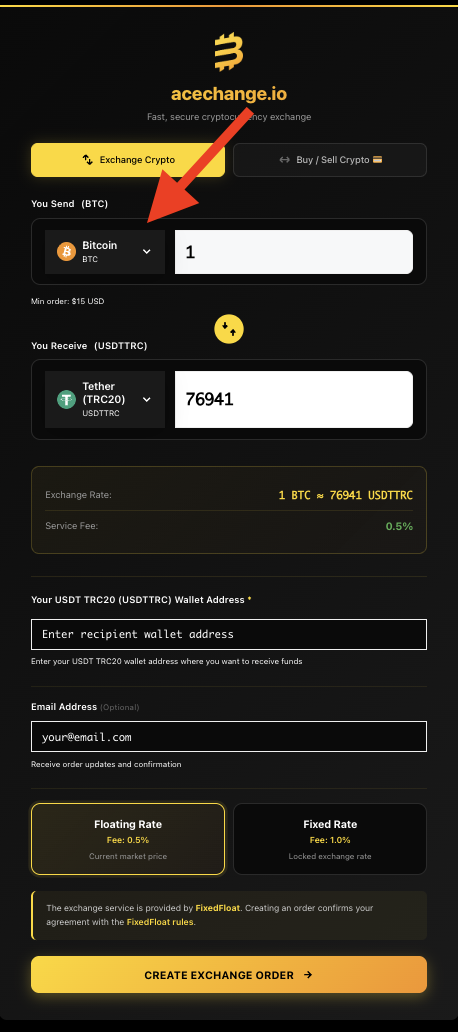
Tap the coin picker
Go to acechange.io/swap-crypto. Tap the left picker. That is where you choose what you are sending. No login, no email.
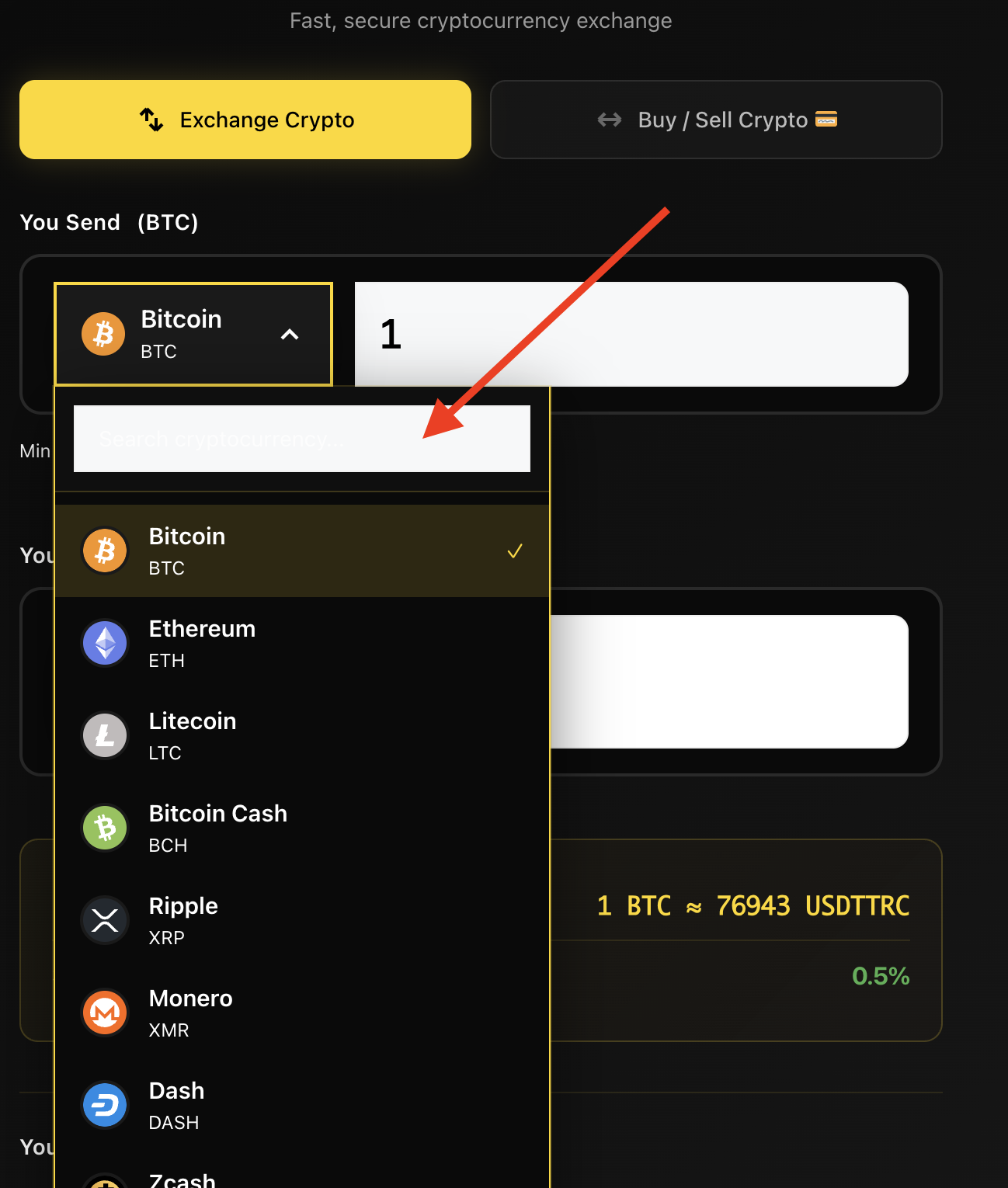
Pick the coin and network
Type the ticker or name. The list filters live. For USDT, USDC or any multi-chain coin, also pick the network — match the wallet you are sending from.
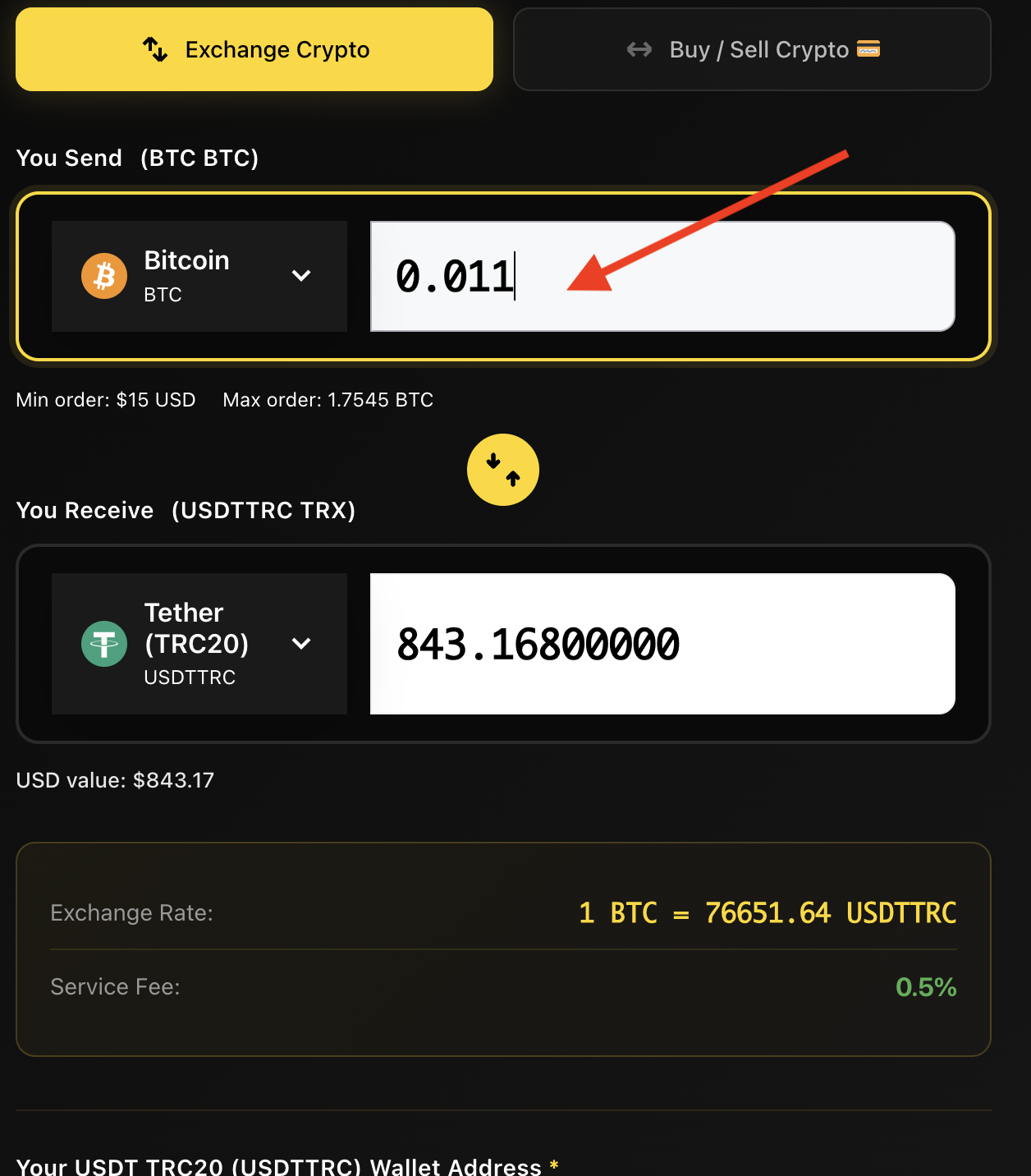
Type the amount
The receive amount updates with the quote. Check the current minimum and maximum for the selected pair. Do not split orders to bypass provider restrictions.
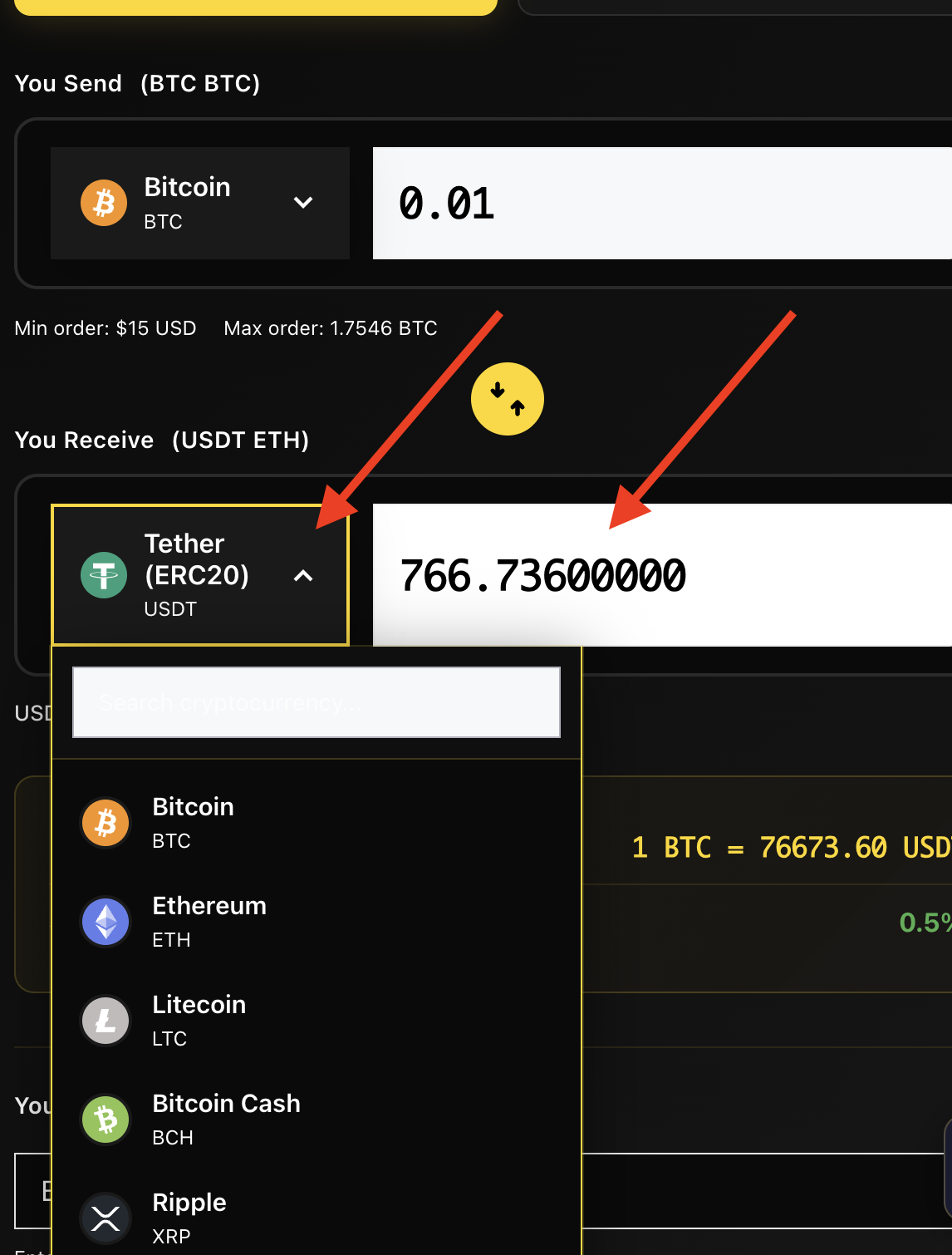
Pick what you receive
Same idea as step 2, but for the receiving coin. The network you pick here must match your destination wallet. Cross-network sends are permanent.
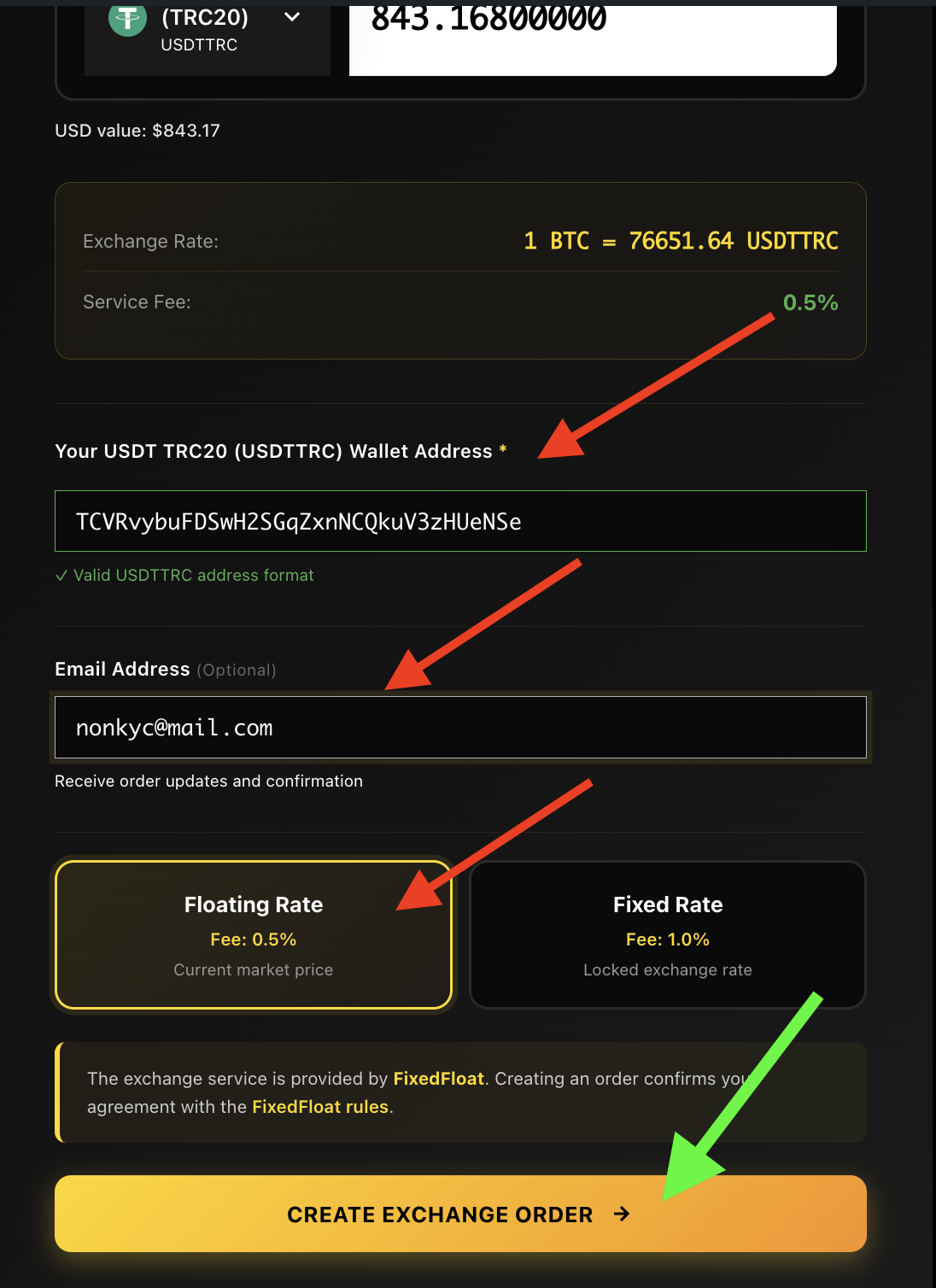
Paste address, pick rate
Paste your receiving address. Email is optional. Pick floating rate (0.5%) for stable pairs or fixed rate (1.0%) to lock the price for ten minutes. Click Create Exchange Order.
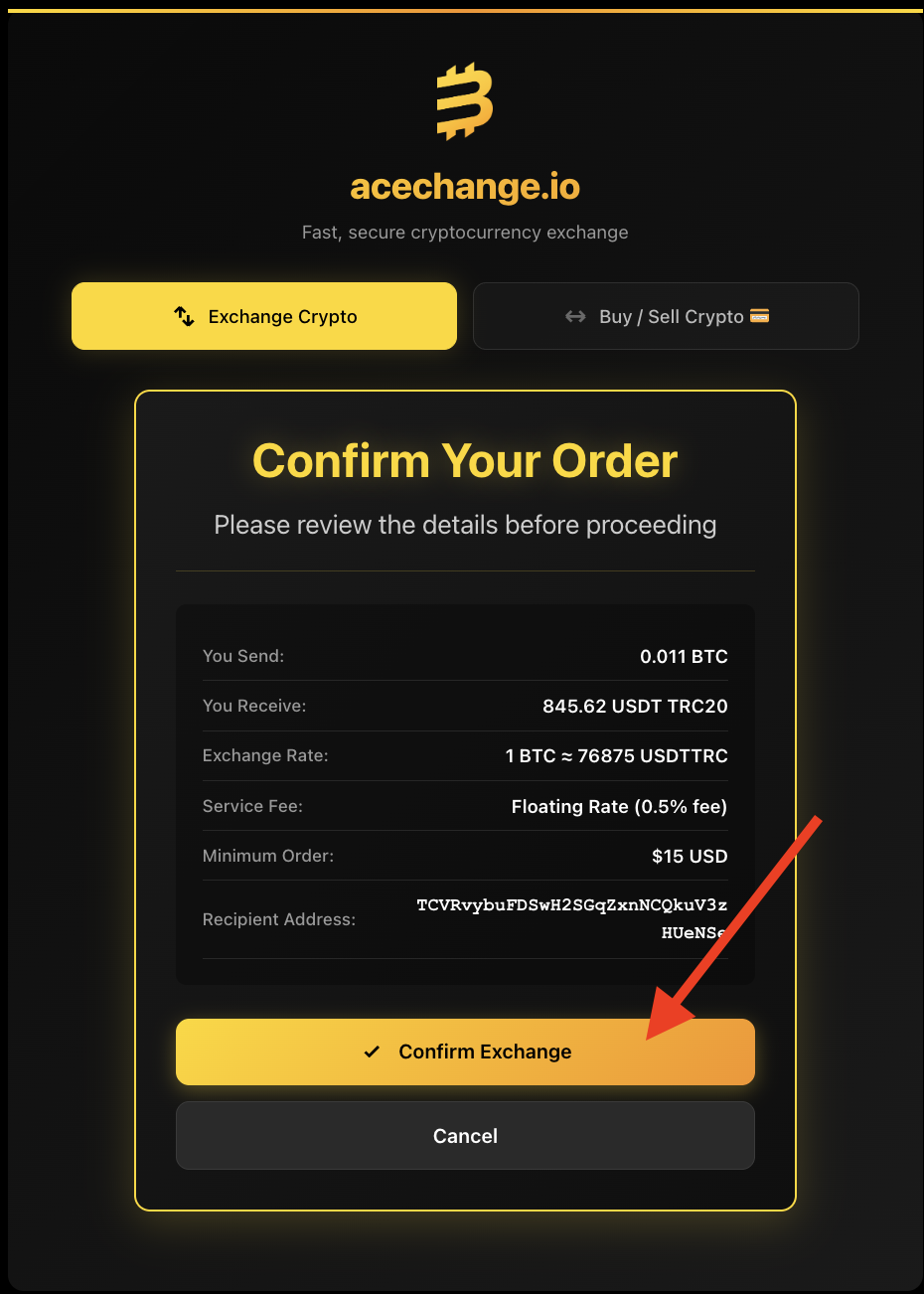
Verify before you confirm
Read every line, especially the receiving address. After you confirm, the address locks and crypto sends are irreversible. Compare the full string, not just the first or last few characters.
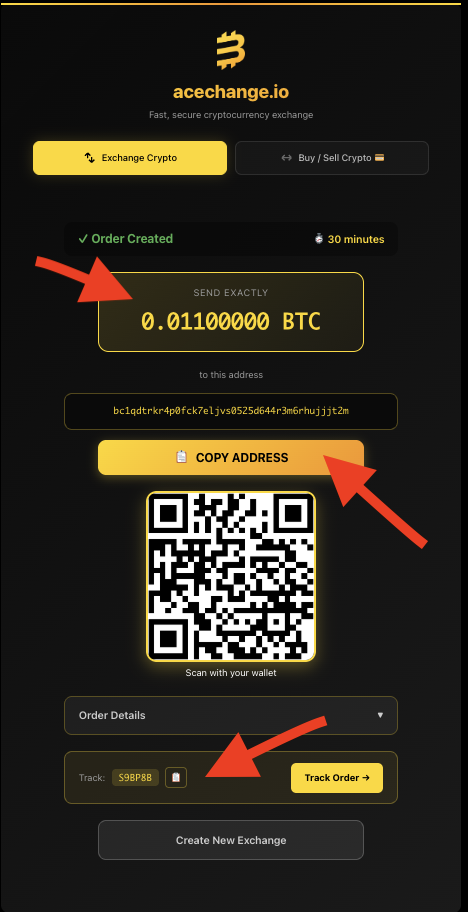
Send and save the Order ID
Save the Order ID — without an email, it is the only key to track-order. Send the exact amount via QR or address. Once the network confirms, the new coin is sent automatically.
You have seen the seven screens. Try it for yourself.
Swap right nowQuick reference
Everything else, in one box.
- Fee. 0.5% floating or 1.0% fixed — built into the displayed rate, no separate charge.
- Time. About five minutes for most pairs. XRP, Solana, Tron settle in seconds; Bitcoin takes 10–30 minutes.
- MEMO required for: XRP, XLM, TON, EOS, ATOM, HBAR, ALGO, BNB BEP-2. If the form shows a MEMO field, it is mandatory.
- USDT / USDC network shortcut. Match the network to your receiving wallet. Compare current costs and availability; no network is always the cheapest or fastest.
- Verify on-chain. Mempool.space (BTC), Etherscan (ETH and ERC-20), Tronscan (TRC-20), Solscan (SOL).
Popular swap pairs
The most-requested no-KYC swaps on AceChange. Each tile opens with the rate already loaded.
Common questions
What is the simplest way to swap crypto without KYC?
Open the live swap form, choose both assets and networks, enter the receiving address and any required memo or tag, and review the quote. Save the order instructions before sending. No AceChange account is required; provider conditions still apply.
How long does an instant crypto swap take?
Completion depends on deposit confirmations, the selected networks and provider processing. The order tracker shows progress. A network delay or review can take longer than a quoted estimate; do not treat five minutes as a guarantee.
Can I exchange crypto to crypto anonymously?
An account-free swap does not guarantee anonymity. Public blockchains retain transaction history, and the service processes order data. Read the Privacy Policy and provider rules before sending funds.
How do I swap Bitcoin to USDT without an account?
Choose BTC as the sending asset and select the USDT network supported by your destination wallet. Copy that network’s deposit address and check any minimum deposit. Review the live quote and order-specific instructions before sending BTC.
What is the best no-KYC crypto swap for beginners?
For a first swap, prioritise a supported receiving network, clear deposit instructions and a quote you understand. This guide shows the workflow; coin availability, limits and prices should be checked in the current form.
Are anonymous crypto exchanges legal in 2026?
Eligibility and legal obligations depend on your location and the provider. Check current restrictions and local requirements. A no-account interface does not establish a legal exemption or remove reporting obligations.
How do I exchange one cryptocurrency for another without KYC?
Choose a supported pair and network, enter your receiving address, review the quote and follow the order’s deposit instructions. Save the private tracking link. A no-KYC swap does not guarantee that additional information can never be requested during a review.
Can I convert USDT to Bitcoin without an account?
Yes, the AceChange swap form does not require an exchange account. Match the USDT sending network to your wallet, select BTC as the receiving asset and enter your Bitcoin address. Review the amount and instructions; network cost and availability vary.
No-KYC swap vs regular exchange
What you keep when you skip the account.
| Feature | AceChange | Regular CEX |
|---|---|---|
| Sign-up | Not required | Mandatory |
| Identity verification | Not required | Passport / ID |
| Email or phone | Optional | Required |
| Custody | You hold the coins | Exchange holds them |
| Withdrawal cap | No upper limit | Tier-based |
| Service fee | From 0.5% | 0.1–1.5% + spread |
| Reporting | Maximum privacy | DAC8 / FATF |
Ready to swap crypto without KYC?
Two wallet addresses. No account. No ID. About five minutes.
Swap now
