
How to swap crypto in 2026.
The simple, complete guide.
Everything you need to exchange one cryptocurrency for another — BTC, ETH, XMR, USDT, USDC and 100 more — without an account, without KYC, and without giving up custody of your coins. Read it once, swap forever.
What is a crypto swap?
A short, plain-English definition before we go deeper.
Quick answerA crypto swap is a single non-custodial transaction that exchanges one cryptocurrency for another (e.g. BTC for XMR) without fiat conversion or KYC, typically completing in about 5 minutes.
Crypto swap — in one sentence
A crypto swap is a single transaction that exchanges one cryptocurrency for another (for example BTC for XMR, or ETH for USDT) without going through fiat currency and, on a non-custodial service like AceChange, without giving up custody of your coins to a third party.
Key facts at a glance
- Type of transaction: Direct crypto-to-crypto, no fiat conversion
- Custody: You hold your keys from start to finish
- Account required: No
- Typical completion time: Under 5 minutes (verified May 2026)
- Minimum order: $15 USD equivalent · Maximum: no upper limit
When you swap crypto on AceChange, three things happen in sequence: you tell the platform which pair to exchange and where to send the result; the platform shows you a unique deposit address and the exact amount to send; you broadcast the transaction from your wallet, and once it confirms on-chain the new coin is dispatched directly to your receiving address.
That structure is what makes a non-custodial crypto exchange fundamentally different from a centralized exchange (CEX) like Binance or Coinbase. On a CEX you deposit, the exchange holds your coins under its own keys, you trade against an order book inside the platform, and you eventually withdraw. On a swap service, you never deposit at all — the coins move through a single transaction, wallet to wallet, and your custody is preserved.
This guide walks you through exactly how to do that, step by step, with real screenshots from the live AceChange platform.
Swap vs exchange vs convert vs trade — what’s the difference?
Four words that often mean the same thing, and sometimes don’t. Here’s how the crypto industry actually uses them in 2026.
Quick answerSwap and exchange mean the same thing in non-custodial services. Convert is the centralized-exchange marketing term for the same action inside a KYC account. Trade involves an order book and active position management.
Swap
A single, self-contained transaction that exchanges coin A for coin B. Most often used for non-custodial services where you keep your keys throughout. Example: swap BTC for XMR on AceChange.
Exchange
A broader term that covers any crypto-to-crypto trade, on a swap service or on a centralized order-book platform. In practice, “exchange crypto” and “swap crypto” are used interchangeably outside of trading-desk contexts.
Convert
The marketing label that centralized exchanges (Coinbase, Kraken, Binance) use for an in-account swap between two coins. Functionally identical to a swap, but it happens inside your KYC’d account — the coins never leave the venue’s custody.
Trade
Placing buy and sell orders against an order book on a centralized exchange. Requires an account, KYC and a balance held by the venue. Used by active traders, not by people who simply want to move from one coin to another.
For most people the question “how do I swap crypto?”, “how do I exchange crypto?” and “how do I convert crypto?” all have the same answer — this guide covers all three.
Why use AceChange to swap crypto
A privacy-first, non-custodial crypto swap built for people who value control of their funds and don’t want to hand over an ID to exchange one coin for another.
Quick answerAceChange is a non-custodial crypto swap service operating since 2019, with no KYC, no account, fees from 0.5%, and 4,000+ trading pairs across 20+ blockchain networks.
Truly anonymous swap
No KYC, no email, no phone number. AceChange does not ask for documents and does not store personal data — your crypto exchange stays your business.
Non-custodial exchange
Coins move directly from your wallet through the swap engine to your destination wallet. AceChange never holds your funds — true wallet-to-wallet trade.
Instant crypto exchange
Most swaps complete within five minutes (median measured Q2 2026). Live order tracking shows every confirmation, so you always know exactly where your crypto is.
Fair, transparent rates
The price you see is the price you get. The service fee is built into the displayed exchange rate — no hidden spreads, no last-second markups, no surprises before you confirm.
24/7 human support
Real specialists via live chat, email and Telegram. Average response under 15 minutes — no bots, no scripts, no delays. Crypto questions answered by people.
100 coins, 4,000+ swap pairs
Hand-picked support for BTC, ETH, XMR, USDT (ERC-20, TRC-20, BEP-20, Polygon, Arbitrum, Solana), USDC, LTC, BCH, SOL, BNB and the most-traded altcoins across 20+ blockchain networks.
How to swap crypto in 3 simple steps
A clean, predictable swap flow — no signup, no KYC, no friction. From clicking Exchange to receiving your crypto typically takes under five minutes.
Quick answerTo swap crypto: (1) choose the pair and amount, (2) paste your receiving wallet address, (3) send the deposit. The new coin arrives in your wallet within five minutes — no account or KYC required.
Choose your pair & amount
Select the cryptocurrency you want to send and the one you want to receive. Live exchange rates are shown instantly — pick floating or fixed rate based on how stable the pair is.
Enter your receiving wallet
Paste the wallet address (and MEMO if needed). Pick the correct network for multi-chain assets like USDT or USDC. Always double-check the address before continuing.
Send & receive in minutes
Send crypto to the unique deposit address. Once confirmed on-chain, your new coin is delivered straight to your wallet — typically within five minutes.
How to swap crypto on AceChange — full visual walk-through
A real, screenshot-by-screenshot tutorial of an anonymous no-KYC crypto swap. Seven steps, seven actual screens from the live platform.
Quick answerThe full crypto swap process on AceChange takes seven on-screen steps and about 30 seconds of clicks before you send your deposit. The remaining ~4-5 minutes is blockchain confirmation time.
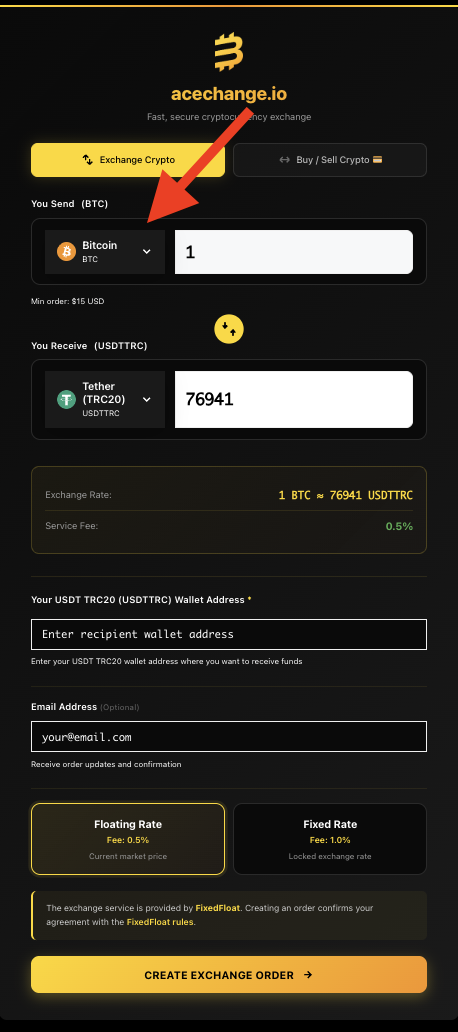
Open the coin picker
On the AceChange homepage or swap-crypto page, click the coin picker on the left side of the swap widget. This is where you choose which cryptocurrency you want to send. The red arrow highlights exactly where to click.
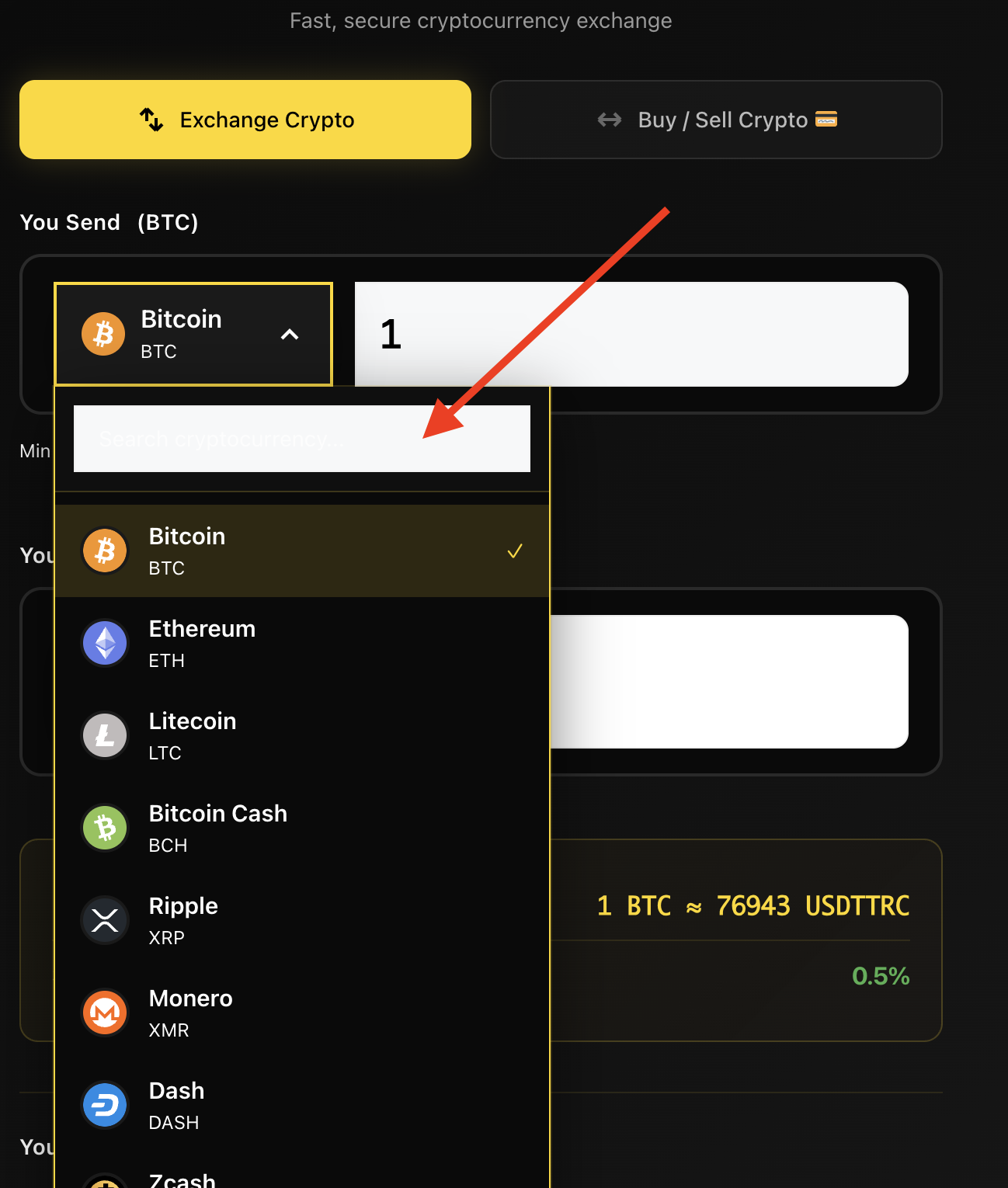
Search and select your coin
Once the picker is open, type the coin’s full name (for example Monero) or its ticker (XMR) into the search field — the list filters instantly. Important: for multi-chain coins like USDT or USDC, always pick the correct network (TRC-20, ERC-20, BEP-20, Polygon, Arbitrum or Solana) — sending on the wrong network can result in lost funds.
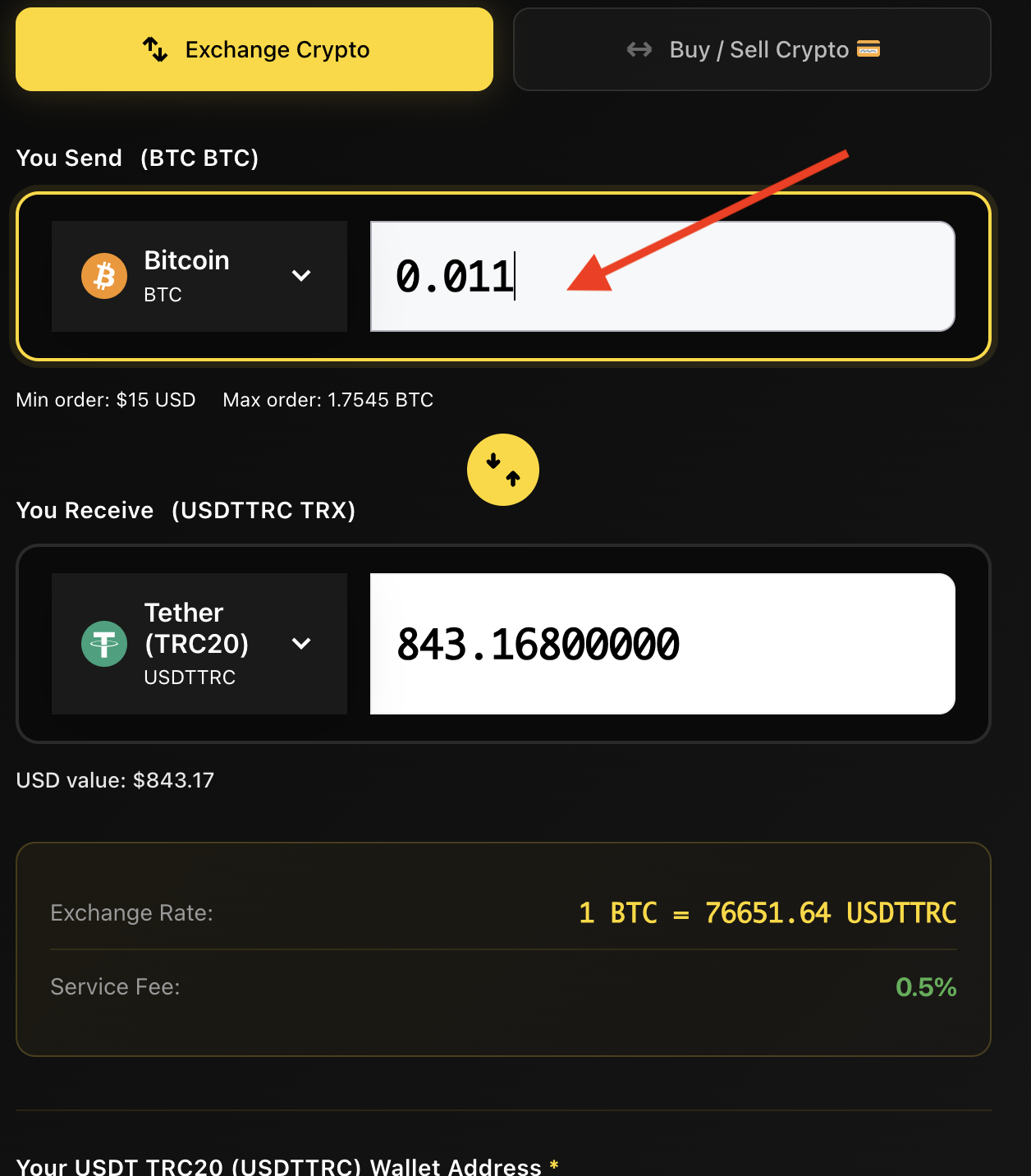
Enter the amount you want to swap
Type the exact amount you’d like to exchange — for example 0.001 BTC. The widget instantly shows you how much you’ll receive in the destination coin at the live exchange rate. You can edit this anytime before creating the order.
Tip: just below the amount field you’ll see Min order and Max order for that specific pair. This is a per-transaction limit only — there’s no cap on how many swaps you can run.
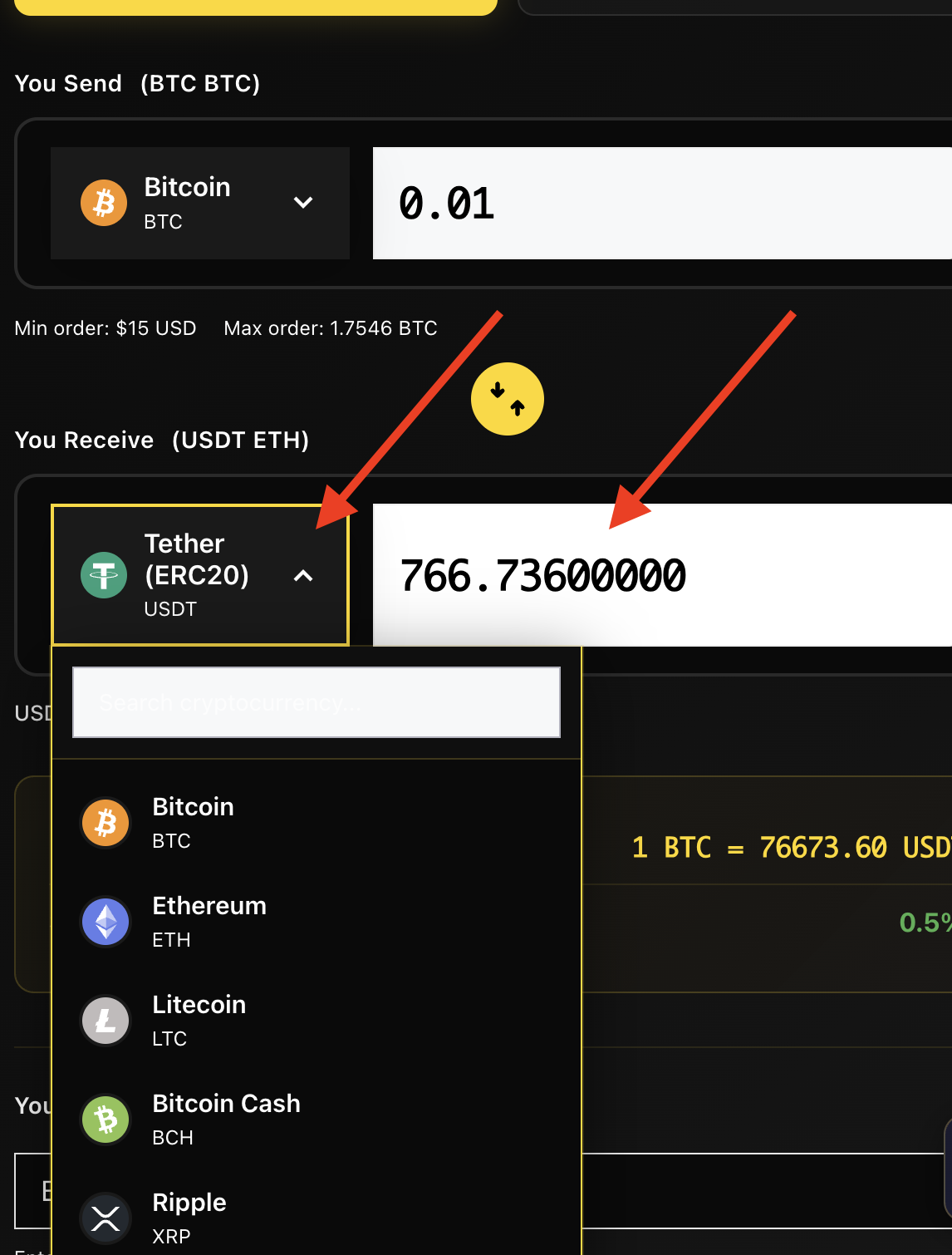
Pick the coin you want to receive
Now do the same for the destination coin — click the right-side picker and select what you want to receive (for example USDT if you’re swapping BTC into a stablecoin). The same network rule applies: for USDT, USDC and other multi-chain coins, always confirm you’ve picked the right network — TRC-20, ERC-20, BEP-20, Polygon, Arbitrum or Solana.
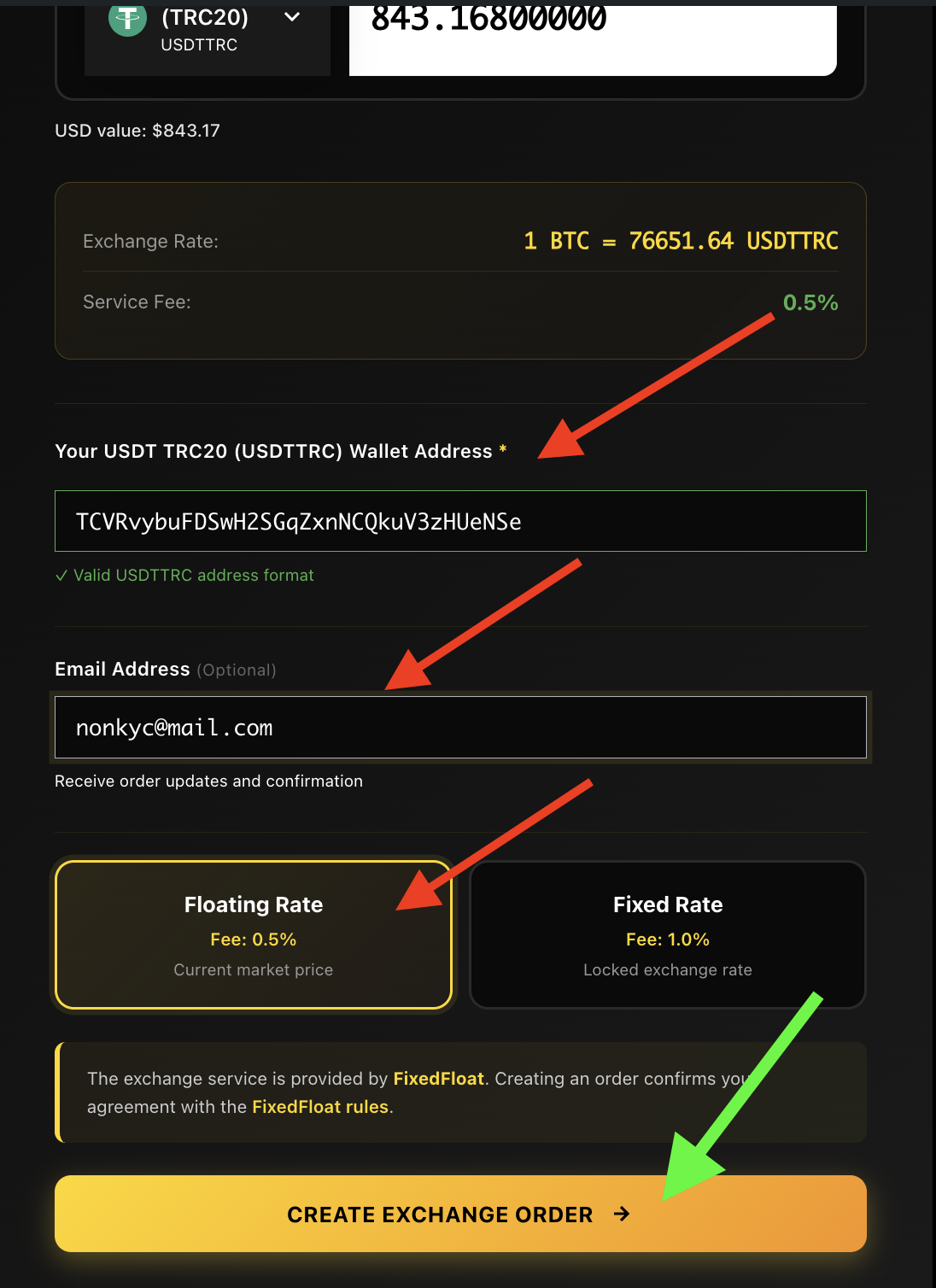
Enter your wallet address and pick the rate type
Paste the wallet address where you’d like the new coin delivered — for example, your USDT address if you’re receiving USDT. Email is optional; if you add it, you’ll get a detailed order receipt and a tracking link. Then choose your rate type:
- Floating rate — fee from 0.5%. The exchange rate follows the live market until your deposit is confirmed, so you may receive slightly more or less.
- Fixed rate — fee 1.0%. The rate is locked the moment you create the order and stays valid for ten minutes — you receive the exact amount shown.
When everything looks right, click the green Create Exchange Order button.
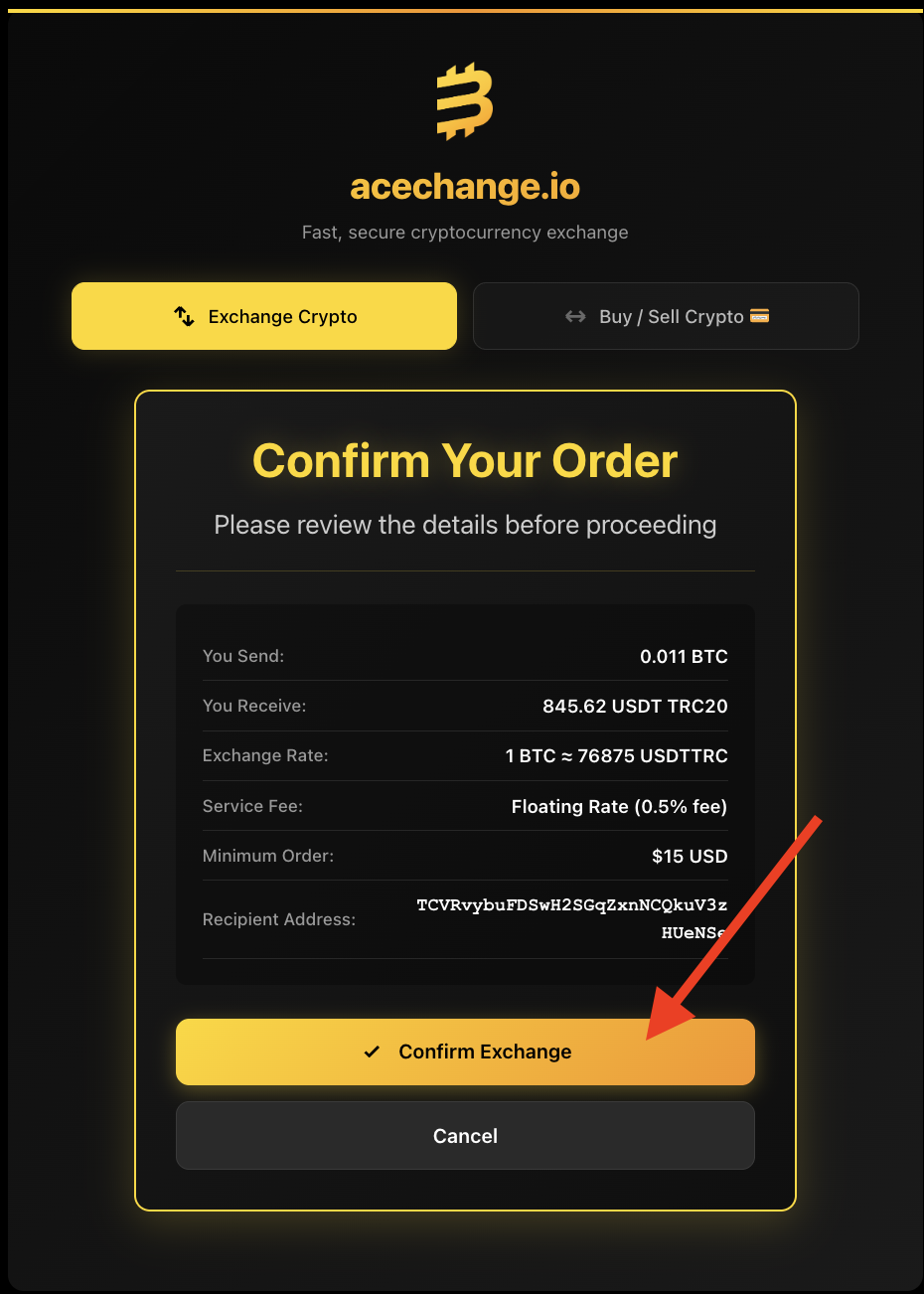
Review the order summary
Before sending any crypto, take a moment to verify everything: amount sent, amount received, exchange rate, service fee and — most importantly — the receiving wallet address. The wallet address cannot be changed after this step, so getting it right matters. Crypto transactions are irreversible.
Send the deposit and track your order
You’ll see your unique Order ID — save it. If you didn’t enter an email, this ID is the only way to retrieve your order if something goes wrong (for example, sending a wrong amount). You can track any order at any time at acechange.io/track-order.
Now send the exact amount shown to the deposit address — either by scanning the QR code with your wallet app or by clicking the copy button next to the address. Sending a different amount may delay the swap. Once the deposit is confirmed on-chain, your new coin lands directly in your wallet — typically in under five minutes.
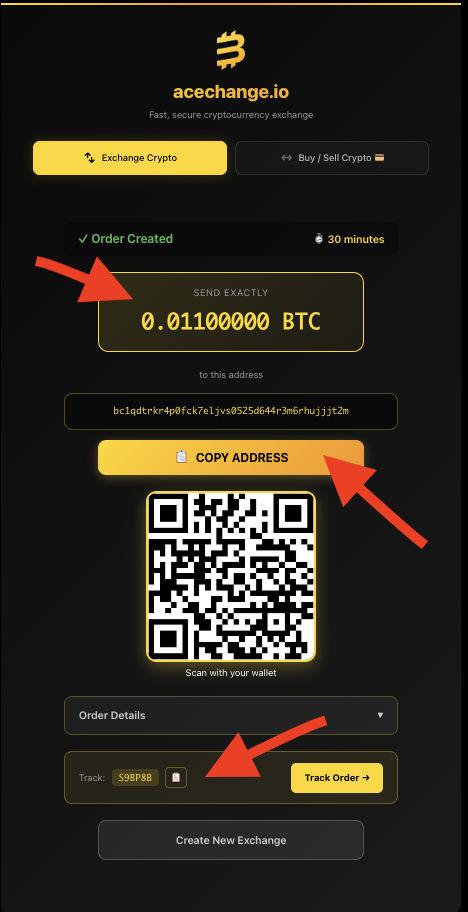
Screenshots above are from the live AceChange platform. Wallet addresses, Order IDs and any sensitive details are partially redacted for privacy.
What is a MEMO or destination TAG — and when do you need one?
Some cryptocurrencies require a second piece of information besides the wallet address.
Quick answerA MEMO or destination tag is a routing code (mandatory for XRP, XLM, TON, ATOM, EOS, HBAR, ALGO, BNB BEP-2) that tells a shared-address exchange which user a deposit belongs to. Skipping it can lock your funds for up to 14 days.
Why some coins need a MEMO or TAG
Many cryptocurrency exchanges and custodial wallets share a single blockchain address across all their users. The MEMO or TAG is the routing code that tells the exchange which user a deposit belongs to — like an apartment number on a shared street address.
If a MEMO or TAG is required and you forget it, your funds do not disappear, but they land in the platform’s pooled wallet. Recovery is possible through emergency support, but it can take up to 14 days. It’s much faster — and safer — to enter the MEMO at send time.
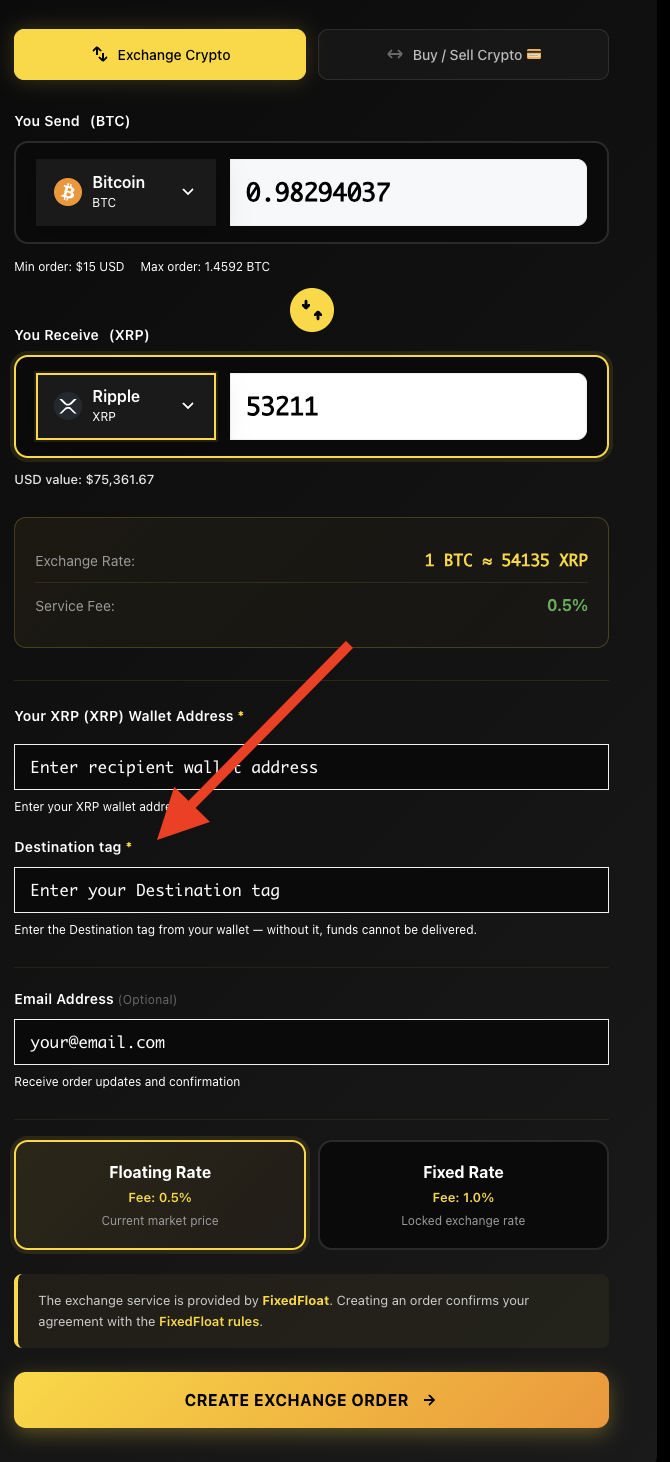
Quick rule: if the AceChange swap form shows a MEMO or TAG field, fill it in. If it doesn’t show one, you don’t need it.
For checks specific to your receiving wallet, read the Monero to USDT network guide, the USDT to XRP destination-tag guide, or the TON to USDT TRC20 wallet guide before funding an order.
No-KYC swap vs. regular crypto exchange
A side-by-side comparison so you understand exactly what you’re getting from a non-custodial crypto swap.
Quick answerA no-KYC swap on AceChange requires no account, ID, email or phone — you keep custody of your coins. A regular CEX requires KYC verification, holds your coins under its keys, and reports trading data under DAC8 and FATF Travel Rule (effective 2026).
| Feature | AceChange (No-KYC swap) | Regular CEX (KYC) |
|---|---|---|
| Account & sign-up | Not required | Mandatory |
| Identity verification | Not required | Passport / ID |
| Email / phone | Optional only | Required |
| Custody of funds | You hold them | Exchange holds them |
| Withdrawal limits | No upper limit | Tier-based caps |
| Service fee | From 0.5% | 0.1–1.5% + spread |
| Privacy of trading data | Maximum | Reported under DAC8 / FATF |
Fees breakdown — what you pay and to whom
Two separate costs apply to every crypto swap.
Quick answerAceChange charges a 0.5% service fee on floating-rate swaps or 1.0% on fixed-rate swaps (built into the displayed exchange rate). Separately, the blockchain network fee is paid to miners or validators when you broadcast the deposit transaction. No other fees apply (verified May 2026).
| Cost type | Paid to | Amount | When |
|---|---|---|---|
| Service fee — Floating rate | AceChange | From 0.5% | Built into the displayed exchange rate |
| Service fee — Fixed rate | AceChange | 1.0% | Built into the displayed exchange rate |
| Network fee (sending) | Blockchain miners / validators | Varies by network | When you send the deposit |
| Network fee (receiving) | Blockchain miners / validators | Built into the swap output | Automatically deducted |
AceChange does not charge any deposit, withdrawal or hidden spread fees beyond the service fee shown above.
Network confirmation times — what to expect
Every blockchain works at its own speed.
Quick answerTypical swap completion times: Bitcoin 10-30 min, Ethereum 3-5 min, Monero ~20 min, Solana under 30 seconds, XRP ~5 seconds, USDT/USDC on Tron under 1 minute (verified May 2026).
| Coin / Network | Confirmations needed | Typical time |
|---|---|---|
| Bitcoin (BTC) | 1–3 | 10–30 minutes |
| Ethereum (ETH, ERC-20) | 12 | 3–5 minutes |
| Monero (XMR) | 10 | ~20 minutes |
| Litecoin (LTC) | 1–12 | 5–10 minutes |
| USDT / USDC (TRC-20) | 19–20 | under 1 minute |
| USDT / USDC (ERC-20) | 12 | 3–5 minutes |
| Solana (SOL, SPL) | ~32 | under 30 seconds |
| XRP | 1 | ~5 seconds |
| Tron (TRX) | 19 | ~1 minute |
| Bitcoin Cash (BCH) | 15 | 1–1.5 hours |
| Dogecoin (DOGE) | 1–10 | ~10 minutes |
Some coins need only one confirmation, others a few — but as soon as AceChange records your deposit, the new coin is dispatched automatically.
Frequently asked questions about how to swap crypto
Everything beginners and intermediate users ask about anonymous, non-custodial crypto swap on AceChange.
What does it mean to swap crypto?
Swapping crypto means exchanging one cryptocurrency directly for another — for example, BTC for XMR or ETH for USDT — without ever converting through fiat currency. A non-custodial swap service like AceChange routes the trade between two wallets without holding your funds, so the coins move from your sending address through the swap engine to your receiving address in a single transaction.
How do I swap crypto for the first time?
Pick the pair you want to exchange (e.g., BTC to USDT), enter the amount, paste your receiving wallet address, choose a fixed or floating rate, and create the order. Then send the exact deposit amount shown to the unique deposit address. Once the deposit is confirmed on-chain, the new coin lands directly in your wallet — typically within five minutes.
What is the difference between swap, exchange, convert and trade?
Swap and exchange usually mean the same thing in the non-custodial context — moving from one coin to another in a single transaction. Convert is the marketing term used by centralized exchanges for the same action inside a custodial account. Trade refers to placing buy and sell orders on an order-book exchange and is typically a longer process tied to an account, KYC and balances held by the venue.
Can I swap crypto without KYC in 2026?
Yes. AceChange is a non-custodial swap service that lets you exchange crypto without creating an account, providing an email or uploading any ID. You only enter your sending and receiving wallet addresses. Identity verification is never required for crypto-to-crypto swaps on the platform.
How long does it take to swap crypto?
Most swaps complete in 5 to 30 minutes. The exact time depends on the network confirmation speed of the coin you send: Bitcoin usually takes 10 to 30 minutes; Ethereum, Monero and most newer chains are typically faster; Solana, Tron and XRP settle in seconds.
How do I swap Bitcoin to Monero (BTC to XMR)?
Open AceChange, pick BTC as the coin you send and XMR as the coin you receive, type your amount, then paste your Monero wallet address. Choose fixed rate to lock the price (recommended for volatile pairs like BTC ↔ XMR), confirm the order summary, and send the exact deposit amount. XMR arrives in your Monero wallet within minutes, anonymously.
What fees do I pay when I swap crypto?
Two costs apply: a service fee paid to AceChange — from 0.5% on floating-rate swaps and 1.0% on fixed-rate swaps, already included in the displayed exchange rate — and a blockchain network fee paid to miners or validators when you broadcast the deposit. There are no deposit fees, withdrawal fees or hidden spreads.
What is a fixed-rate vs floating-rate swap?
Floating rate (fee from 0.5%) follows the live market price between deposit and execution; the receive amount can shift slightly. Fixed rate (fee 1.0%) locks the exchange rate at order creation for ten minutes — the exact amount you see is the exact amount you receive. For volatile pairs or large amounts, fixed rate eliminates slippage.
Is swapping crypto legal?
Using a non-custodial crypto swap is legal in most jurisdictions because you remain in full custody of your funds at all times. Tax obligations still apply — crypto-to-crypto swaps are taxable events in most countries, and you are responsible for reporting capital gains, especially with EU DAC8 in force from 1 January 2026.
What is a MEMO or destination tag and when do I need one?
Some networks share a single blockchain address across many users — XRP, XLM, TON, EOS, ATOM, HBAR, ALGO, BNB BEP-2 and a few others. The MEMO or destination tag is the routing code that tells the receiving exchange which user a deposit belongs to. If the swap form shows a MEMO field, it is mandatory; without it, recovery can take up to 14 days.
How do I verify my swap on the blockchain?
You can check any swap on the blockchain itself — open Mempool.space for Bitcoin, Etherscan for Ethereum and ERC-20 tokens, Tronscan for TRC-20 USDT and USDC, or Solscan for Solana. Paste your sending address, look at the OUT transactions and find the transaction hash (TXID). Once it has at least one confirmed block, AceChange records the deposit and dispatches the new coin automatically.
Can I swap large amounts of crypto without KYC?
Yes. There are no upper limits on swap amounts. The minimum order is the equivalent of $15 USD. Some flagged transactions may require additional verification, but the vast majority of swaps complete without any verification at all.
Informational content. Not financial advice. Tax and reporting obligations remain with the user.
Ready to swap crypto privately?
You’ve read the guide. Now do it — no account, no KYC, just paste a wallet address and exchange.
Start swap on AceChange
