
How to Anonymize Crypto Transactions in 2026: A Step-by-Step Guide
Learn how to professionally anonymize your crypto transactions and protect your identity and assets — with verified 2026 techniques and advanced timing OpSec.
 By Marcus Richardson, Founder & Privacy Research Lead at AceChange
|
Published
|
Updated
|
11 min read
By Marcus Richardson, Founder & Privacy Research Lead at AceChange
|
Published
|
Updated
|
11 min read
📖 Quick answer
To anonymize crypto transactions in 2026, swap your cryptocurrency into Monero (XMR) on a non-custodial no-KYC service, then swap Monero back to any coin on a fresh new wallet. The Monero step breaks the on-chain trail because Monero’s protocol hides the sender (ring signatures, ring size 16), receiver (stealth addresses) and amount (RingCT) by default. The method works for Bitcoin, Ethereum, Solana, USDT and any of 70+ other cryptocurrencies. Two swaps at roughly 0.5% each — approximately 1% total in fees — take about 30 minutes. It requires no account, no identity documents, and no software beyond a wallet app like Cake Wallet on your phone. For larger amounts, split the swap into non-round tranches with randomized delays.
Two swaps through Monero. That’s it.
No software to install. 30 minutes on your phone.
📋 Concrete example — say you have 0.1 BTC
You create 2 new empty wallets
In Cake Wallet on your phone: one new Monero wallet, one new Bitcoin wallet. Nobody knows these exist. They have no history and no connection to you.
You swap: old BTC → Monero
On AceChange.io you send your 0.1 BTC and receive Monero on your new Monero wallet. On the public Bitcoin blockchain this looks like you sold your coins. The Monero that lands in your wallet cannot be linked to that BTC — Monero’s blockchain hides sender, receiver and amount.
You swap: Monero → new BTC (to the new wallet)
On AceChange.io you send the Monero and receive fresh BTC — this time to your new Bitcoin wallet. These BTC have zero blockchain connection to the 0.1 BTC you started with. Done.
💡 Works with any cryptocurrency — not just Bitcoin
The same two-swap process anonymizes ETH, USDT, SOL, BNB, LTC, XRP, TRX and 70+ others. Swap into Monero, swap back out to whatever coin you want on a fresh wallet. The Monero step always breaks the trail — regardless of which coin you started with or ended with.
Why this works: Bitcoin, Ethereum and most other coins are public — anyone can follow them. Monero is private — nobody can follow it. You enter Monero from your old wallet, you exit Monero to a new wallet, and the Monero step in the middle cuts the trail.
Exactly what to tap, in what order, on iPhone.
How to Anonymize Your Crypto — Step by Step
Create New Wallets
Download Cake Wallet — a non-custodial wallet that supports Monero, Bitcoin, Ethereum, Litecoin, Solana and more in one app. As of 2026 it’s the community’s chosen successor to MyMonero (sunset January 2026) and Exodus (dropped XMR in August 2025). Create:
→ A new Monero wallet (this is your privacy bridge — it uses a 16-word Polyseed by default)
→ A new wallet for your target coin (BTC, ETH, SOL, etc.) — this is your clean destination
These wallets have no link to your identity. Write the seed phrases on paper and store offline. Never photograph them, never cloud-sync them.
📱 Need help creating a wallet?
If you’ve never used a non-custodial wallet before, we’ve included a complete 13-step Cake Wallet walkthrough at the bottom of this article — annotated iPhone screenshots from App Store download, through PIN setup and seed backup, to a Monero address ready to receive funds. Skip it if you already have a wallet.
📖 Open Full Wallet Setup WalkthroughSwap Your Crypto → Monero (XMR)
Open AceChange.io. Select your current crypto as “You Send” (BTC, ETH, USDT, SOL, etc.) and XMR as “You Receive.” Paste your new Monero wallet address from Step 1. Send your crypto and receive XMR in 5–30 minutes.
What happens on the blockchain: On the Bitcoin / Ethereum side, it looks like you sent your coins to a swap service — same pattern as selling. Once they enter Monero, the transparent trail ends. Ring signatures (ring size 16 since Fluorine Fermi, August 2022), stealth addresses, RingCT amount hiding, and Dandelion++ network-layer obfuscation combine to make destination-tracing infeasible without breaking the cryptography.
No account, no KYC, no limits on AceChange.io crypto-to-crypto swaps.
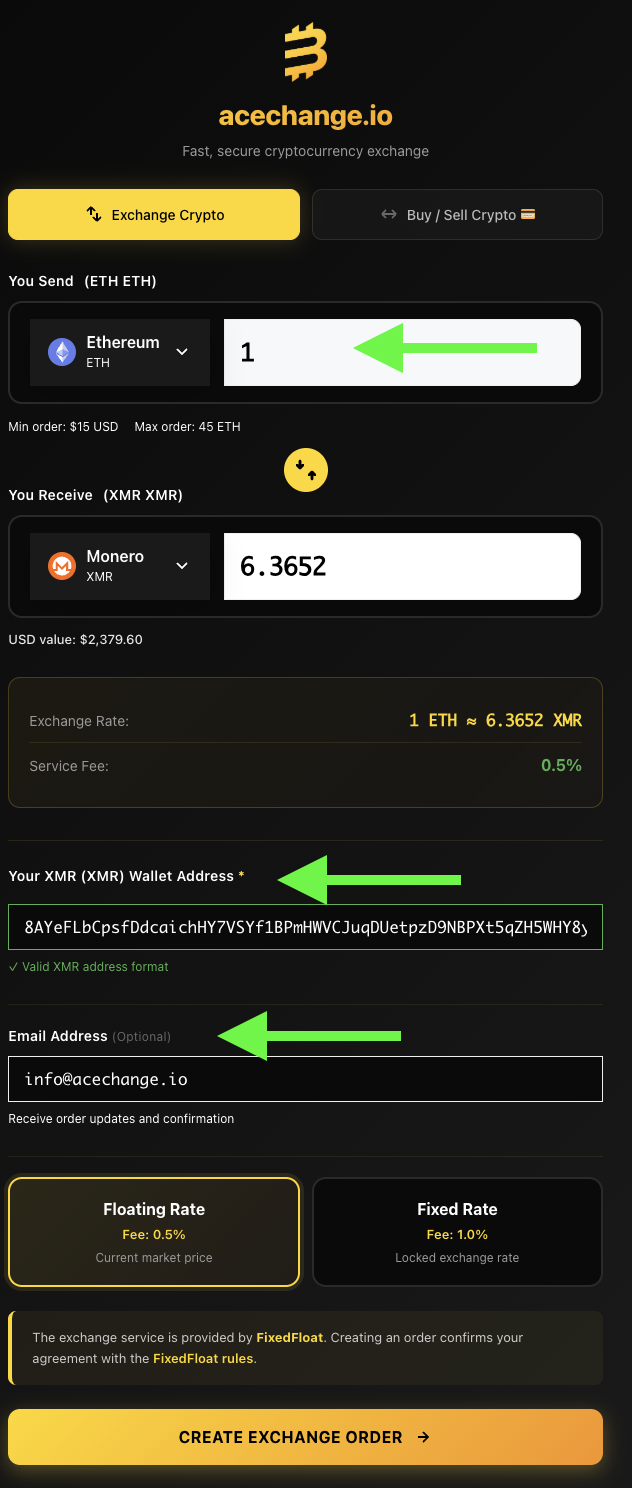
📝 How to fill out the form
1. Pick the crypto you want to swap
Under “You Send”, tap the coin icon — a menu opens with all supported cryptocurrencies. Search for the one you want to remove the KYC link from (70+ coins supported). In our example we picked Ethereum (ETH), but it could be BTC, USDT, SOL, LTC — anything you hold.
2. Enter the amount
Type in how much of that crypto you’re sending (green arrow in the screenshot). The minimum order is $15 USD equivalent.
3. Choose Monero (XMR) as what you want to receive
Tap the icon under “You Receive” and pick Monero (XMR). This is the whole point — we’re swapping into Monero to strip the KYC trail from our coins and make the on-chain history untraceable.
4. The rate is calculated automatically
You’ll see exactly how much Monero you’ll receive for your crypto — in our screenshot, 1 ETH = 6.3652 XMR (≈ $2,379.60). The rate updates live until you confirm the order.
5. Paste your Monero address
Into “Your XMR Wallet Address” (second green arrow), paste your Monero receiving address. If you’re using Cake Wallet, get it by tapping Receive and Copy (see Step 11 of the wallet setup walkthrough below). AceChange validates the address format automatically — you’ll see a green “Valid XMR address format” confirmation.
6. Email is optional
Third green arrow — this field is not required. Add an email only if you want order updates and a confirmation receipt sent to you. The same order ID and tracking info shows up on the next screen anyway, so you can just write it down there.
7. Pick Floating Rate (recommended)
Floating Rate follows the market price and charges 0.5% fee. Fixed Rate locks in the current rate but costs 1% fee. For quick swaps, Floating is fine.
8. Tap Create Exchange Order
This takes you to the deposit screen — where AceChange shows you the address to send your ETH (or whatever coin you chose) to.
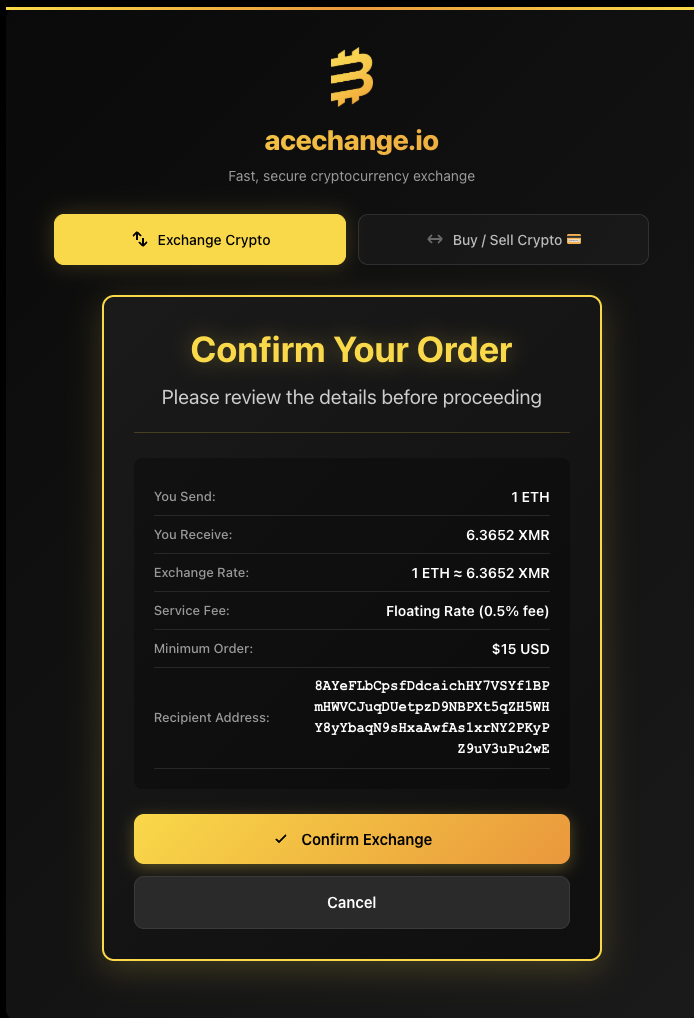
Confirm Your Order — a review screen appears so you can check every detail before the swap starts.
🛡️ Always verify the recipient address — every single time
Clipboard-hijacker malware is a real threat. Malicious software silently replaces any cryptocurrency address you copy with the attacker’s address. You paste what you think is your Monero address — but it’s the attacker’s. You only notice when your XMR lands in someone else’s wallet.
What to check on this screen:
- First 6 and last 6 characters of the recipient address must match exactly what’s in Cake Wallet (or your hardware wallet)
- Amount (You Send) is what you intended to swap
- Exchange rate looks reasonable (compare with a price aggregator if unsure)
- Service fee is 0.5% (Floating) or 1% (Fixed) — not higher
If anything looks off, tap Cancel. You’re not charged anything until you confirm and send the crypto.
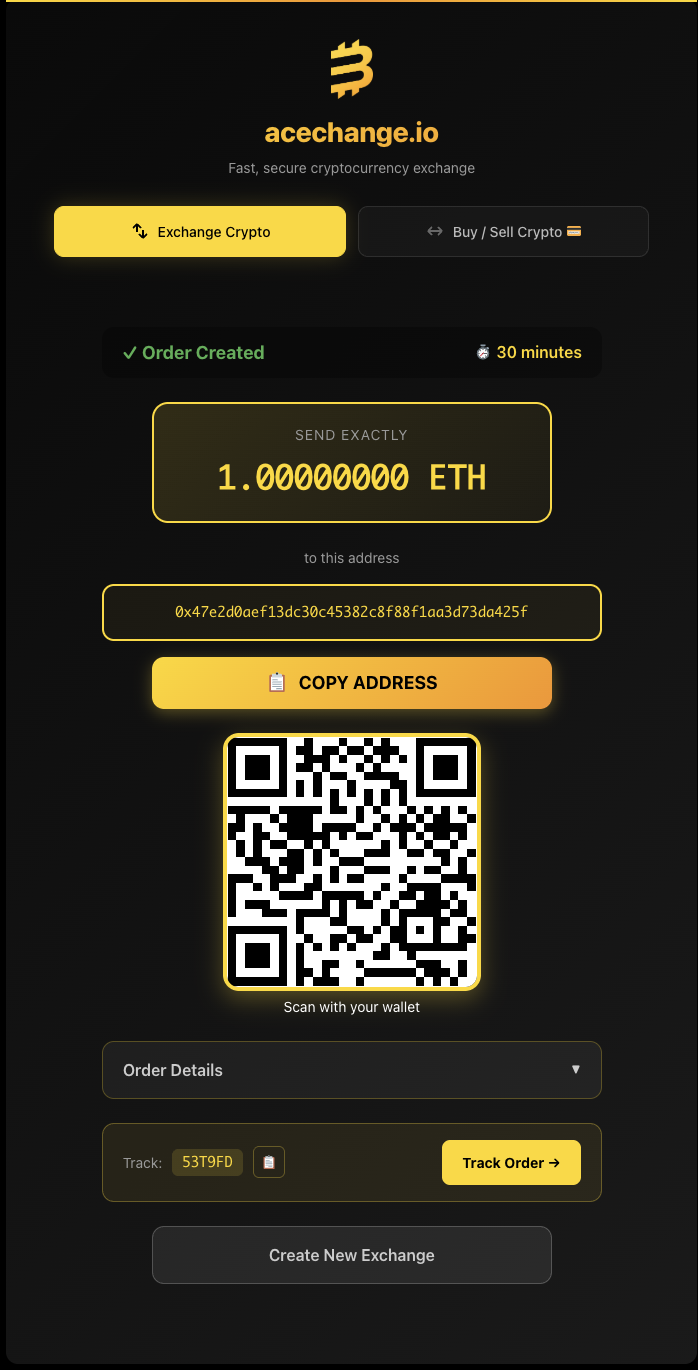
Your order is created. AceChange generates a unique deposit address and QR code. Send the exact amount shown to this address.
📦 What’s on this screen
✅ Order Created — 30 minute timer
You have 30 minutes to send your crypto. If the timer runs out, the order auto-cancels — nothing is lost, you just start over. No cost, no consequence.
💸 Send the exact amount
Send exactly the amount shown — in this example 1.00000000 ETH. Sending less or more can delay the order or require manual handling. If your wallet auto-deducts the network fee from the amount, make sure the final sent amount matches.
🎯 Unique one-time deposit address
The address shown (0x47e2...da425f) is generated just for this one order. Don’t reuse it, don’t save it, don’t bookmark it — every new swap gets a new address. Use Copy Address or scan the QR code with your sending wallet.
🔍 Track your order — no login needed
Write down the Track ID (here: 53T9FD). You can check your order status anytime at acechange.io/track-order — just paste the ID, no account required. You can also tap Track Order directly from this screen.
⚡ What happens after you send
Stage 1
⏳ Awaiting Deposit
AceChange watches the deposit address for your incoming transaction.
Stage 2
🔄 Exchanging
Once your crypto is confirmed on-chain, the swap to Monero begins automatically.
Stage 3
✅ Complete
XMR is sent to your Monero wallet. The whole flow usually takes 5–30 minutes.
On the blockchain, nobody can correlate your incoming XMR to the crypto you originally sent. The trail ends at AceChange.
Swap Monero → Your Clean Crypto (or Keep It in XMR)
Once your Monero lands in Cake Wallet, you have two paths. Pick whichever fits your situation.
Option A
🔒 Keep it in Monero
If privacy is all you want, you’re done. XMR is your private store of value — ring signatures, stealth addresses and RingCT keep it unlinkable for as long as you hold it.
Option B
🔁 Swap to your preferred crypto
If you want holdings you can actually spend or trade elsewhere, swap the XMR out to a fresh, clean wallet of whatever coin you prefer.
🎯 Which coin should you swap into?
If volatility is fine
→ Bitcoin (BTC)
Most liquid, most widely accepted, strongest long-term track record.
If you want price stability
→ USDT or USDC
Stablecoins pegged 1:1 to the US dollar — same value whether you hold them a day or a year.
🔄 How the second swap works
The process is identical to Step 2 — same form, same 8 fields, same confirmation screen. The only differences:
- You Send is now XMR (Monero), not ETH
- You Receive is whichever coin you chose above (BTC, USDT, USDC…)
- Recipient Address is the address of your clean destination wallet — a brand-new wallet with zero prior activity (see wallet setup guide if you haven’t created one yet)
Receiving USDT after an XMR swap? First check which USDT network your receiving wallet or exchange accepts. The ticker alone is not enough. Our XMR to USDT wallet and network guide walks through that check before you open an order.
Send the XMR from Cake Wallet, wait a few minutes, and the clean coin lands in your fresh wallet.
✅ Result
You now hold fresh crypto in a wallet with zero on-chain connection to your original coins or your identity. The Monero step severed the transparent trail — the new coins are clean, anonymous, and ready to use.
(linked to KYC) → AceChange.io
BTC → XMR → Monero Wallet
🔒 Trail ends here → AceChange.io
XMR → BTC → New Clean Wallet
✅ No link to you
No account • No KYC • From 0.5% fees • 70+ coins
Complete Cake Wallet Setup — Step-by-Step Walkthrough
If you don’t yet have a non-custodial wallet, this section walks through the entire Cake Wallet setup on iPhone with 13 annotated screenshots — from installing the app, through PIN and seed backup, to having a Monero address ready to receive funds. Safe to skip if you already have a Monero wallet and a clean destination wallet ready.
Screenshots taken on iPhone 16 Pro running iOS 18 and Cake Wallet 4.x. The flow is nearly identical on Android and on earlier iOS versions.
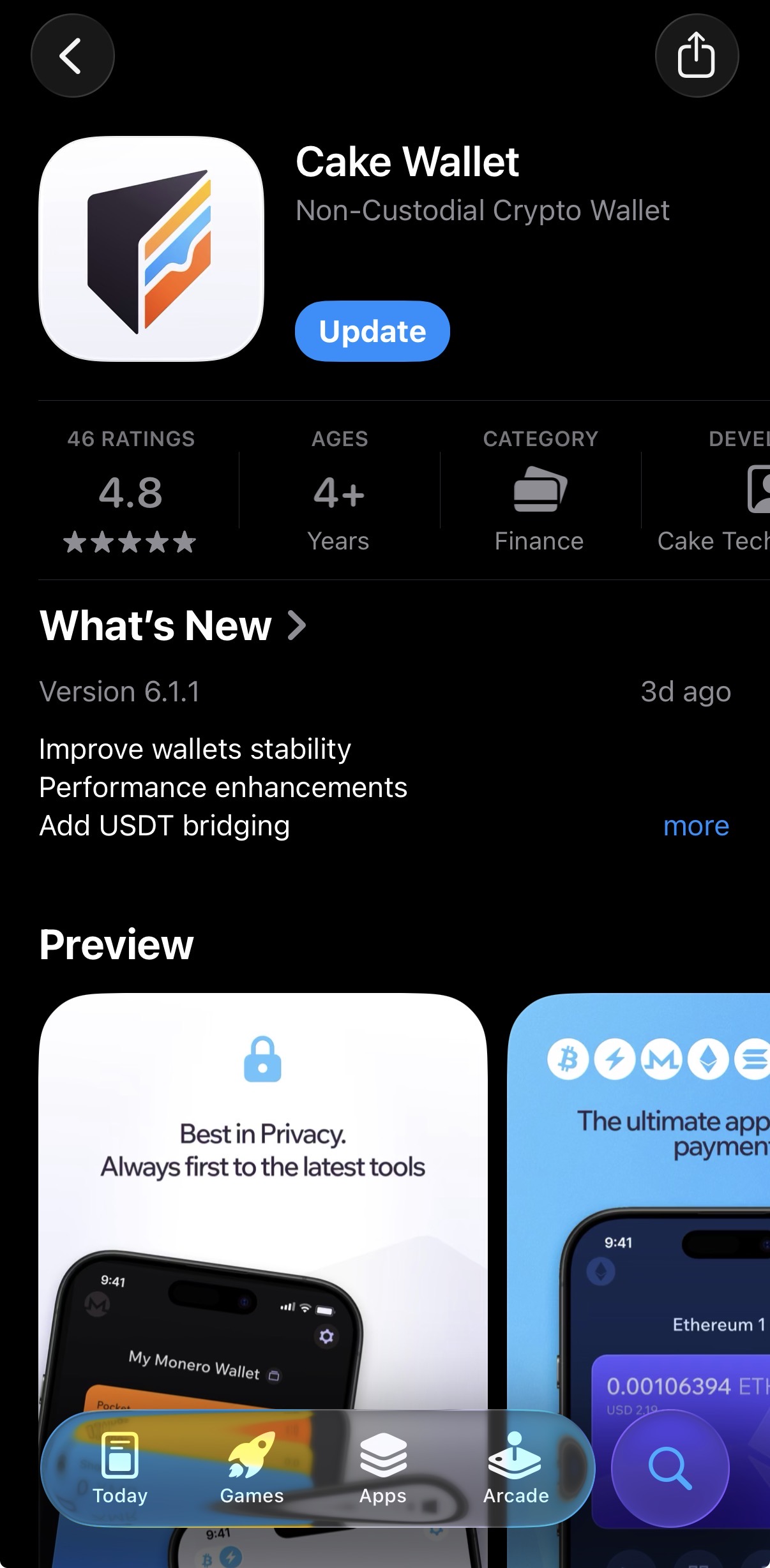
1. Install Cake Wallet from the App Store.
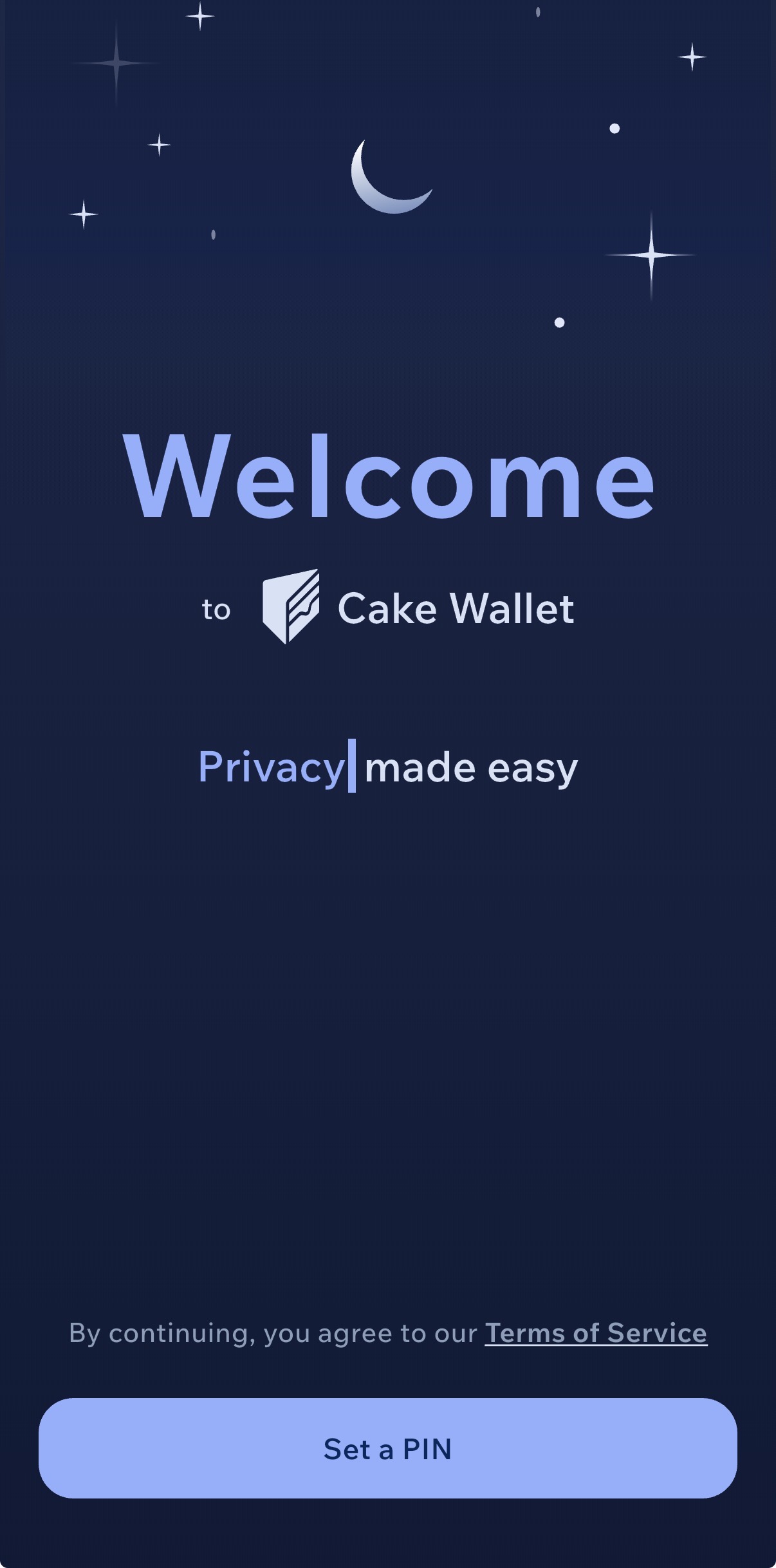
2. Welcome screen — tap Set a PIN to secure the app.
⚠️ Critical security tip
Use a completely different PIN than your phone unlock code. If someone gains physical access to your iPhone — through theft, a wrench attack, or coercion — knowing the phone PIN would otherwise immediately unlock your crypto too. A separate Cake Wallet PIN is your last line of defense.
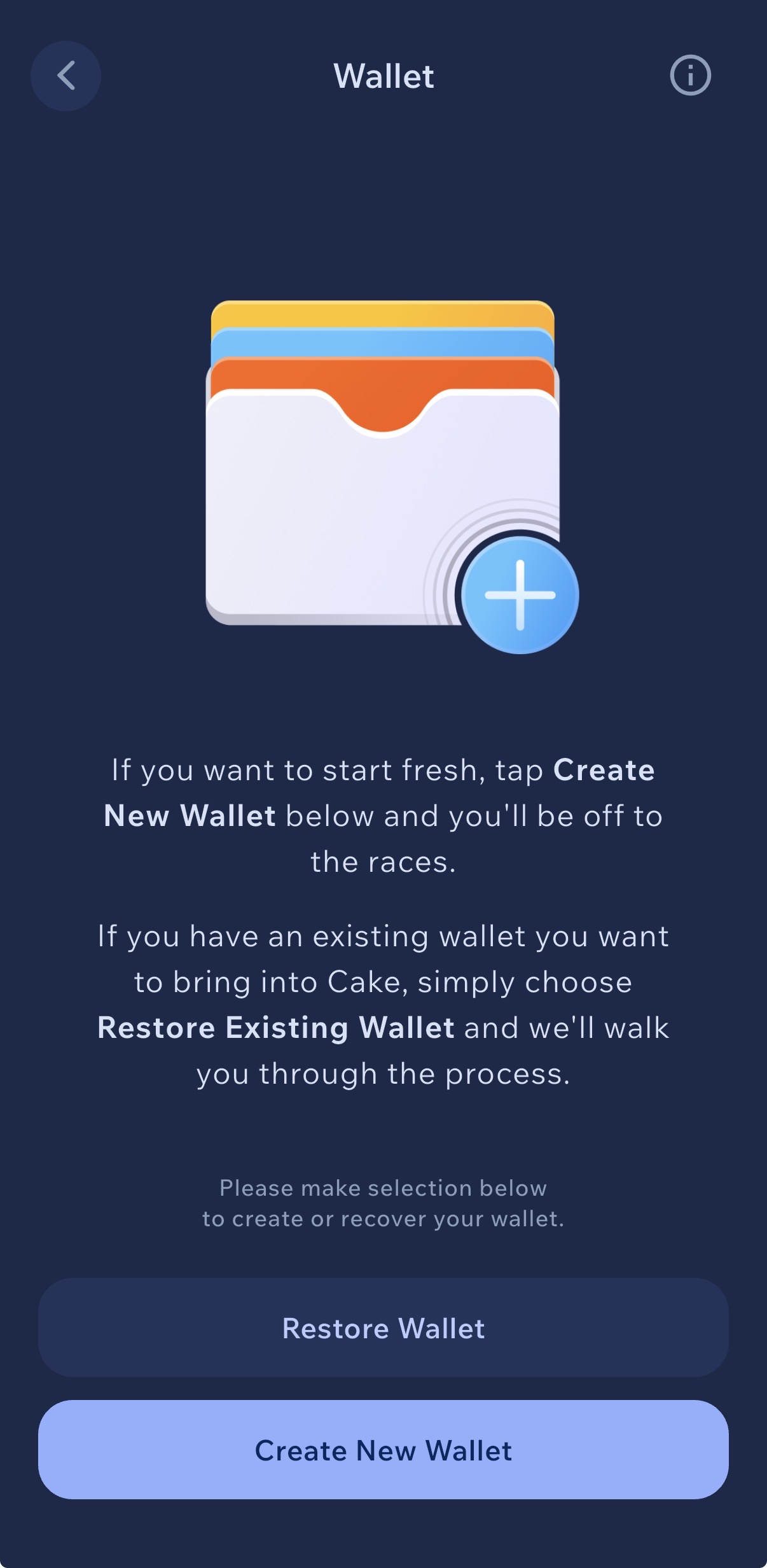
3. Tap Create New Wallet to start fresh.
💡 Why fresh wallet only
Never restore an existing wallet for this method. The whole point is to receive your Monero to an address that has no history and no link to you. Restoring a wallet you’ve used before would import all its past transactions — defeating the anonymization.
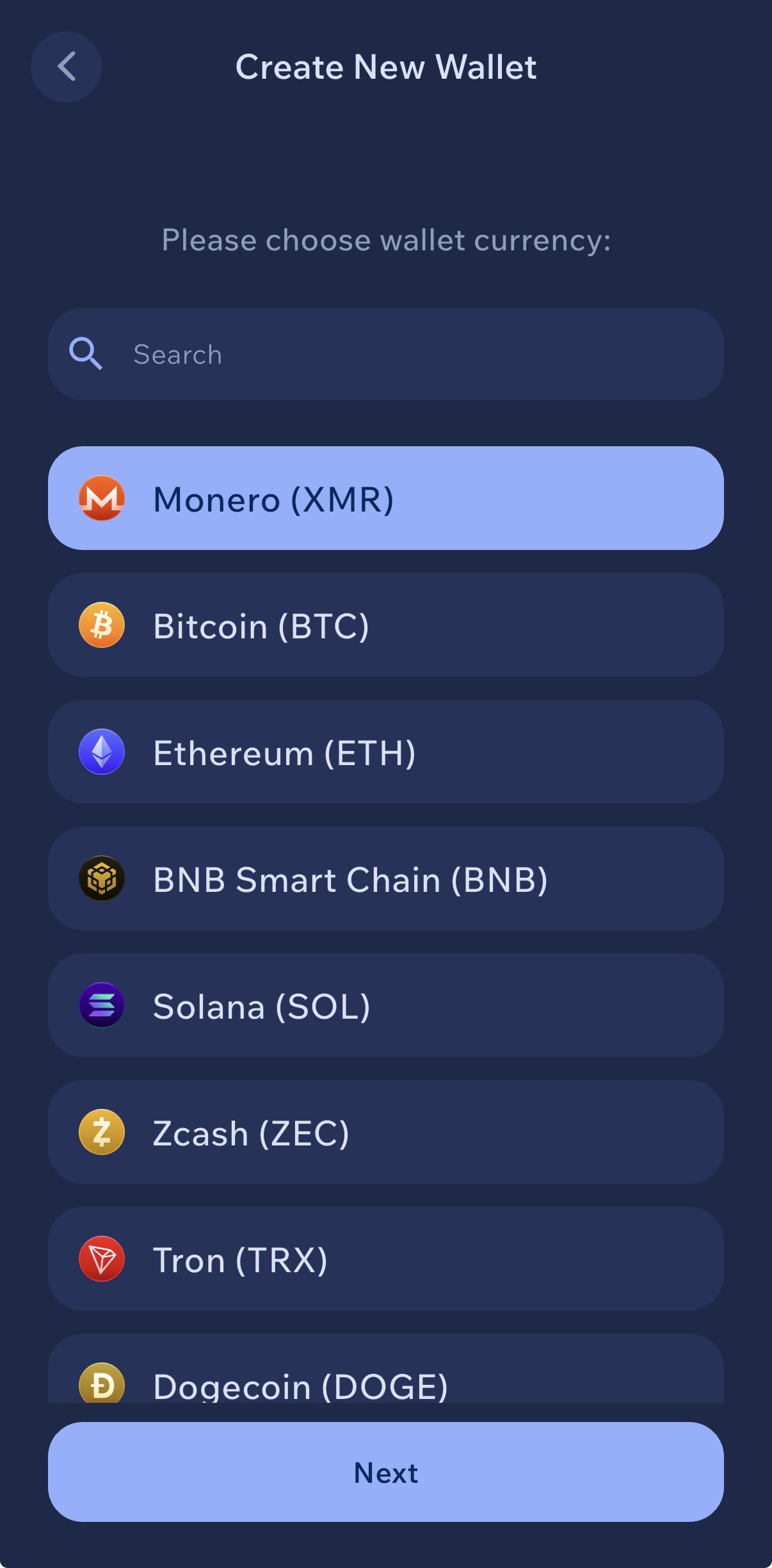
4. Select Monero (XMR) at the top, then tap Next.
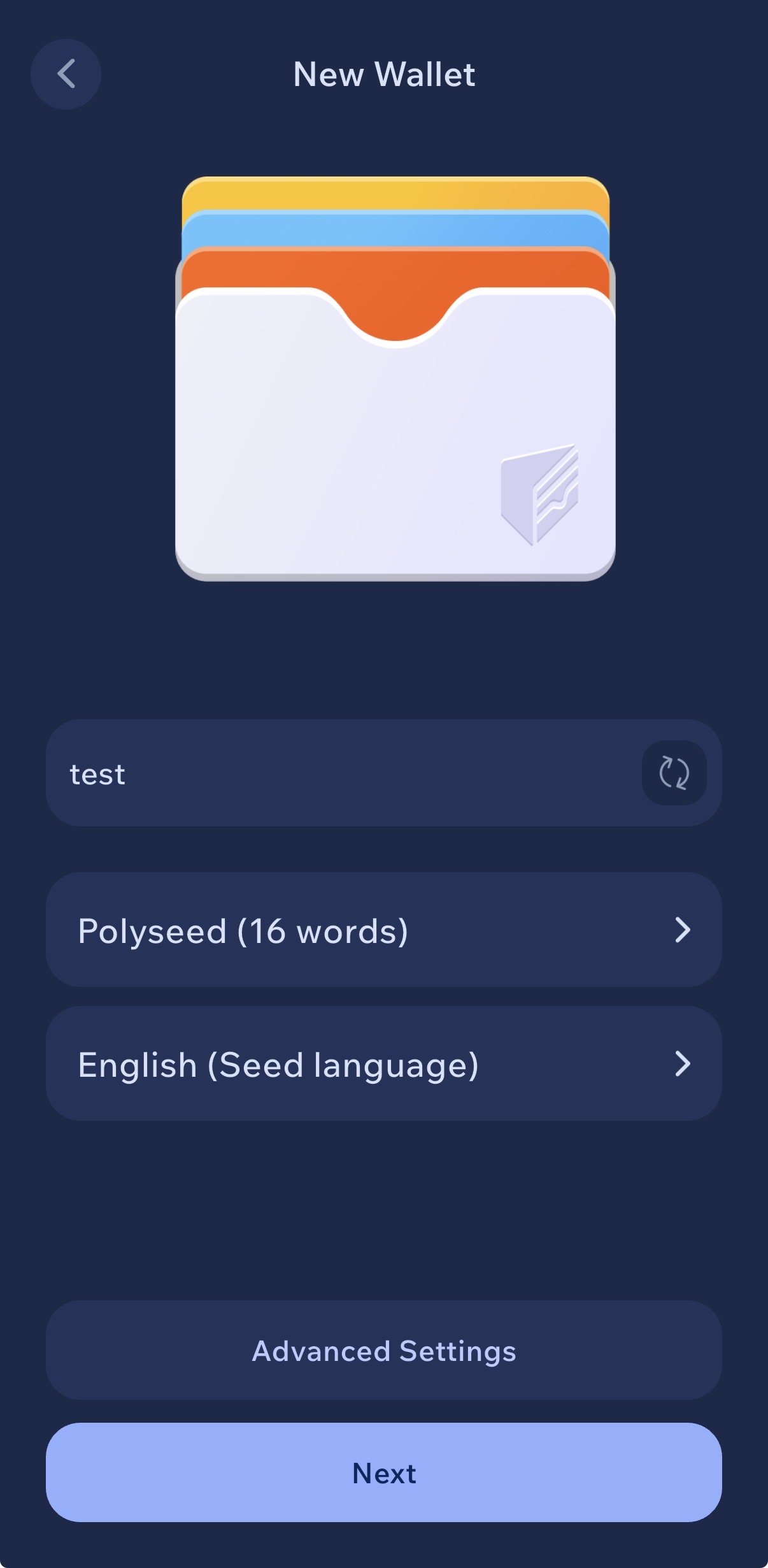
5. Name your wallet (we used “test”), keep Polyseed (16 words), tap Next.
💡 About seed formats & wallet name
Monero supports multiple seed formats: the original 25-word legacy seed and the newer 16-word Polyseed. Tapping the Polyseed option lets you switch to 25-word legacy, but Polyseed 16 is the modern recommended standard — shorter, with built-in error correction and encoded wallet creation date.
Wallet name is stored only on your device — use anything. In this guide we called it “test”, but in practice pick something neutral that doesn’t reveal what’s inside (avoid names like “savings” or “big stack”).
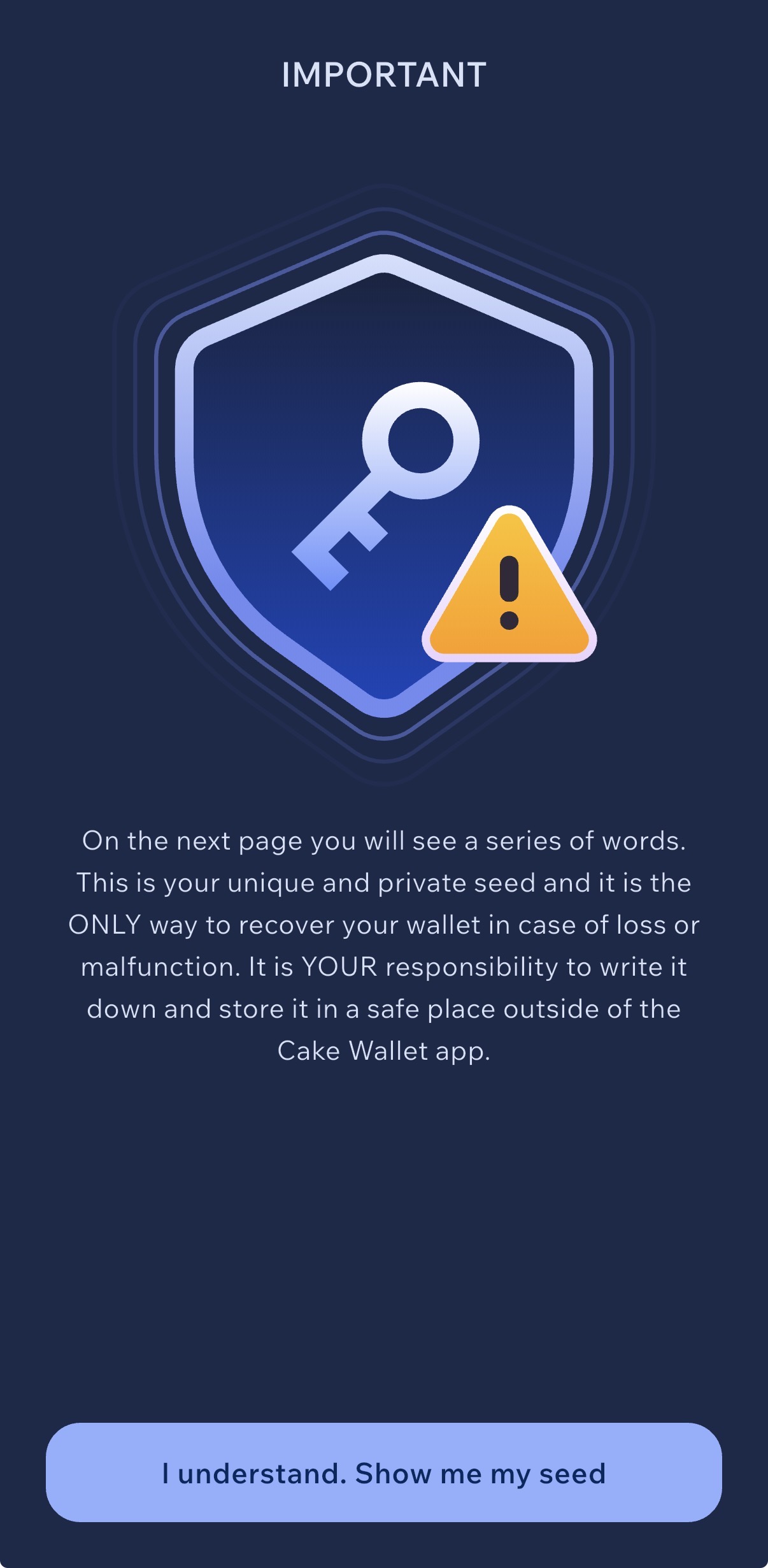
6. Read the warning, then tap “I understand. Show me my seed”.
🚨 How to store your seed — the right way
Write it on paper. Two copies. Two physical locations. That’s it.
NEVER: photograph, screenshot, type it into your phone, save it in iCloud / Google Drive / Dropbox / Notes / Email drafts / password managers. If the seed ever touches a device connected to the internet, assume it’s compromised.
For serious amounts: use a fireproof metal seed plate (e.g. Cryptosteel, Billfodl) and split storage across geographically separate locations.
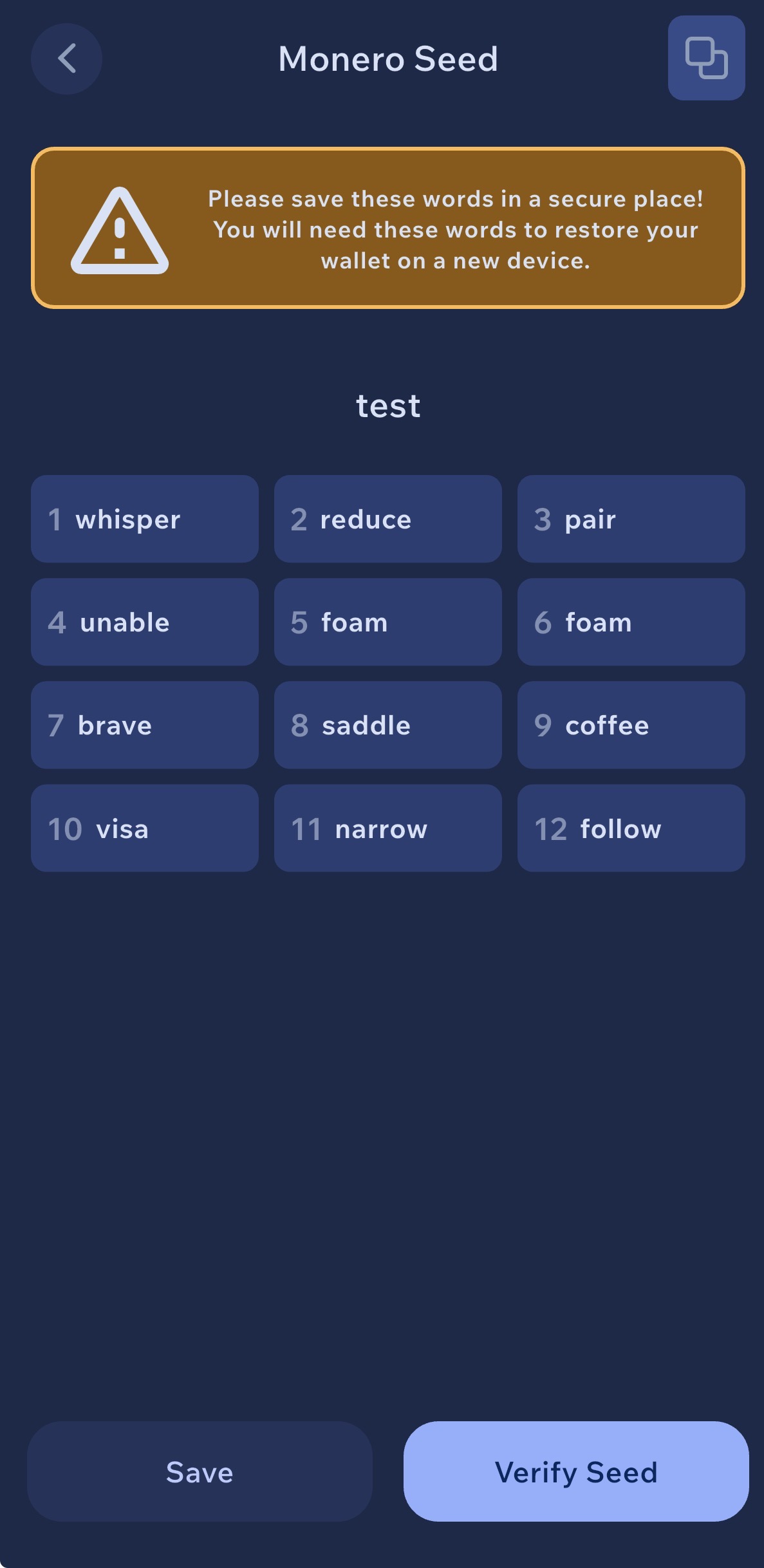
7. Your Monero seed phrase — write every word in the exact numbered order shown.
🚨 This is the single most important step — read carefully
Order matters — you cannot skip, swap, or rearrange a single word. The seed is not just a list of random words; each position (1, 2, 3…) is part of the mathematical derivation of your wallet. If you write word #5 in position #6, you will recover a completely different wallet and lose access to your funds forever.
Paper is okay for small amounts — but not ideal. Paper burns, gets wet, and degrades. For anything worth protecting, engrave the seed on a fireproof, waterproof metal plate that survives the worst case. We recommend the SafePal Cypher stainless-steel seed plate — rated to withstand fire, water, corrosion and physical damage, and small enough to fit in a safe or hidden compartment.
Fireproof · Waterproof · Indestructible cold storage
Never online. Never digital. Don’t photograph the seed. Don’t type it into your phone. Don’t save it in iCloud, Google Drive, Dropbox, Notes, email drafts, or a password manager. If the seed ever touches an internet-connected device, assume someone already has it.
Best practice: two copies, two physically separate locations (e.g. one at home in a safe, one at a trusted family member’s house or a bank deposit box). Don’t tell anyone where they are.
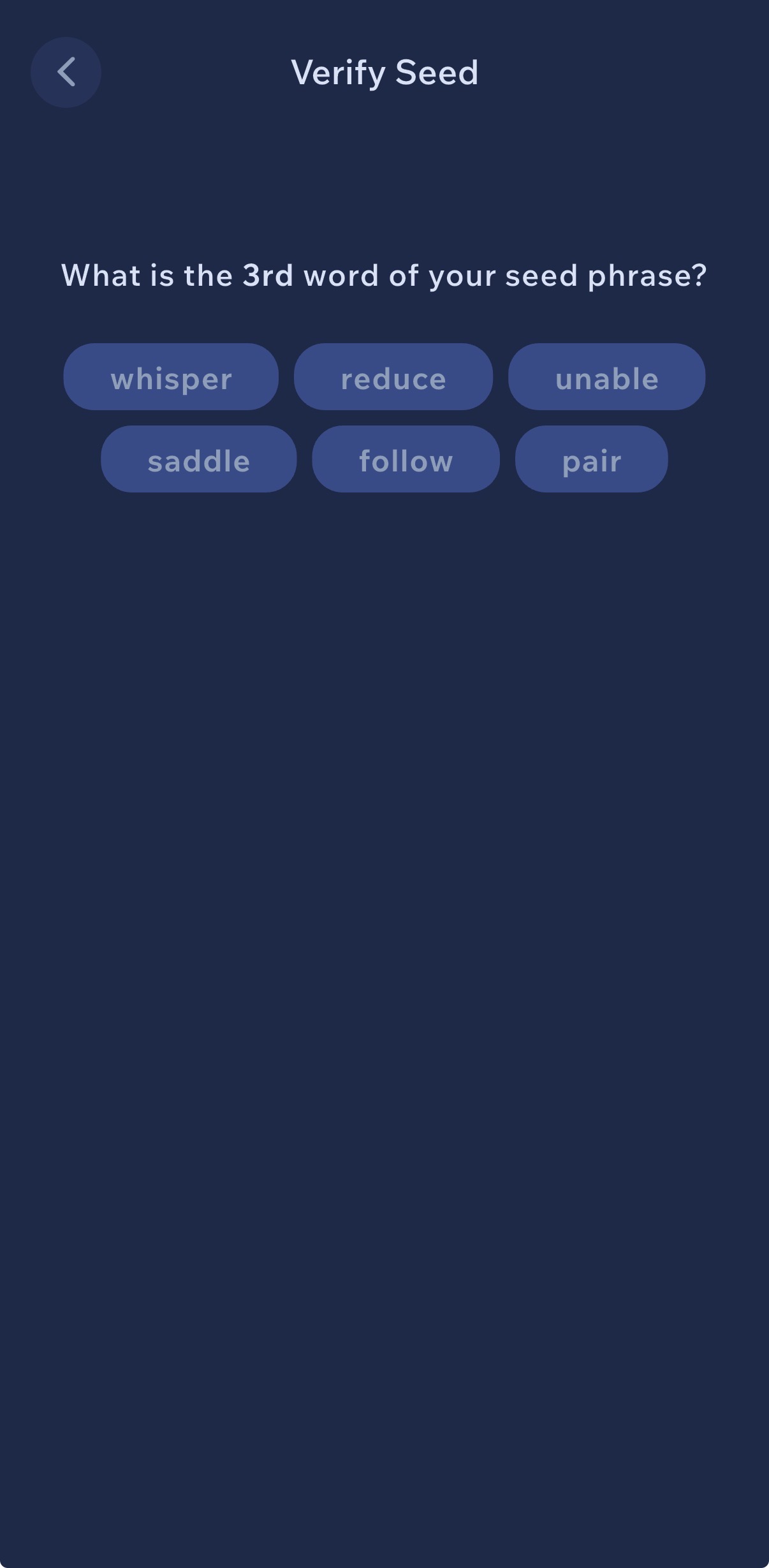
8. Verify your seed phrase. Cake Wallet will ask you to confirm specific word positions from your Polyseed.
💡 Why the app asks more than once
Cake Wallet will typically ask you to confirm several different word positions, one after another — for example “what is word #3?”, then “what is word #11?”, then another position. This isn’t a glitch or error; the app is intentionally cross-checking your written backup at random points to confirm your entire 16-word seed is complete and correct, not just the first few words.
Answer each one patiently. If you can’t, stop — your backup is incomplete. Go back to the seed screen, rewrite carefully, and try again.
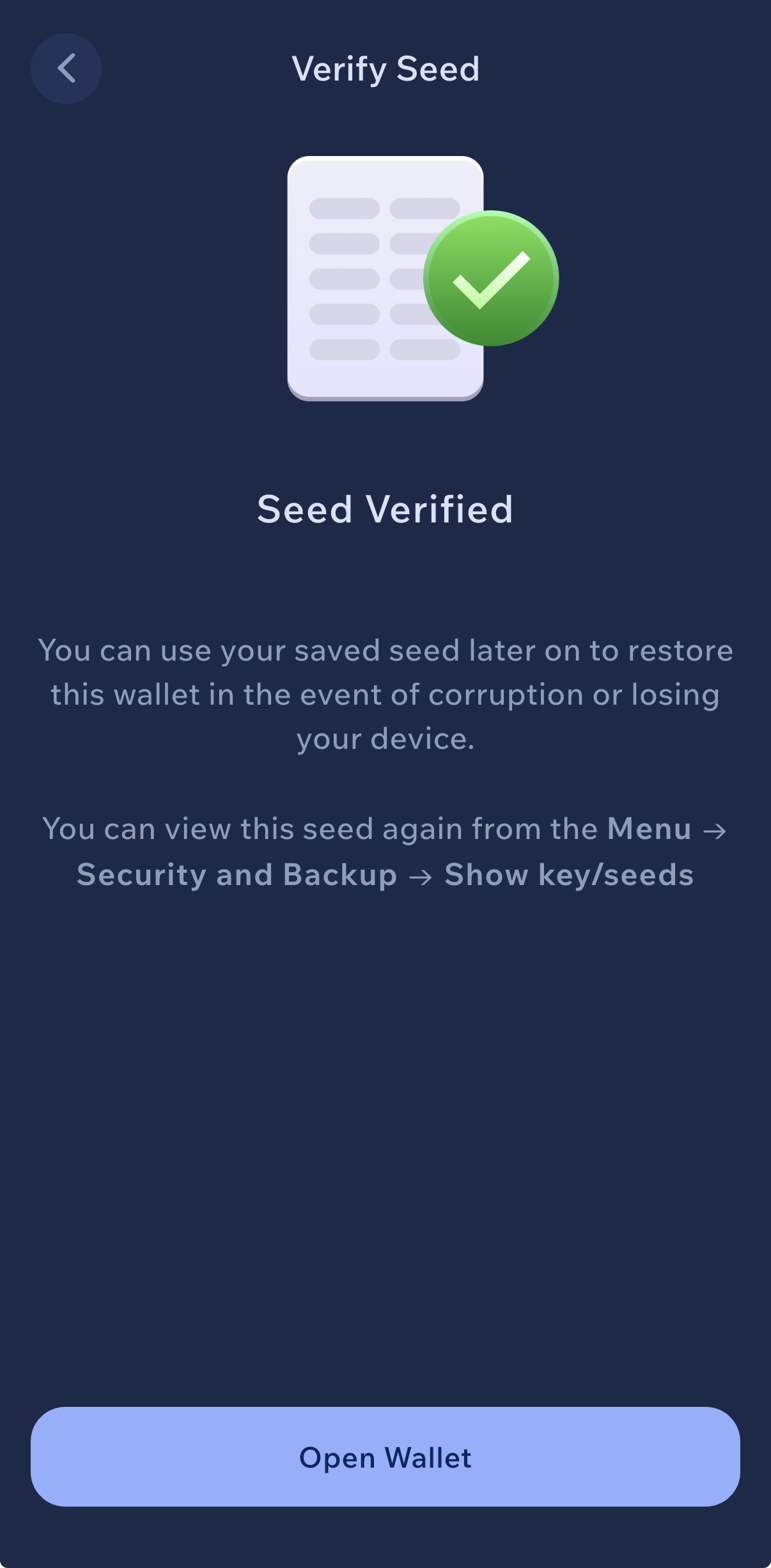
9. Seed Verified. Tap Open Wallet — your new Monero wallet is ready.
✅ Good to know
You can view the seed again anytime from Menu → Security and Backup → Show key/seeds. Useful if you want to re-check your written copy — but only do it in a private setting with no cameras, screen recorders, or other people around.
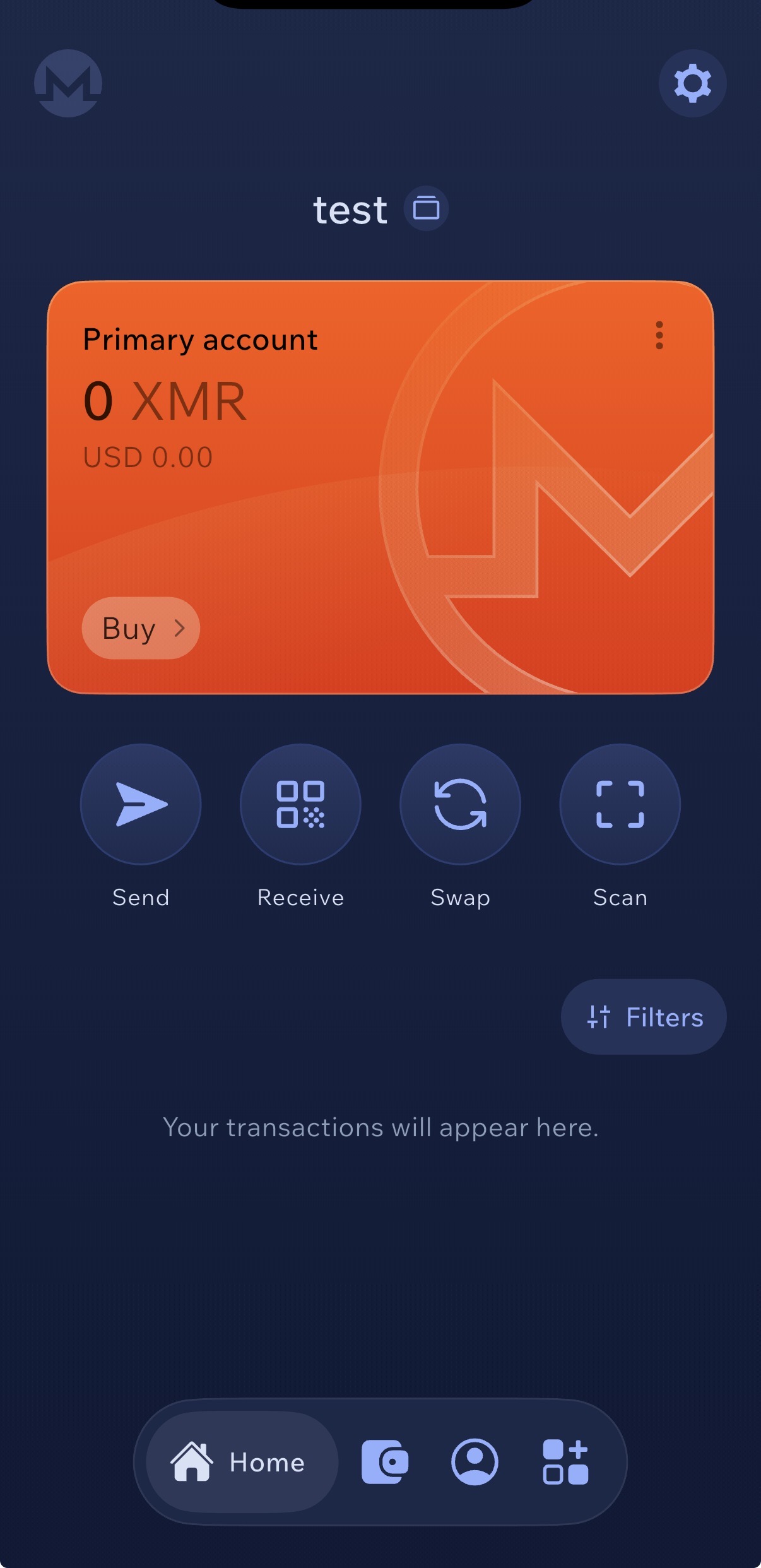
10. Wallet is live. Clean 0 XMR balance, no history, no link to your identity. Ready to receive Monero.
👉 What’s next
Tap Receive on this screen to generate your Monero stealth address — you’ll paste it into AceChange.io in the next section to receive the swapped XMR.
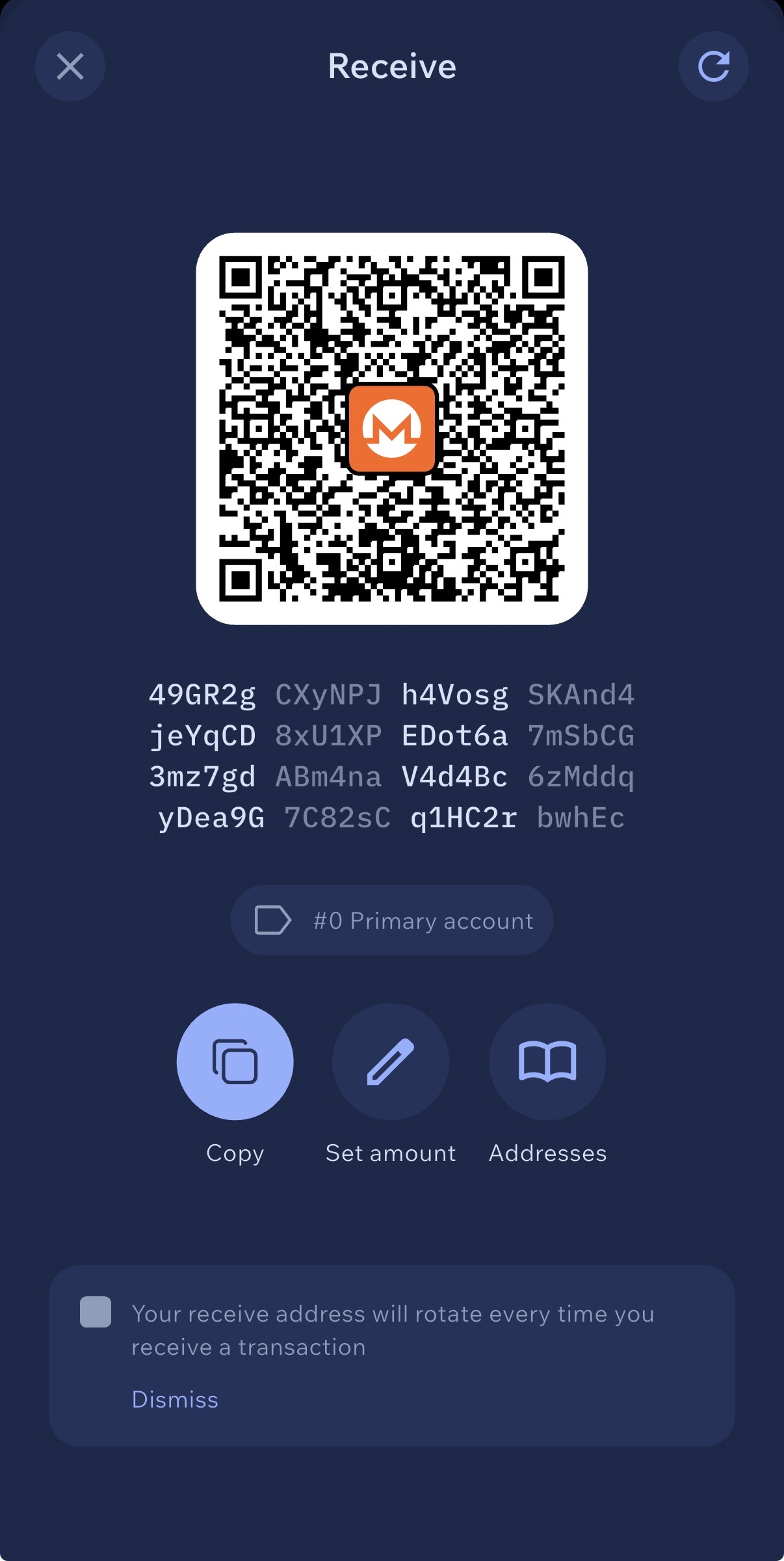
11. Tap Receive — this is your Monero address and QR code. Share it anywhere you want to receive XMR.
💡 How to receive Monero
Any time you want to receive XMR, open Cake Wallet and tap Receive. You’ll see a QR code and a long alphanumeric address (starting with 4 for primary or 8 for subaddresses) — this is YOUR Monero address. Tap Copy to grab it, then paste it anywhere someone needs to send you Monero: an exchange, a friend, or the AceChange.io swap form.
Always double-check the first and last 6 characters match before sending any transaction — clipboard-hijacker malware is a real threat.
🎭 Why Monero addresses are private
See the banner at the bottom: “Your receive address will rotate every time you receive a transaction”. This is Monero’s stealth address protocol in action — even though you share the same public address, every incoming transaction lands at a unique one-time on-chain address that only you can decode with your private view key. Nobody looking at the Monero blockchain can tell that multiple payments went to the same wallet. This is one of the core reasons Monero is private by default while Bitcoin is not.
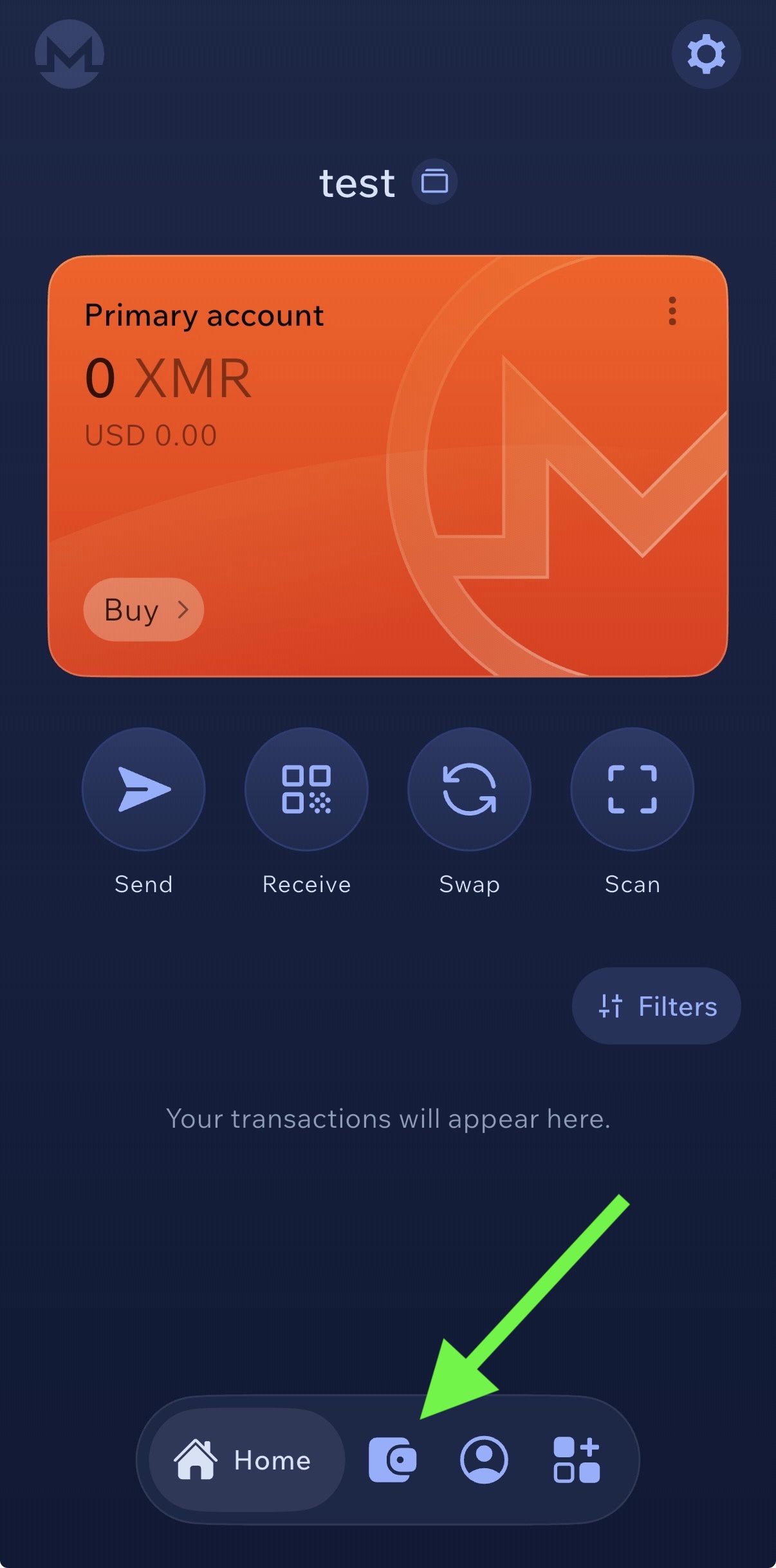
12. Add a second wallet for your target cryptocurrency
Now create your clean destination wallet — a fresh, history-free wallet for the coin you want to receive at the end of the swap (BTC, ETH, SOL, USDT, or any of 15+ supported currencies).
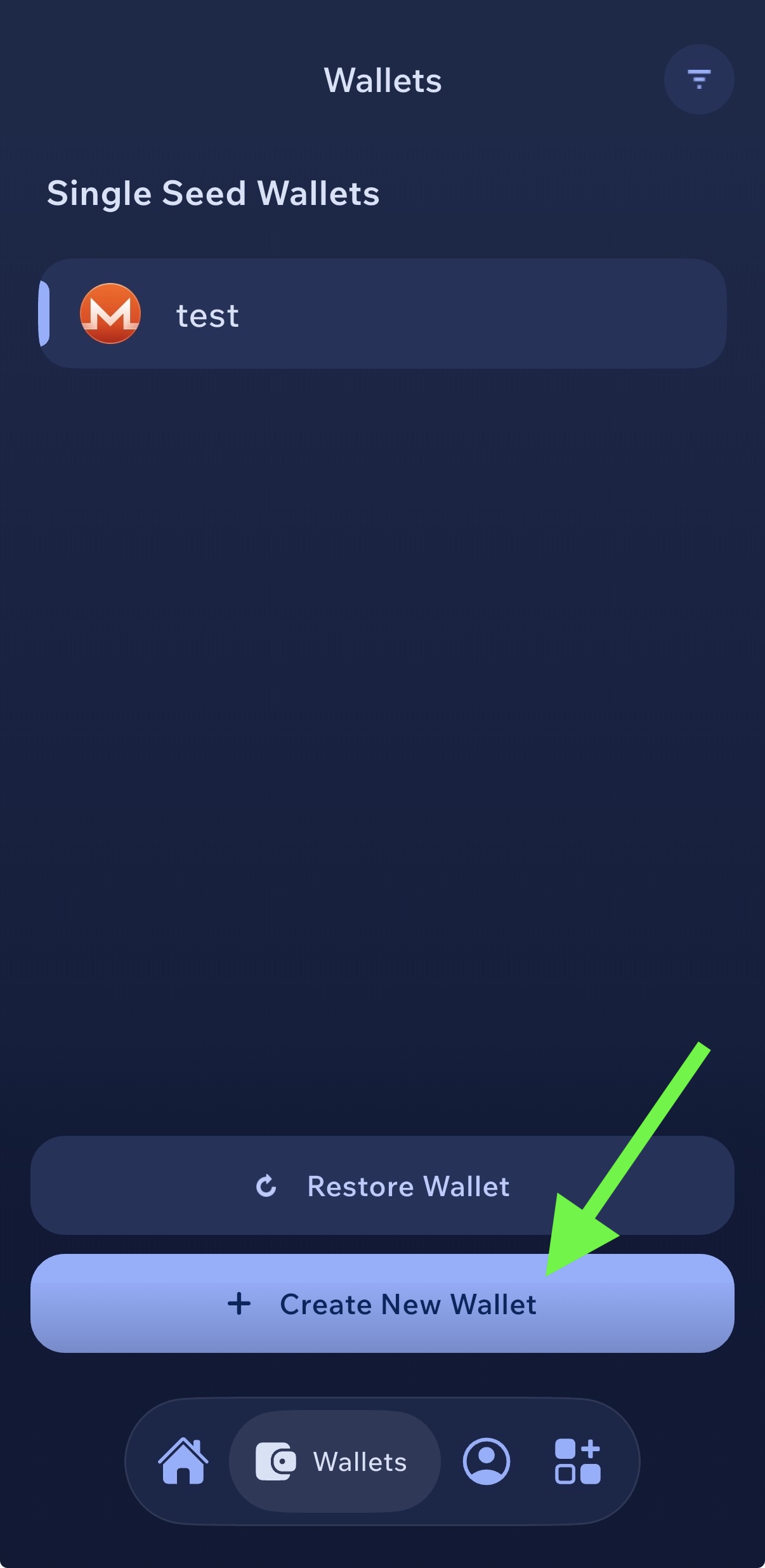
💡 Why the second wallet must be new
This second wallet is where your anonymized crypto lands after the Monero swap. For the privacy to actually work, it must have zero previous activity — no KYC-exchange withdrawals, no transactions linked to you, no connection to your original coins. The Monero step breaks the trail only if the destination address is clean.
Repeat steps 3–9 for this new wallet: create a fresh seed, write it down on paper (or metal), verify, and save the address for later.
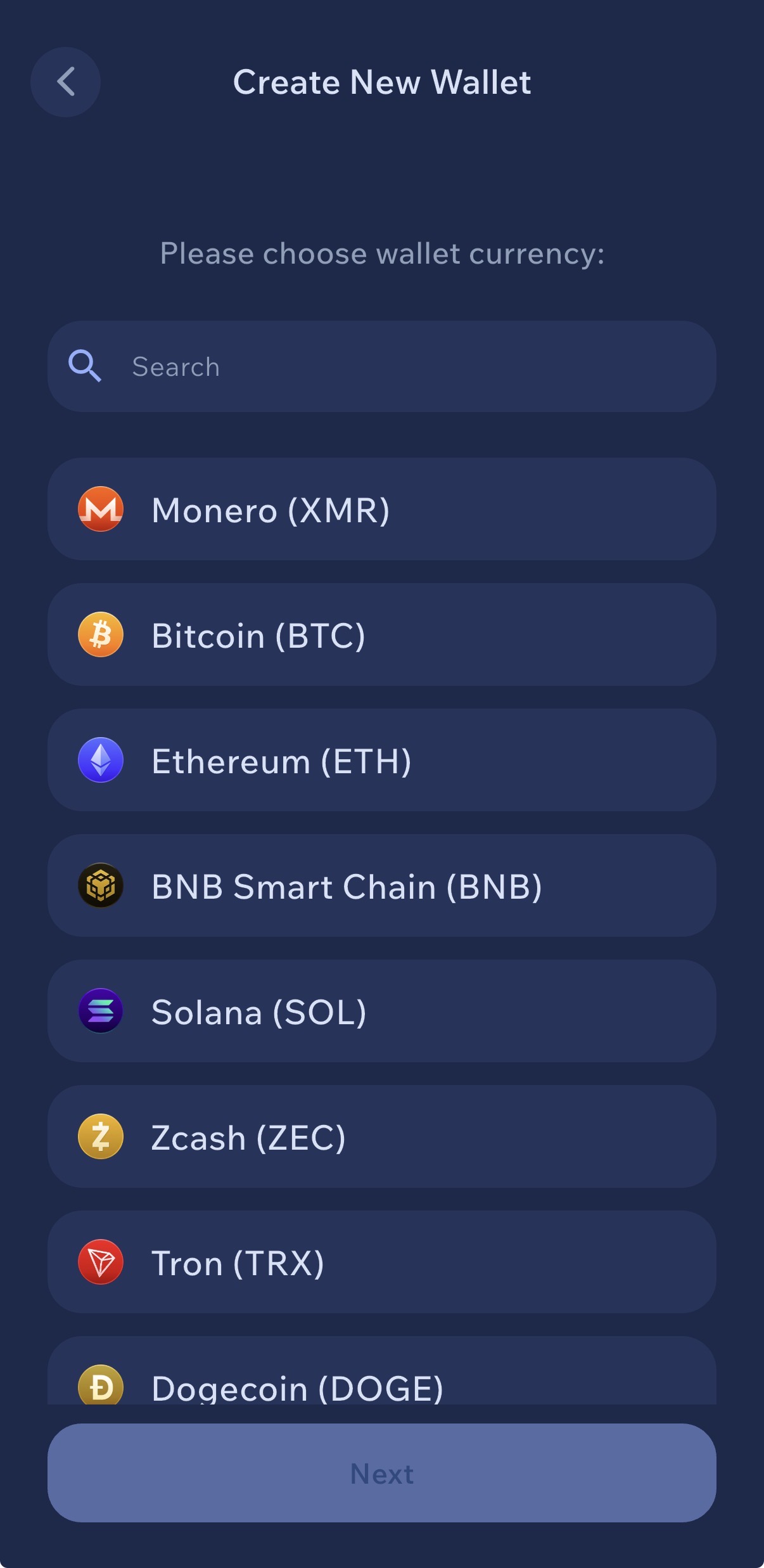
13. Pick any supported currency — Bitcoin, Ethereum, Solana, USDT, or whatever coin you want to receive at the end.
💡 Same setup flow as Monero
After picking the currency, Cake Wallet walks you through the same sequence as Steps 5–9 of this guide — name the wallet, generate a seed (12 words for BIP39 coins like BTC/ETH, 16 for Polyseed), write it down, verify, done. A few details differ per coin (for example, BTC has no account labels and Solana uses a different derivation path), but the core flow is identical.
🔐 Your clean destination doesn’t have to be Cake Wallet
The clean destination address can come from any non-custodial wallet you trust — it doesn’t have to be Cake Wallet and the final coin doesn’t have to be Bitcoin. The only rule: it must be a freshly generated wallet with zero prior activity. Options include:
- Hardware wallets (Ledger, Trezor, SafePal S1, Coldcard) — gold standard for serious amounts; the seed never touches an online device
- Desktop wallets (Electrum, Exodus, Sparrow, Bitcoin Core) — more capable than mobile, good for larger sums
- Other mobile wallets (BlueWallet, Phoenix, Trust Wallet) — convenient, but treat as hot-wallet storage only
For anything you wouldn’t want to lose, use a hardware wallet. Cake Wallet is fine for small-to-medium amounts and day-to-day use.
Timing & Amount Splitting: The Boundary Attack
Monero’s cryptography protects what happens on Monero. But the boundary — the swap in and the swap out — is transparent on both sides. If you send exactly 1.00 SOL to a swap service at 14:02 UTC and the equivalent of 1.00 SOL lands somewhere else seven minutes later, you have created a time-plus-amount fingerprint that a well-resourced blockchain analyst can correlate with high probability.
The academic state of the art
ABCTracer (arXiv:2504.01822, April 2025) demonstrated 91.75% F1 cross-chain traceability across 12 DeFi bridges using three signals:
- Temporal: time interval between source deposit and destination withdrawal
- Amount/fee ratio: bridge fees typically 0–3%, which leaves a narrow predictable band
- Spatial: destination chain and address clustering
Chainalysis Reactor now covers over 325 million cross-chain swaps and 300+ bridges/DEXs. The Finnish Vastaamo / Julius Kivimäki case (convicted 2024) is the canonical public example where BTC → XMR → BTC timing correlation combined with exchange-side KYC data produced a conviction — without any cryptographic break of Monero.
🛡️ Defense: split amounts and randomize timing
If you need to move 1 SOL through XMR, don’t do it as one round-trip. Split it into three or four deposits with non-round amounts and randomized timing.
- Use non-round amounts — avoid 0.25 / 0.25 / 0.25 / 0.25 (too obvious)
- Space swaps across varying intervals — 1 hour, 4 hours, 2 days
- Vary the output destination between tranches if possible
- Consider using more than one non-custodial swap provider
This is not required for typical users. Monero’s ring signatures, RingCT and stealth addresses already hide your activity on the Monero chain itself. Amount-and-timing splitting is specifically for the boundary between transparent chains and Monero — the one place timing correlation can succeed. For a $200 swap it is overkill. For a $20,000 swap moving through a chain-analysis-rich environment, it is prudent OpSec. The judgment call is your own personal threat model and lawful self-protection, not a blanket rule.
How Private Is Bitcoin? How Anonymous Is Crypto Really?
Most people assume crypto is anonymous. It’s not. Bitcoin, Ethereum and most cryptocurrencies are pseudonymous — every transaction is recorded on a public blockchain that anyone can read. The only thing hiding your identity is the wallet address, and that breaks the moment it’s linked to you through a KYC exchange.
Blockchain-analysis firms like Chainalysis, TRM Labs and Elliptic make billions tracing crypto transactions for governments, tax agencies and law enforcement. If you bought Bitcoin on Coinbase and sent it to your personal wallet, that trail is permanent and public.
Bitcoin vs Monero: Privacy Comparison
Bitcoin (BTC)
Sender: Visible on blockchain
Receiver: Visible on blockchain
Amount: Visible on blockchain
Traceable: Yes, always
Monero (XMR)
Sender: Hidden (ring signatures)
Receiver: Hidden (stealth addresses)
Amount: Hidden (RingCT)
Traceable: Not by design
Is Monero traceable? Not cryptographically. Monero was built from the ground up for privacy. Every transaction uses ring signatures (ring size 16 — 15 decoys hide the real spender, active since the Fluorine Fermi hard fork on August 13, 2022), stealth addresses (a one-time destination address for every payment), and RingCT (hides the amount via range proofs). A further upgrade called FCMP++ has been running on a public alpha stressnet since October 3, 2025 and is tentatively targeted for mainnet activation in mid-to-late 2026; it will extend the anonymity set from 16 to the entire Monero chain.
The IRS awarded up to $1.25 million to Chainalysis and Integra FEC in 2020 to crack Monero. No cryptographic break was ever produced. Every publicly documented “Monero was traced” case to date — including the September 2024 leaked Chainalysis video — has relied on metadata, IP addresses, or exchange-side KYC data, not on breaking ring signatures, RingCT, or stealth addresses. Running your own node or routing through Tor defeats the known metadata attacks.
That’s exactly why routing your crypto through Monero is the most effective way to make transactions private in 2026. No complicated setup — just two swaps through a non-custodial service.
Essential Security Rules for Crypto Holders
Anonymizing your coins is only half the job. Protect yourself in the physical world too:
🤐 Never tell anyone how much crypto you hold
Not friends, not family, not online. The Ledger co-founder David Balland was kidnapped from his home in Cher, France on January 21, 2025 precisely because his role was public. Multiple 2025 victims were identified through social media bragging about holdings.
📍 Never share your location in real time
If you went on vacation on March 10, post the photos on March 30. Real-time location sharing tells criminals either that you’re away from home — or exactly where to find you.
🔐 Use separate devices for crypto
A dedicated phone or laptop for wallet apps and exchange access. Don’t mix it with your everyday social media, email and browsing device. Our full device-setup walkthrough covers this in detail.
🏠 Don’t use your home address for KYC verification
If possible, give exchanges a legitimate alternative mailing address you control, such as a PO Box, virtual mailbox, or registered office, so a future data breach never reveals where you live. If the exchange data leaks — and in 2025 alone, Coinbase and Waltio both leaked — attackers get your home address.
🚫 Don’t show off wealth on social media
No screenshots of portfolios, no “just hit 1 BTC” posts, no luxury lifestyle tied to crypto. Multiple 2025–2026 kidnapping victims were identified through social media flexing. Jameson Lopp’s advice: “Don’t talk about Bitcoin, at least not while using your real name or face.”
🔑 Use a decoy wallet
Keep a small amount of crypto in a visible wallet. If forced to hand over access under duress, surrender the decoy. Your real holdings should be in a separate, hidden cold storage that takes time to access (multisig, time-locked, or geographically separated).
Why Privacy Matters More Than Ever
Physical “wrench attacks” against crypto holders surged more than 75% year-over-year in 2025 per Jameson Lopp’s public dataset (github.com/jlopp/physical-bitcoin-attacks), with some methodologies measuring a 169% jump. Criminals are not hacking wallets — they’re targeting people. They identify victims through exchange data breaches, social media, and public blockchain records.
France, 2026. The Interior Ministry announced on April 16, 2026 at Paris Blockchain Week that the country recorded 41 crypto-related kidnappings and home invasions in the first 3.5 months of 2026 alone — roughly one every 2.5 days. Minister-delegate Jean-Didier Berger explicitly cited leaked KYC data as a driver.
If you bought crypto on a KYC exchange, that exchange has your name, address and ID linked to your wallet. If that data leaks — and in 2025 it did, at unprecedented scale — attackers know exactly who you are and what you hold.
⚠️ Verified Real-World Incidents
Kidnapped with his wife from their home near Vierzon. Attackers severed one of his fingers as leverage. €10M Bitcoin ransom demanded from Ledger co-founder Eric Larchevêque. Rescued by France’s GIGN elite unit on the night of January 22. The alleged mastermind was arrested in Morocco in June 2025.
Italian trader held 17 days in a $40K/month rented Manhattan townhouse by two suspects. Tortured to extract the seed phrase to a roughly $28M BTC wallet. Escaped barefoot and flagged a traffic officer. Both defendants pleaded not guilty and are held without bail.
Held at gunpoint for 5 days. $15M in crypto extorted.
Overseas support contractors (TaskUs, India) were bribed to exfiltrate customer data starting around December 2024. 69,461 users affected per the Maine AG breach notification. Stolen data included: name, home address, phone, email, last-4 SSN, masked bank data, government-ID images, and account-balance snapshots. Remediation cost estimated at $180M–$400M.
~50,000 customer records exposed, including 2024 tax reports that list crypto holdings. Directly usable as a wrench-attack target list.
Home-invasion attempt at David Prinçay’s residence in Val-de-Marne. He was not present; attackers fled with phones.
The pattern is always the same: criminals identify holders through exchange data, social media, or public blockchain records — then use physical violence. The only real protection is making sure your identity is not linked to your crypto. That is what this entire guide is about.
FAQ
Is it legal to anonymize my crypto?
In most jurisdictions, using privacy tools for your own crypto is legal. Monero is legal to own and use in the US, UK and most countries. In the EU, Article 79 of the EU AMLR (Regulation 2024/1624) will prohibit EU CASPs from holding anonymous accounts or servicing privacy coins from July 10, 2027 — but it does not criminalize personal privacy-tool use. Always comply with your local tax reporting requirements regardless of which privacy methods you use.
Can blockchain analysis trace this?
On Bitcoin / Ethereum, analysts see you sent crypto to a swap service. Once it enters Monero, the on-chain trail ends — ring signatures, stealth addresses and RingCT hide sender, receiver and amount. The coins you receive on the other side have no on-chain connection to the originals. The residual risk is timing and amount correlation at the boundary, which the Timing & Amount Splitting section above explains how to defeat.
How much does this cost?
Two swaps on AceChange.io at 0.5% each (floating rate) = ~1% total. Plus minimal network fees. A small price for on-chain privacy.
Do I need to wait between the two swaps?
Monero’s privacy works instantly from a cryptographic standpoint. But for anything other than small amounts, yes — waiting hours or days between swaps and splitting into non-round amounts defeats published timing-and-amount correlation attacks (see ABCTracer, arXiv 2504.01822 — 91.75% F1 cross-chain traceability). You can keep the XMR in your Cake Wallet as long as you want.
How private is Bitcoin?
Not private. Every Bitcoin transaction is permanently public. Anyone can look up any wallet address and see its full history. Blockchain-analysis firms routinely trace Bitcoin for governments and law enforcement. If your wallet has ever touched a KYC exchange, your entire transaction history is linked to your identity.
Is Monero traceable?
Not cryptographically. Monero uses ring signatures (ring size 16), stealth addresses, RingCT and Dandelion++ on every transaction by default. No external observer can determine who sent funds, who received them, or how much was transferred. Every publicly documented “Monero was traced” case has relied on metadata (IPs, exchange KYC, logs) — never a break of the cryptography. Running your own node or using Tor defeats the known metadata attacks.
How anonymous is crypto?
Most crypto (Bitcoin, Ethereum) is pseudonymous — not anonymous. Transactions are public and routinely linked to real identities through exchange KYC records. Only privacy-by-default coins like Monero provide true on-chain anonymity.
How to make crypto transactions private?
Swap your existing crypto to Monero (XMR) on a no-KYC service like AceChange.io, then swap Monero back to your desired coin on a new wallet. The Monero step breaks the transparent trail. Two swaps, ~1% total fees, under 30 minutes. For amounts above a few thousand dollars, split into tranches and randomize the timing.
Should I use a VPN, Tor, or both when swapping?
Use default-configuration privacy tools and don’t stack unusual combinations. The Tor Project explicitly documents that modifying the Tor Browser or layering VPN + Tor makes you easier to fingerprint, not harder. Cake Wallet has built-in Tor for node connections — enable it. For maximum protection use Whonix / Qubes-OS with the Monero GUI on a local node. Read our full device-setup guide.
Protect Your Privacy Today
Swap any crypto through Monero in minutes. No account. No KYC. No trace.
Start Anonymous Swap on AceChange.io →About the Author
Marcus Richardson
Founder & Privacy Research Lead at AceChange
Marcus Richardson is an expert in anonymization, digital security and OSINT (Open Source Intelligence). Throughout his career he has worked at international companies including IBM, Palantir Technologies and European government agencies, focusing on data analysis, investigations and security strategies.
He specializes in digital-footprint identification, identity protection, and practical online-anonymization methods. Drawing on experience from real-world investigations, he understands how information is gathered, analyzed and exploited — and therefore how to design effective countermeasures for both individuals and organizations.
He currently focuses on supporting Ukraine through education and the implementation of digital-security best practices, contributing to methodologies and practical standards that strengthen protection of people and sensitive information online.
🔗 Related Reading & Useful Links
It is important to understand that this article is intended for everyday users who want to protect themselves against the growing threats and attacks targeting individuals who own or use cryptocurrencies.
AceChange is a response to this long-term growing trend. Our mission is to educate and help regular users better understand the risks and effectively protect themselves in the digital environment.
This content is designed for people who want to protect themselves, their families, and their assets. However, if someone has engaged in fraudulent or other unlawful activity, this article or any related guidance will not help them, as the relevant authorities have the tools and capabilities to identify and investigate such activities.
Disclaimer: This guide is for personal privacy and security purposes only. Always comply with your local laws and tax obligations. AceChange.io does not custody funds. Verify current fees on the official website before swapping.
Sources: getmonero.org · monero.observer · US Department of the Treasury (OFAC) · IRS Criminal Investigation · Coinbase SEC 8-K (May 14, 2025) · Jameson Lopp’s physical-attacks dataset · ABCTracer (arXiv:2504.01822) · EU Regulation 2023/1113 & 2024/1624 · Chainalysis · TRM Labs · Elliptic · Privacy Guides · Tor Project · French Ministry of the Interior (Paris Blockchain Week, April 16, 2026).
First published: March 17, 2026. Last updated: — added timing & amount splitting OpSec, updated 2026 incident data, schema.org markup, and responsive-grid fixes.
