

How to Get a Refund
Your order is in Emergency status? Don’t worry. Here’s exactly what happened and how to get your funds back.
Track Your OrderWhat Is Emergency Status?
Emergency status means your order requires manual action. This typically happens when your payment arrived after the order expired. Your funds are safe — they are held by the exchange service until you decide what to do next.
Your funds are not lost. You have full control to either get a refund or continue the exchange. No action is taken without your confirmation.
Why Did This Happen?
Here are the most common reasons why an order can enter Emergency status:
Late Payment
The payment was sent after the order’s time limit expired. Fixed-rate orders expire in 10 minutes, float-rate orders in 30 minutes.
Incorrect Amount
The amount sent didn’t match the amount specified in the order. Even a small difference can trigger an Emergency status.
Network Congestion
Blockchain network was busy and your transaction took longer to confirm than expected, causing the order to expire before confirmation.
Technical Issue
A temporary issue occurred during order processing. This is rare but can happen due to exchange service maintenance or connectivity issues.
Your Two Options
When your order is in Emergency status, you can choose one of these options:
Step-by-Step Guide
Open the Track Order Page
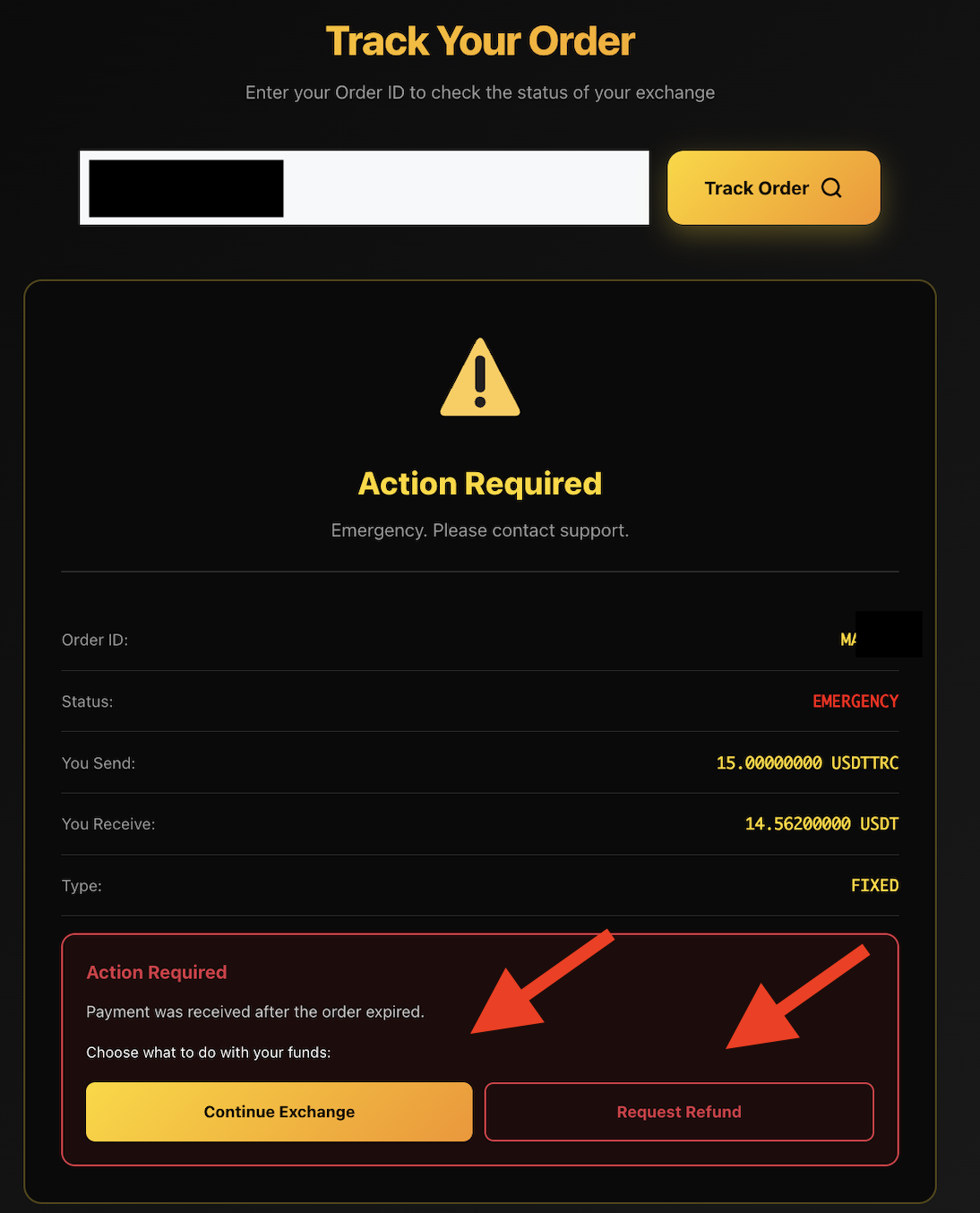
Go to acechange.io/track-order and enter your Order ID. You received this ID when your order was created. You will see your order details with the status marked as EMERGENCY in red.
Review the Action Required Message
Below your order details, you’ll see a red “Action Required” box. It explains what happened — most commonly: “Payment was received after the order expired.” Underneath, you’ll find two buttons:
- Continue Exchange — gold button
- Request Refund — outlined button
Choose Your Option
Option A: Request Refund
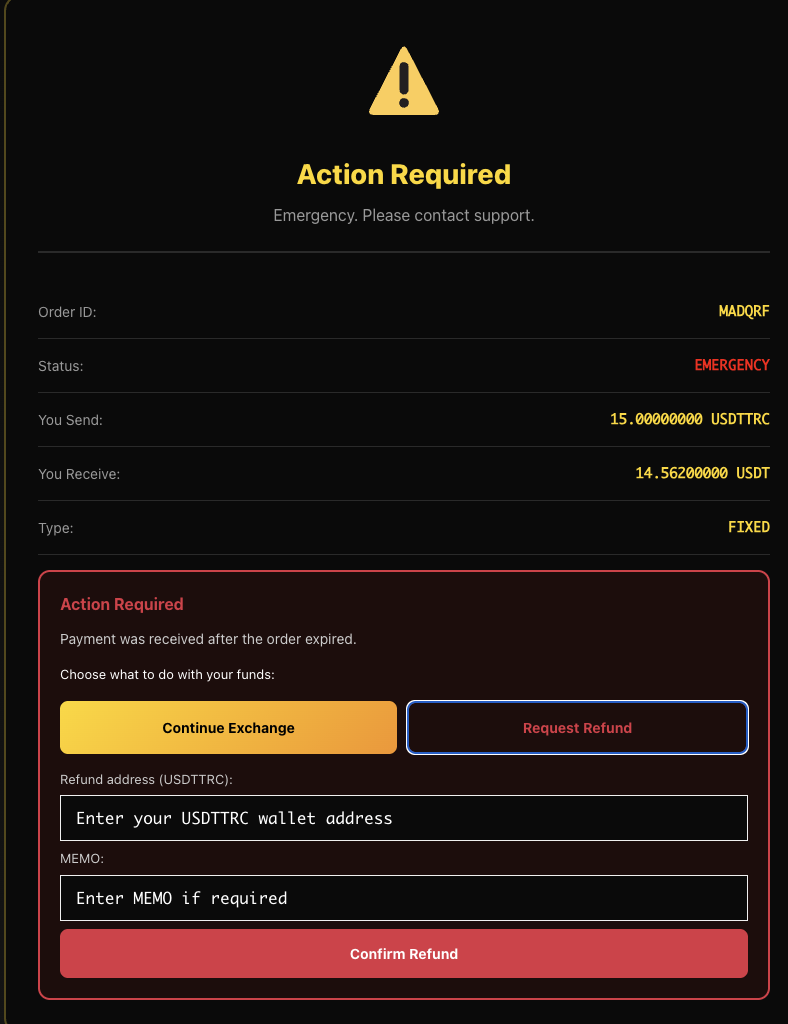
- Click the “Request Refund” button
- A form will appear below. Enter your wallet address where you want to receive the refund
- If your cryptocurrency requires a MEMO or Destination Tag (e.g. XRP, XLM, EOS), enter it in the MEMO field
- Double-check the address — refunds sent to a wrong address cannot be recovered
- Click “Confirm Refund”
Option B: Continue Exchange
- Click the “Continue Exchange” gold button
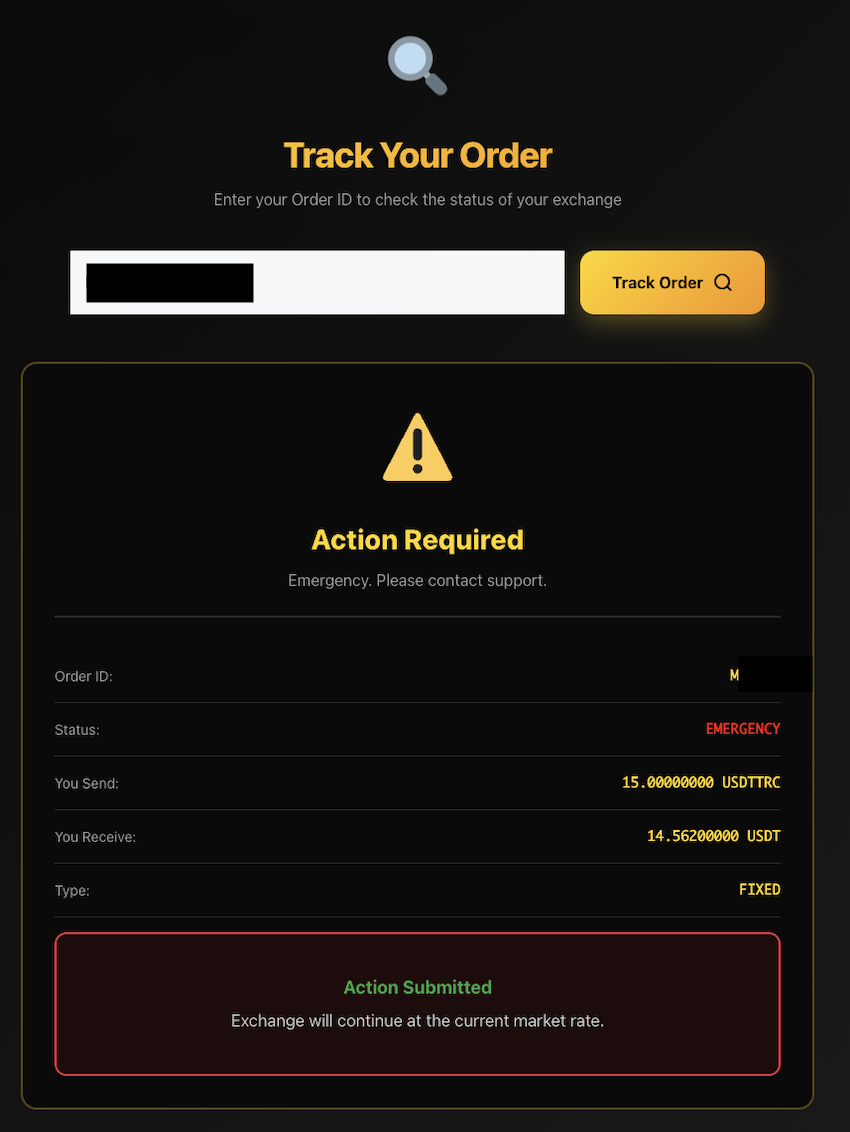
- The exchange will proceed at the current market rate
- You’ll see a confirmation: “Action Submitted”
- Your exchanged funds will be sent to the address from your original order
Tip: If the current market rate is favorable, choosing “Continue Exchange” can be the faster option. If you prefer to get your original cryptocurrency back, choose “Request Refund.”
Frequently Asked Questions
How long does a refund take?
Refunds are typically processed within 5 to 30 minutes after confirmation. The exact time depends on the blockchain network congestion of the cryptocurrency being refunded.
Is there a fee for requesting a refund?
A small blockchain network fee is deducted from the refund amount to cover the transaction cost. The exact fee depends on the cryptocurrency and current network conditions.
What if I entered a wrong refund address?
Unfortunately, blockchain transactions are irreversible. Always double-check your wallet address before clicking “Confirm Refund.” If you sent to a wrong address, the funds cannot be recovered.
Can I change my mind after choosing an option?
Once you confirm your choice (refund or continue exchange), the action is processed immediately and cannot be reversed. Make sure you are certain before confirming.
What is MEMO and do I need it?
MEMO (also called Destination Tag or Extra ID) is an additional identifier required by some cryptocurrencies like XRP, XLM, or EOS. If your wallet or exchange requires a MEMO, you must enter it — otherwise your refund may be lost. If your cryptocurrency doesn’t require a MEMO, simply leave the field empty.
My order is stuck and I don’t see any action buttons. What should I do?
If your order shows Emergency status but you don’t see the “Continue Exchange” or “Request Refund” options, please contact our support team at support@acechange.io with your Order ID. We’ll resolve it as quickly as possible.
Ready to Resolve Your Order?
Track your order and choose your preferred option in just a few clicks.
Track Your Order